Summary
Enabling GOG on a Project Zomboid server is primarily for facilitating cross-play with users who own the game on GOG, as GOG and Steam versions are typically in separate multiplayer ecosystems. Enabling compatibility often requires running the dedicated server in "non-Steam" mode, which bypasses Steam verification. "Zomroid" refers to an Android launcher that allows mobile play.
How to Enable Zomroid or GOG on a Project Zomboid Server
1. Log in to the BisectHosting Starbase panel.
2. Stop the server.
3. Go to the Files tab.
4. Open the ProjectZomboid64.json file.
5. Under "vmArgs", change the -Dzomboid.steam value to 0.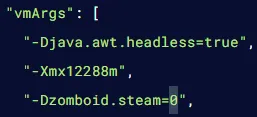
6. Press the Save button.
7. Start the server.