
Summary
Changing the map on a BeamMP server keeps gameplay fresh and exciting by offering new environments to explore. Different maps can cater to various playstyles, such as racing, off-roading, or roleplaying, enhancing the overall server experience. It also prevents players from getting bored with the same scenery, encouraging them to return for more diverse content.
How to Change the Map on a BeamMP Server
1. Log in to the BisectHosting Starbase panel.
2. Stop the server.
3. Go to the Startup tab.
4. On the Map field, enter the desired map code.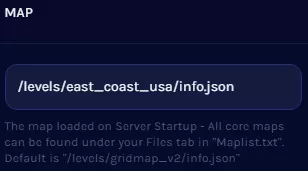
5. Start the server.
BeamMP Default Map Codes
/levels/gridmap_v2/info.json/levels/automation_test_track/info.json/levels/east_coast_usa/info.json/levels/hirochi_raceway/info.json/levels/italy/info.json/levels/jungle_rock_island/info.json/levels/industrial/info.json/levels/small_island/info.json/levels/smallgrid/info.json/levels/utah/info.json/levels/west_coast_usa/info.json/levels/driver_training/info.json/levels/derby/info.json