
Summary
Enabling hardcore mode on a Minecraft server increases the difficulty by limiting players to a single life, creating a higher-stakes, more intense survival experience. It adds a sense of challenge and urgency, as death results in permanent removal from the server or locked world. This mode encourages strategic gameplay, teamwork, and careful resource management for long-term survival.
| Note | Enabling hardcore requires a New World to be created; it cannot be enabled on existing servers. |
How to Enable Hardcore Mode on a Minecraft Server
1. Log in to the BisectHosting Starbase panel.
2. Stop the server.
3. Go to Config Files > Server Properties from the left sidebar.
4. Navigate to the Toggle Hardcore Mode field.
5. Select True from the dropdown.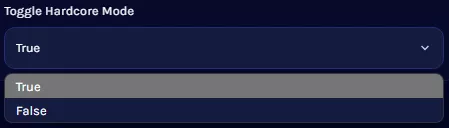
6. Under the Level Name field, change the name to create a New World.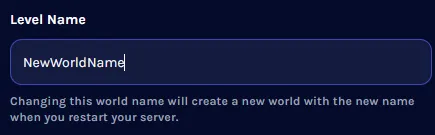
7. Start the server.