
Summary
Prioritizing servers on a BungeeCord server network in Minecraft is essential to ensure the smooth and uninterrupted functioning of the network. BungeeCord is a proxy system that connects multiple servers, providing players with a seamless experience across all servers. Prioritizing servers helps to distribute players to the correct server order, ensuring proper fallback operation in case the primary server goes down.
| Note | Learn how to setup a BungeeCord server network here. |
How to Prioritize Servers in a BungeeCord Server Network
1. Log in to the BisectHosting Premium or Budget panel.
2. Stop all servers on the BungeeCord server network.
3. On the BungeeCord server, go to the File Manager tab on the left.
4. Open config.yml for editing.
5. Under listeners:, locate the priorities: line.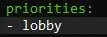
6. Add the names of the Minecraft servers in the BungeeCord server network. Players will always enter the first server listed.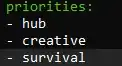
7. Change force_default_server: from false to true.
8. Choose the blue Save and close button on the lower right.
9. Start all servers.