
Summary
Installing Endstone Essentials on a Minecraft Bedrock server enhances gameplay with quality-of-life improvements, custom commands, and valuable utilities. It streamlines server management, making it easier for admins to control settings, teleport players, and automate tasks. This add-on improves the multiplayer experience by adding essential tools without drastically altering vanilla gameplay.
| Requirement |
| Endstone must be enabled. Learn how to here. |
How to Install Endstone Essentials on a Minecraft Bedrock Server
1. Choose the desired Endstone Essentials plugin here. c
c
2. Download the .whl file from Releases.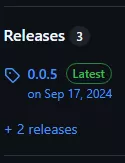
3. Log in to the BisectHosting Starbase panel.
4. Stop the server.
5. Go to the Files tab.
6. Open the plugins folder.
7. Upload the downloaded file from Step 2.
| Note | Follow, if any, additional installation instructions from the plugin page. |
8. Start the server.