Summary
Installing Endstone plugins on a Minecraft Bedrock server adds powerful customization options, enabling new game mechanics, automation, and admin tools. With support for Python and C++, these plugins offer flexibility while maintaining high performance. Endstone's easy-to-use API makes managing and developing server enhancements more accessible.
| Requirement |
| Endstone must be enabled. Learn how to here. |
How to Install Endstone Plugins on a Minecraft Bedrock Server
1. Download the desired Endstone plugin from Github or Bedrinth.
2. Log in to the BisectHosting Starbase panel.
3. Stop the server.
4. Go to the Files tab.
5. Open the plugins folder.
6. Upload the downloaded file from Step 1.
7. If the file is a .zip file, unarchive the file.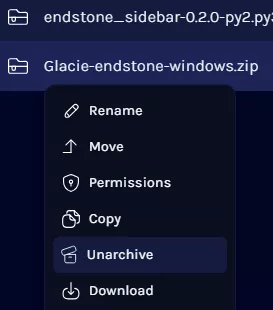
| Note | Follow any specific installation instructions from the plugin page. |
8. Start the server.