
Xbox Anniversary: How to Get the Minecraft Bedrock Edition OG Green Skin
Posted on by

Share:

Share on X

Share on Facebook

Share on Threads

Share on Bluesky

Copy to Clipboard

Share via email
Xbox is celebrating 25 years with free items across many of its games, including Minecraft! So, today, we explain step by step how to get the Minecraft OG Green Skin before it is gone forever.
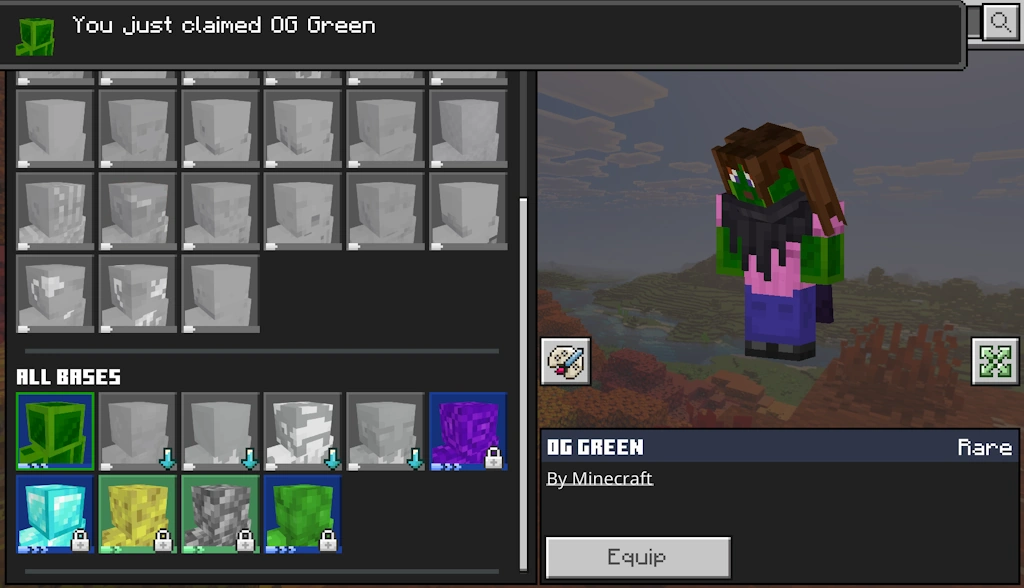 Available from November 10, 2026, at 10 AM PT to December 10, 2026, at 10 AM PT, the Minecraft OG Green Skin is a free full-body skin in the classic Xbox green color for Bedrock Edition players. To claim it, you need only a copy of Bedrock Edition and an internet connection.
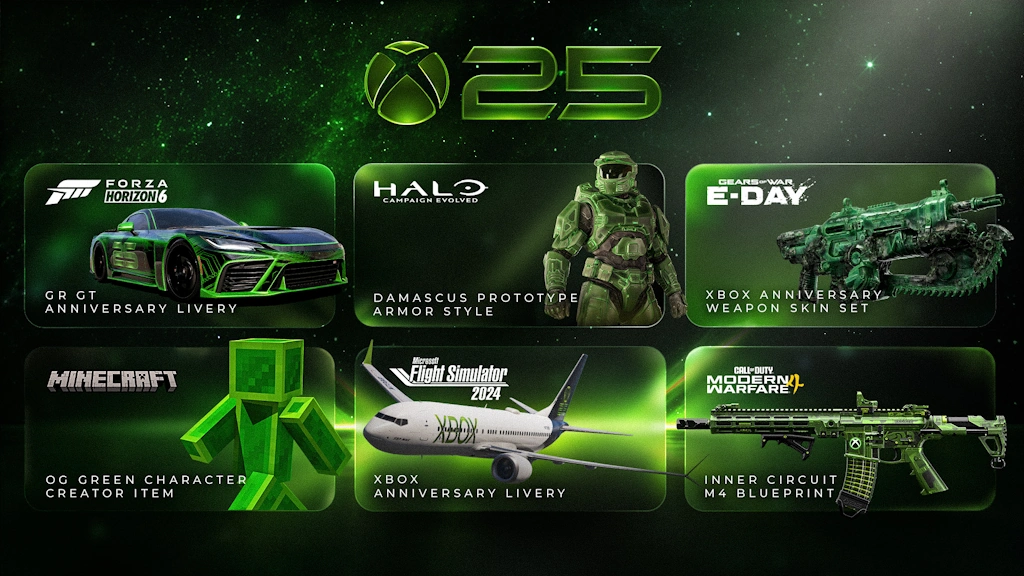 Alongside the OG Green Skin, Xbox players on console, PC, and mobile can claim the limited time Xbox 25th Anniversary badge for their profile. This reward only requires logging in for it to be automatically obtained. Other possible cosmetics include a weapons skin set for Gears of War E-Day, an anniversary GR GT livery for Forza Horizon 6, Halo Campaign Evolved prototype armor, Xbox livery for Flight Simulator 2024 planes, and an Xbox M4 skin in Call of Duty Modern Warfare 4. The dates and availability do, however, vary for each.
Finally, while it is not a cosmetic, Minecraft Bedrock Edition players can now take a look at their account statistics with Xbox Playback. It provides every detail from the first game on the account to the sometimes-frightening number of hours spent in each and every one, including Minecraft. If any of the numbers are too high, remember that “I forgot to close the game” is a valid excuse!
How to Get the Minecraft OG Green Skin
Available from November 10, 2026, at 10 AM PT to December 10, 2026, at 10 AM PT, the Minecraft OG Green Skin is a free full-body skin in the classic Xbox green color for Bedrock Edition players. To claim it, you need only a copy of Bedrock Edition and an internet connection.
- Launch Minecraft Bedrock Edition.
- Click or tap “Dressing Room”.
- Open the “Character Creator” tab.
- Expand the “Body” menu.
- Click or tap “Bases”.
- Under “All Bases” select OG Green.
- Click “Get”.
Other Xbox Anniversary Celebration Cosmetics
Alongside the OG Green Skin, Xbox players on console, PC, and mobile can claim the limited time Xbox 25th Anniversary badge for their profile. This reward only requires logging in for it to be automatically obtained. Other possible cosmetics include a weapons skin set for Gears of War E-Day, an anniversary GR GT livery for Forza Horizon 6, Halo Campaign Evolved prototype armor, Xbox livery for Flight Simulator 2024 planes, and an Xbox M4 skin in Call of Duty Modern Warfare 4. The dates and availability do, however, vary for each.
Finally, while it is not a cosmetic, Minecraft Bedrock Edition players can now take a look at their account statistics with Xbox Playback. It provides every detail from the first game on the account to the sometimes-frightening number of hours spent in each and every one, including Minecraft. If any of the numbers are too high, remember that “I forgot to close the game” is a valid excuse!Join our Newsletter
Subscribe for the latest updates on all things gaming!

How would you rate this blog?
Share your opinion and help us make our blogs even better!
Didn't like
Neutral
Liked

Need a game server?
Rent a game server where you and your friends can play privately with low latency and custom settings. Choose from 110+ games, invite people from around the globe, and enjoy private matches, or build your own online community with your own rules.

Relevant Blogs







GET THE INSIDE SCOOP!
Join our email for updates on our hosted games, company news and exclusive deals. Stay in the loop!













