

Hytale Preorder Guide: Registration, Name Reservation, & More
Posted on by

Share:

Share on X

Share on Facebook

Share on Threads

Share on Bluesky

Copy to Clipboard

Share via email
Hytale is now available for preorder, and fans can officially support what could very well be one of the world’s next biggest games. So, today, we explain the preorder process step-by-step in our Hytale preorder guide, along with how to register and reserve your name in record time.
 Hytale preorders began December 13, 2025, and are available until the game’s early access release on January 13, 2026. During this time, accounts can be created, Hytale can be preordered, and names can be reserved. The developers have confirmed there are no preorder cosmetics or rewards since they do not want to pressure players into feeling like they need to purchase early.
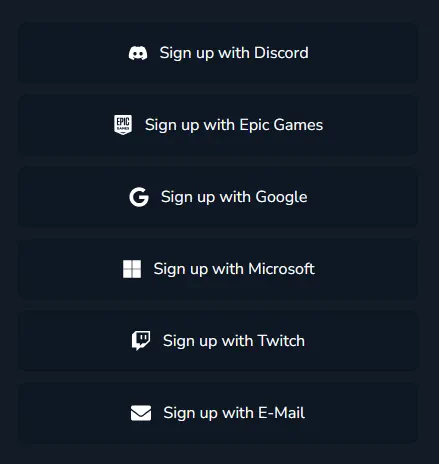 The first step to pre-purchasing Hytale is registering an account on the official website. Below, we have detailed the steps required to complete the sign-up process as quickly as possible.

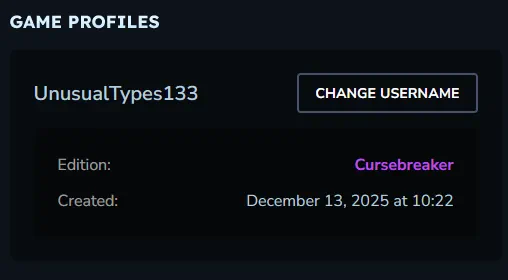 After purchasing Hytale, heading over to “Game Profiles” under “Account” will show your recent purchase with a random name applied. This is, thankfully, only temporary and can be changed to a new name or one reserved previously.
The Hytale Preorder Period: Dates & Details
Hytale preorders began December 13, 2025, and are available until the game’s early access release on January 13, 2026. During this time, accounts can be created, Hytale can be preordered, and names can be reserved. The developers have confirmed there are no preorder cosmetics or rewards since they do not want to pressure players into feeling like they need to purchase early.
How to Register an Account
The first step to pre-purchasing Hytale is registering an account on the official website. Below, we have detailed the steps required to complete the sign-up process as quickly as possible.
- Open the Hytale official website found here.
- Click “Register”.
- On PC, “Register” is on the top-right of the webpage.
- On Mobile, “Register” is in the drop-down menu on the top-left of the webpage.
- Select a registration method (Discord, Google, Email, Etc.).
- Enter the requested information.
- Confirm the account by clicking on the link sent to the registered email address.
Hytale Preorder Guide
- Standard - $19.99
- Supporter - $34.99
- Cursebreaker - $69.99
- Open the Hytale official website found here.
- Log in to your Hytale account if not already logged in.
- Click “PRE-PURCHASE”.
- On PC, “PRE-PURCHASE” is on the top-right of the webpage.
- On Mobile, “PRE-PURCHASE” is in the drop-down menu on the top-left of the webpage.
- Select your desired Hytale edition. Upgrading to higher tiers later is possible.
- Select your preferred payment method.
- Fill out the requested details and agree to the Terms of Service.
- Complete the order.
Hytale Name Reservation
After purchasing Hytale, heading over to “Game Profiles” under “Account” will show your recent purchase with a random name applied. This is, thankfully, only temporary and can be changed to a new name or one reserved previously.
- Open the Hytale official website found here.
- Log in to your Hytale account if not already logged in.
- Click “Account”.
- On PC, “Account” is on the top-right of the webpage.
- On Mobile, “Account” is in the drop-down menu on the top-left of the webpage.
- Click “Game Profiles”.
- Click “CHANGE USERNAME”.
- Enter a new name or select one that was previously reserved.
- Confirm the change.
Join our Newsletter
Subscribe for the latest updates on all things gaming!

How would you rate this blog?
Share your opinion and help us make our blogs even better!
Didn't like
Neutral
Liked

Need a game server?
Rent a game server where you and your friends can play privately with low latency and custom settings. Choose from 110+ games, invite people from around the globe, and enjoy private matches, or build your own online community with your own rules.

Relevant Blogs







GET THE INSIDE SCOOP!
Join our email for updates on our hosted games, company news and exclusive deals. Stay in the loop!













