

Windrose Console Commands Guide: How to Change Difficulty, World Name, Max Player Count, & more
Posted on by

Share:

Share on X

Share on Facebook

Share on Threads

Share on Bluesky

Copy to Clipboard

Share via email
Perhaps as ye sail around the world of Windrose, ye might be wanting some extra control. Console commands are generally a great way to give yourself quick and easy access to items, teleportation, and more in most games. However, Windrose doesn't currently have traditional console commands. Instead, you'll have to use some direct file workarounds if you want to change your difficulty settings, max player count, and world modifiers on a Windrose dedicated server.
Here, we'll talk you through everything you need to know about entering effective Windrose console commands and how to change things like your difficulty settings, world name, enemy health, and more.
 Unfortunately, there aren't any Windrose console commands at this point in time. However, the game is still in Early Access. As a result, it could have true console commands added in the future. We say "true" console commands, because there are still some settings that you can change by rooting around in the game's files.
Rather than traditional console commands, these are server configuration settings. That means that if you're playing Windrose alone and without a dedicated server, you won't be able to access all of these settings.
Unfortunately, there aren't any Windrose console commands at this point in time. However, the game is still in Early Access. As a result, it could have true console commands added in the future. We say "true" console commands, because there are still some settings that you can change by rooting around in the game's files.
Rather than traditional console commands, these are server configuration settings. That means that if you're playing Windrose alone and without a dedicated server, you won't be able to access all of these settings.
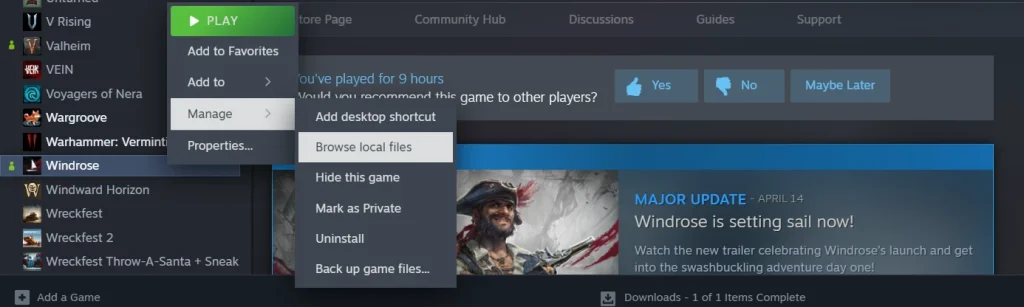
To access your Windrose server configurations, first open your Steam library and scroll to the game.
Once there, right-click Windrose, select the 'Manage' tab, then select 'Browse Local Files.'
Your next destination is the folder 'R5.' Within this folder, you'll find your final destinations: ServerDescription & WorldDescription.
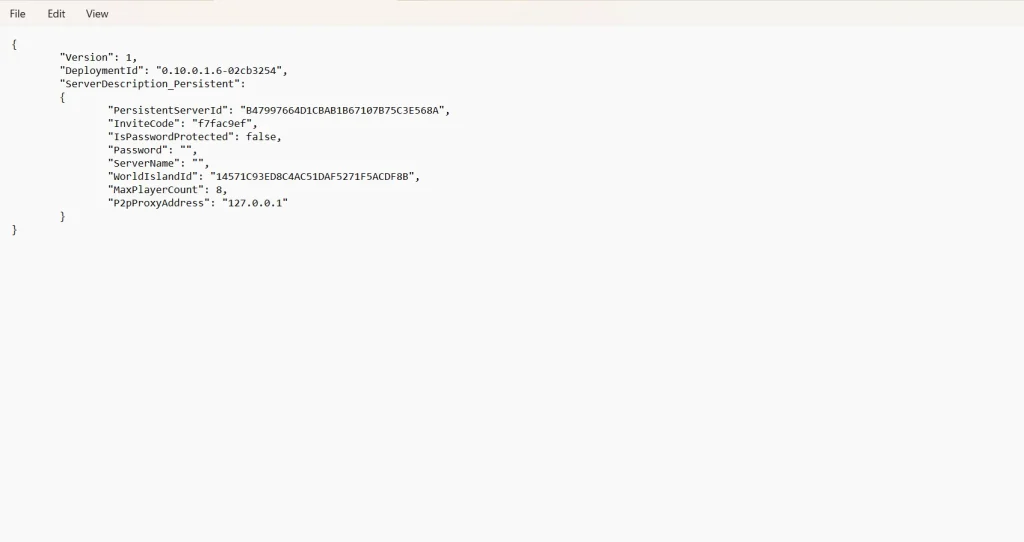
Cracking open ServerDescription gives you a short list of things you can tweak about your game. Meanwhile, the folder WorldDescription will only appear if you have actually created a new world file to explore in Windrose itself. If you have multiple Windrose files, you'll see multiple corresponding WorldDescription folders.
While ServerDescription will give you control over things such as invite codes and max player count, WorldDescription will allow you to make some adjustments to enemy damage, health modifiers, and a bit more. Again, there isn't a lot that can be altered at this stage of the game's development. For now, this is one of the only ways to exercise a little bit of executive control over your game, similar to traditional console commands.
Does Windrose Have Console Commands?
Unfortunately, there aren't any Windrose console commands at this point in time. However, the game is still in Early Access. As a result, it could have true console commands added in the future. We say "true" console commands, because there are still some settings that you can change by rooting around in the game's files.
Rather than traditional console commands, these are server configuration settings. That means that if you're playing Windrose alone and without a dedicated server, you won't be able to access all of these settings.
How to Access Windrose Server Configuration Settings
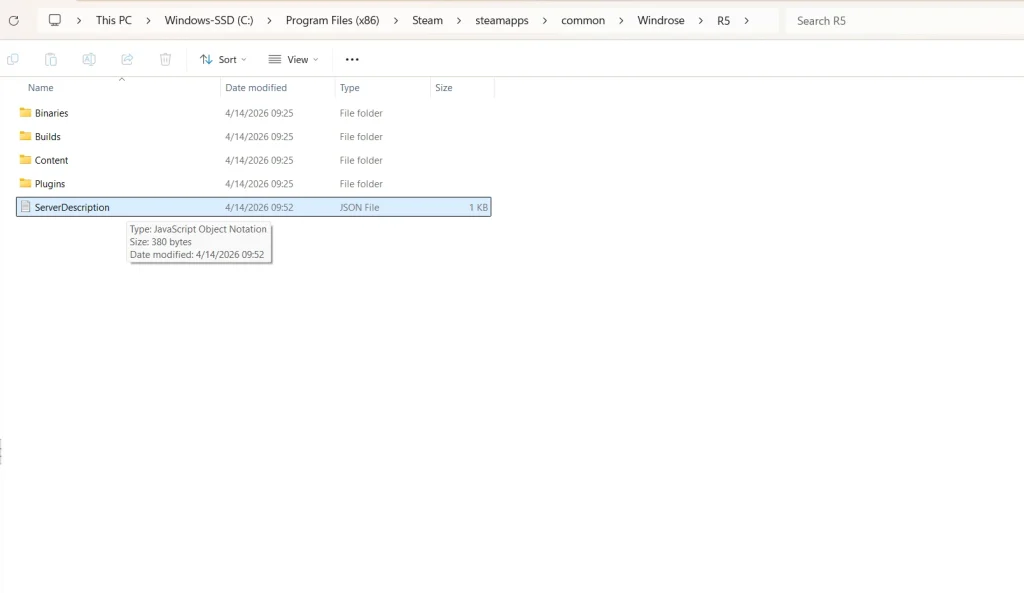
List of Available Server Configurations in Folder 'ServerDescription'
- InviteCode
- Allows you to customize a minimum 6-digit code for friends to join your Windrose server.
- IsPasswordProtected
- You can switch this between "true" and "false."
- Password
- Set a custom-made password for your server.
- ServerName
- Designate your server's specific name.
- MaxPlayerCount
- Adjust the size of how many players you can have on your server at one time.
List of Available Server Configurations in Folder 'WorldDescription'
- WorldName
- Change the name of your game's world.
- WorldPresetType
- Allows you to change the world's preset difficulty between Easy, Medium, & Hard.
- WorldSettings
- Allows you to customize the following list of settings:
- MobHealthMultiplier: Adjusts how much health enemies have.
- MobDamageMultiplier: Adjusts how much damage enemies deal.
- ShipHealthMultiplier: Adjusts how much health enemy ships have.
- ShipDamageMultiplier: Adjusts how much damage enemy ships deal.
- BoardingDifficultyMultiplier: Adjusts the number of enemies that need to be defeated in a boarding action.
- Coop_StatsCorrectionModifier: Adjusts the damage enemies deal based on the number of active players.
- Coop_ShipStatsCorrectionModifier: Adjusts the damage enemy ships deal based on the number of active players.
- CombatDifficulty: Adjusts overall enemy aggression during combat.
- Allows you to customize the following list of settings:
Join our Newsletter
Subscribe for the latest updates on all things gaming!

How would you rate this blog?
Share your opinion and help us make our blogs even better!
Didn't like
Neutral
Liked

Need a game server?
Rent a game server where you and your friends can play privately with low latency and custom settings. Choose from 110+ games, invite people from around the globe, and enjoy private matches, or build your own online community with your own rules.

Relevant Blogs







GET THE INSIDE SCOOP!
Join our email for updates on our hosted games, company news and exclusive deals. Stay in the loop!













