
WARDOGS Controls Guide: All PC & Controller Key Bindings
Posted on by

Share:

Share on X

Share on Facebook

Share on Threads

Share on Bluesky

Copy to Clipboard

Share via email
WARDOGS features an abundance of unexpected keybinds capable of giving you a competitive edge! So, today we explore all WARDOGS controls for PC and controllers (Xbox Series X|S, PS5) to help you prepare for your next fight or flight!
 Note: The following WARDOGS controls highlight the use of an Xbox controller. Button layout may vary for different gamepads.
WARDOGS Controls For PC & Controller
WARDOGS by BULKHEAD is a PC exclusive game in early access as of September 10, 2026, available on Steam. Those jumping in can do so with a choice of Keyboard & Mouse or a Controller.Windows PC Controls (Keyboard & Mouse)
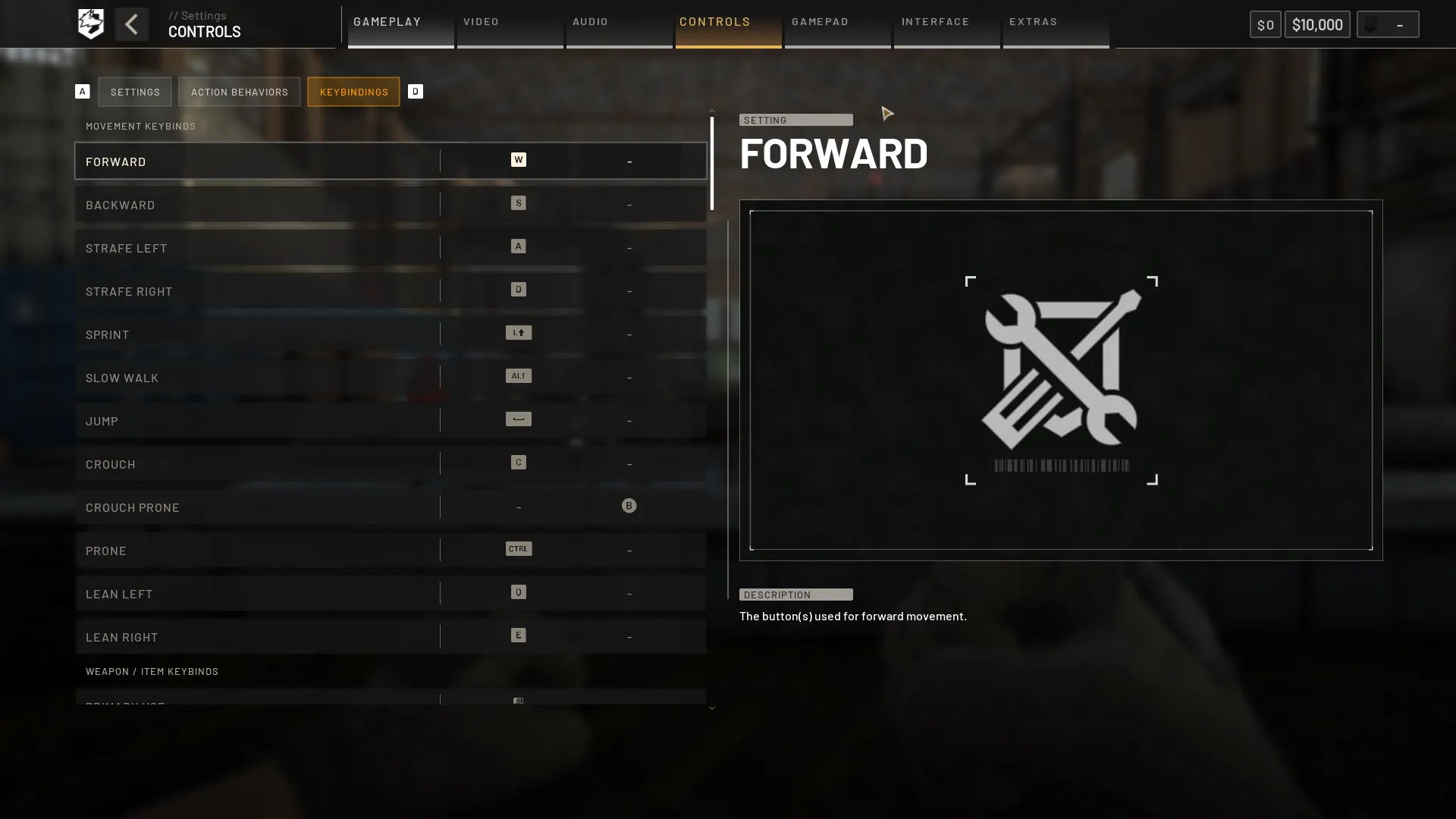
Movement Keybinds
- Forward: W
- Backward: S
- Strafe Left: A
- Strafe Right: D
- Sprint: Left Shift
- Slow Walk: Alt
- Jump: Space
- Crouch: C
- Crouch Prone: Unbound
- Prone: Ctrl
- Lean Left: Q
- Lean Right: E
Weapon / Item Keybinds
- Primary Use: Left Mouse Button
- Secondary Use: Right Mouse Button
- Focus / Hold Breath: Left Shift
- Melee Bash: V
- Reload: R
- Increase Zeroing: Page Up
- Decrease Zeroing: Page Down
- Cycle Fire Mode: B
- Cycle Sights: Z
- Mount Bipod: G
- Toggle Bipod Fold: G
- Deploy Parachute: Space
- Cut Parachute: C
- Inspect: I
- Next Slot: Mouse Scroll Wheel Down
- Previous Slot: Mouse Scroll Wheel Up
- Holster Item: X
- Equipment Wheel: 4
- Quick Slot 1: 1
- Quick Slot 2: 2
- Quick Slot 3: 3
- Quick Slot 4: 4
- Quick Slot 5: 5
- Quick Slot 6: 6
- Quick Slot 7: 7
- Quick Slot 8: 8
- Quick Slot 9: 9
- Quick Slot 0: 0
Interaction Keybinds
- Interact: F
Communication
- Enable/Disable Voice Chat: Unbound
- Enable/Disable Voice Chat (Scoreboard): U
- Push-to-Talk (Squad): J
- Push-to-Talk (Proximity): K
- Ping: Middle Mouse Button
- Ping Wheel (Hold): Middle Mouse Button
- Tip: F1
- Reject Tip: F2
- Bribe: F1
Build Tool Keybinds
- Dismantle: V
- Rotate Buildable: R
- Toggle Snapping: B
Ground Vehicle Keybinds
- Throttle: W
- Brake: S
- Steer Right: D
- Steer Left: A
- Handbrake: Space
- Gear Shift R: R
Rotary Vehicle Keybinds
- Collective (Raise): Left Shift
- Collective (Lower): Ctrl
- Increase Cyclic X: W
- Decrease Cyclic X: S
- Increase Cyclic Y: D
- Decrease Cyclic Y: A
- Yaw Left: Q
- Yaw Right: E
Missile Keybinds
- Increase Cyclic X: W
- Decrease Cyclic X: S
General Vehicle Keybinds
- Next Seat: 0
- Previous Seat: 9
- Lock/Unlock Vehicle: L
- Activate Counter Measure: V
- Buy Ammo / Supplies: B
- Deploy Supply Crate: G
- Horn: H
Vehicle Weapons Keybinds
- Fire Weapon: Left Mouse Button
- Cycle Weapons: Z
- Cycle Fire Mode: B
- Eject From Projectile: C
- Vehicle Weapon Pitch Up: W
- Vehicle Weapon Pitch Down: S
- Vehicle Weapon Yaw Left: A
- Vehicle Weapon Yaw Right: D
Vehicle Camera Keybinds
- Toggle Free Look: Alt
- Toggle Camera Mode: C
- Camera Left View: Left Arrow
- Camera Right View: Right Arrow
- Camera Rear View: Down Arrow
- Camera Zoom In: Page Up
- Camera Zoom Out: Page Down
UI - General Keybinds
- Pause Menu: Esc
- Inventory: Tab
- Scoreboard: Mouse Button
- Give Up: F
- Chat: Enter
- Toggle Vault: V
UI - Map Keybinds
- Tactical Map: M
- Recenter Tactical Map: X
- Zoom Minimap In: [
- Zoom Minimap Out: ]
UI - Active Reload Keybinds
- Active Reload - Up: Up Arrow
- Active Reload - Right: Right Arrow
- Active Reload - Left: Left Arrow
- Active Reload - Down: Down Arrow
Windows PC Controls (Xbox Series X|S Controller)
Note: The following WARDOGS controls highlight the use of an Xbox controller. Button layout may vary for different gamepads.
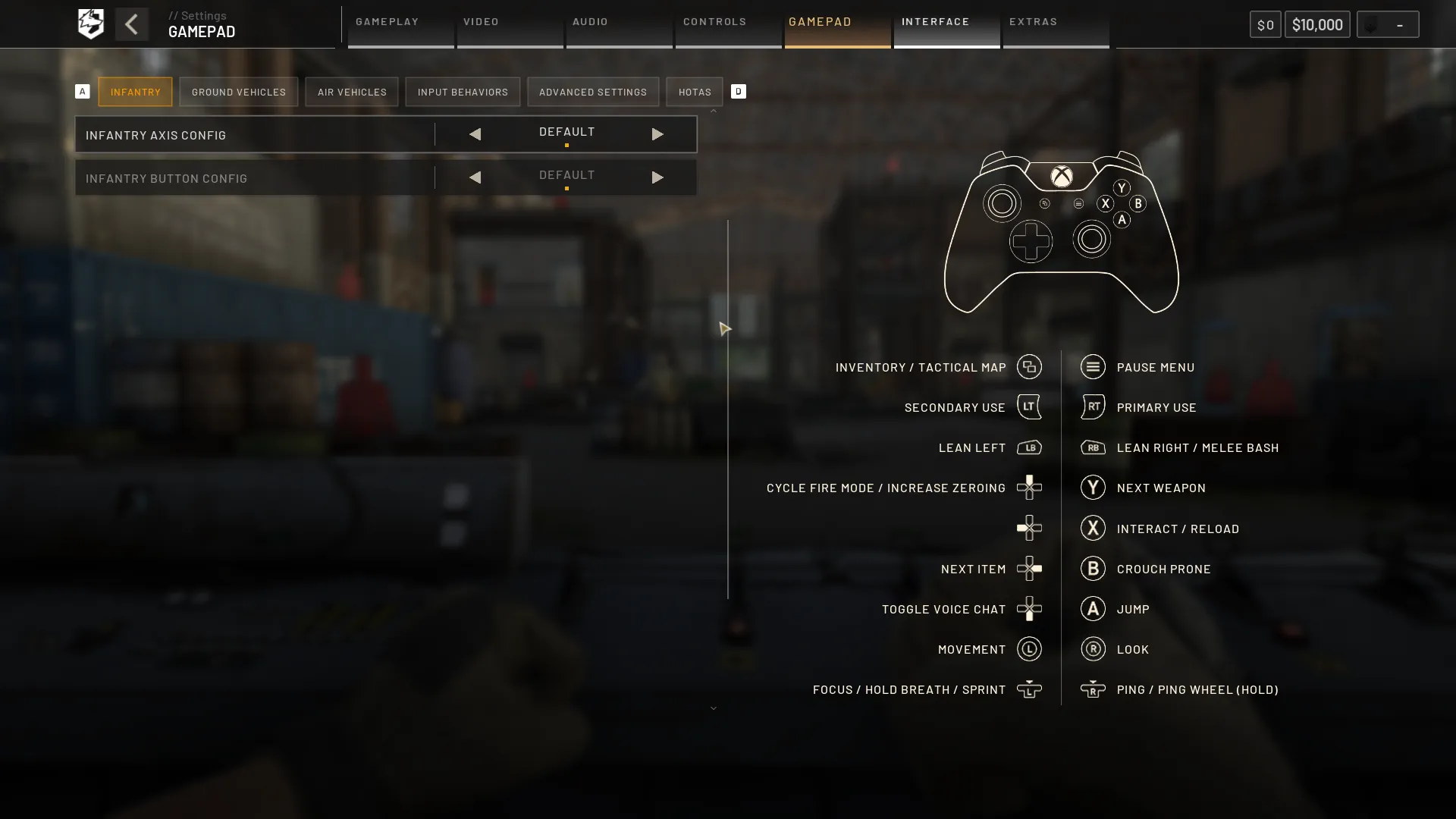
Infantry
- Inventory / Tactical Map: View Button
- Pause Menu: Menu Button
- Secondary Use: LT
- Primary Use: RT
- Lean Left: LB
- Lean Right / Melee Bash: RB
- Cycle Fire Mode / Increase Zeroing: D-Pad Up
- Nothing: D-Pad Left
- Next Item: D-Pad Right
- Toggle Voice Chat: D-Pad Down
- Next Weapon: Y
- Interact / Reload: X
- Crouch Prone: B
- Jump: A
- Movement: Left Stick
- Look: Right Stick
- Focus / Hold Breath / Sprint: Left Stick Click (L3)
- Ping / Ping Wheel (Hold): Right Stick Click (R3)
Ground Vehicles
- Inventory / Tactical Map: View Button
- Pause Menu: Menu Button
- Brake: LT
- Throttle: RT
- Nothing: LB
- Nothing: RB
- Nothing: D-Pad Up
- Toggle Free Look: D-Pad Left
- Toggle Camera Mode: D-Pad Right
- Toggle Voice Chat: D-Pad Down
- Nothing: Y
- Interact: X
- Next Seat: B
- Handbrake: A
- Steer Vehicle: Left Stick
- Free Look Camera: Right Stick
- Horn: Left Stick Click (L3)
- Ping: Right Stick Click (R3)
Air Vehicles
- Inventory / Tactical Map: View Button
- Pause Menu: Menu Button
- Collective (Lower): LT
- Collective (Raise) / Fire Weapon: RT
- Nothing: LB
- Nothing: RB
- Activate Counter Measure: D-Pad Up
- Toggle Free Look: D-Pad Left
- Toggle Camera Mode: D-Pad Right
- Toggle Voice Chat: D-Pad Down
- Nothing: Y
- Interact: X
- Next Seat: B
- Nothing: A
- Cyclic: Left Stick
- Pedals / Free Look Camera: Right Stick
- Horn: Left Stick Click (L3)
- Ping: Right Stick Click (R3)
Windows PC Controls (PlayStation 5 Controller)
Infantry
- Inventory / Tactical Map: Create Button
- Pause Menu: Options Button
- Secondary Use: L2
- Primary Use: R2
- Lean Left: L1
- Lean Right / Melee Bash: R1
- Cycle Fire Mode / Increase Zeroing: D-Pad Up
- Nothing: D-Pad Left
- Next Item: D-Pad Right
- Toggle Voice Chat: D-Pad Down
- Next Weapon: Triangle
- Interact / Reload: Square
- Crouch Prone: Circle
- Jump: Cross
- Movement: Left Stick
- Look: Right Stick
- Focus / Hold Breath / Sprint: Left Stick Click (L3)
- Ping / Ping Wheel (Hold): Right Stick Click (R3)
Ground Vehicles
- Inventory / Tactical Map: Create Button
- Pause Menu: Options Button
- Brake: L2
- Throttle: R2
- Nothing: L1
- Nothing: R1
- Nothing: D-Pad Up
- Toggle Free Look: D-Pad Left
- Toggle Camera Mode: D-Pad Right
- Toggle Voice Chat: D-Pad Down
- Nothing: Triangle
- Interact: Square
- Next Seat: Circle
- Handbrake: Cross
- Steer Vehicle: Left Stick
- Free Look Camera: Right Stick
- Horn: Left Stick Click (L3)
- Ping: Right Stick Click (R3)
Air Vehicles
- Inventory / Tactical Map: Create Button
- Pause Menu: Options Button
- Collective (Lower): L2
- Collective (Raise) / Fire Weapon: R2
- Nothing: L1
- Nothing: R1
- Activate Countermeasure: D-Pad Up
- Toggle Free Look: D-Pad Left
- Toggle Camera Mode: D-Pad Right
- Toggle Voice Chat: D-Pad Down
- Nothing: Triangle
- Interact: Square
- Next Seat: Circle
- Nothing: Cross
- Cyclic: Left Stick
- Pedals / Free Look Camera: Right Stick
- Horn: Left Stick Click (L3)
- Ping: Right Stick Click (R3)
Join our Newsletter
Subscribe for the latest updates on all things gaming!

How would you rate this blog?
Share your opinion and help us make our blogs even better!
Didn't like
Neutral
Liked

Need a game server?
Rent a game server where you and your friends can play privately with low latency and custom settings. Choose from 110+ games, invite people from around the globe, and enjoy private matches, or build your own online community with your own rules.

Relevant Blogs







GET THE INSIDE SCOOP!
Join our email for updates on our hosted games, company news and exclusive deals. Stay in the loop!













