
Rust Console Commands Guide: Every Admin Command & How to Use Them
Publicado em por

Compartilhar:

Compartilhar no X

Compartilhar no Facebook

Compartilhar no Threads

Compartilhar no Bluesky

Copiar para a área de transferência

Compartilhar por e-mail
Those who wield the power of console commands in Rust become the server’s architect of reality. These include powerful commands, such as changing time, controlling the weather, teleporting players, and even becoming invincible through god mode. So, keep reading as we go over how to use console commands in Rust, including all available command options and their effects.
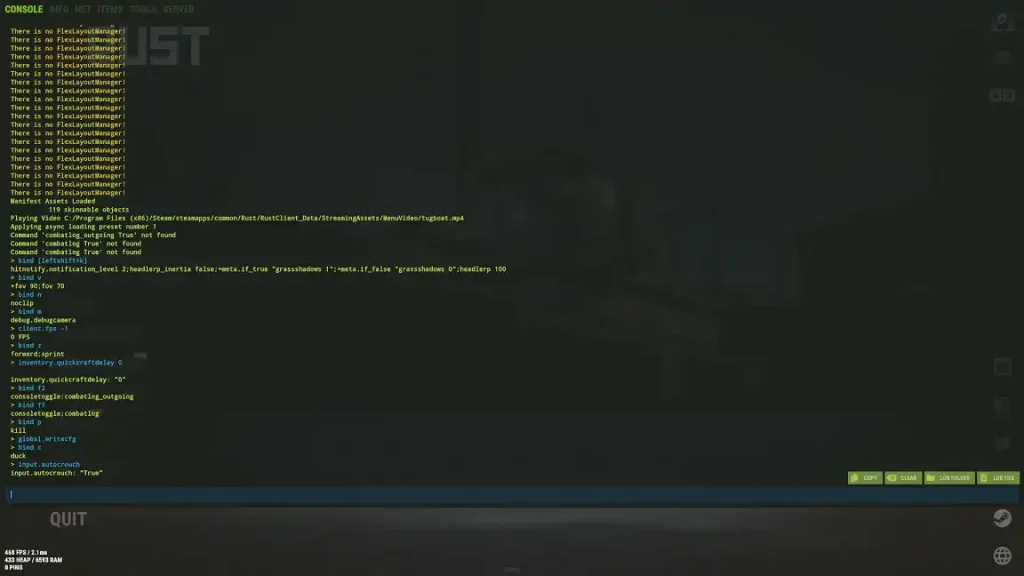 Assuming the player is an administrator of the Rust server, pressing F1 (by default) opens the console, which accepts various commands. The command console should appear on both official and community servers, provided the function is accessible.
Once opened, type the desired command into the console and press Enter. Ensure the commands use correct spelling, spacing, and punctuation to work as intended.
Assuming the player is an administrator of the Rust server, pressing F1 (by default) opens the console, which accepts various commands. The command console should appear on both official and community servers, provided the function is accessible.
Once opened, type the desired command into the console and press Enter. Ensure the commands use correct spelling, spacing, and punctuation to work as intended.
How to Use Console Commands in Rust
Assuming the player is an administrator of the Rust server, pressing F1 (by default) opens the console, which accepts various commands. The command console should appear on both official and community servers, provided the function is accessible.
Once opened, type the desired command into the console and press Enter. Ensure the commands use correct spelling, spacing, and punctuation to work as intended.
All Rust Console Commands
Remember, the user must have the necessary permissions to use console commands in Rust. Request access to these commands from the server’s administrator if they’re not working as anticipated.Player Console Commands
- Kill: Immediately kills the user.
- Respawn: Respawns the character. Works like an unstuck command.
- Connect [IP:Port]: Connect to the specified server.
- Disconnect: Disconnect from the current Rust server.
- Seed: Displays the current map seed.
- CombatLog: Displays recent damage information.
- Clear: Clears the command console.
- Copy: Copies the content in the command console.
- Quit: Force-quit the game and return the user to the desktop.
- perf 1: Displays real-time FPS and system performance stats.
- mutelist: Displays all muted players.
- netgraph.enabled true/false: Displays network stats (e.g., ping, FPS, and packet loss)
- world.rendermap: Creates a high-resolution PNG file of the current map.
- cinematic_view 1: Hides the HUD.
- global.time: Displays the current in-game time.
- report [player name] [reason]: Reports a player with the provided reason.
- version: Displays the game’s current version.
Server Management Console Commands
- server.save: Saves the Rust server’s current state.
- server.stop: Stops the current Rust server.
- server.start: Starts the Rust server.
- server.writecfg: Save server changes to the config file.
- servers.seed: Set or display the Rust server seed.
- servers.saveinterval [seconds]: Sets the server’s autosave interval.
- server.hostname: Changes the server’s hostname.
- server.maxplayers: Sets the maximum number of players allowed in the Rust server.
- server.globalchat true/false: Toggles global chat.
- server.description: Sets the Rust server’s description.
- server.url: Sets the Rust server’s website URL.
Server Admin Console Commands
- ban: Bans a player using that user’s name.
- banid: Bans a player using that user’s Steam ID.
- unban: Unbans a player.
- kick: Kicks a player from the current Rust server.
- kickall: Kicks all players from the current Rust server.
- moderatorid: Grants moderator access to the specified user.
- ownerid: Grants administrator access to the specified user.
- noclip: Enables flight and the ability to clip through objects.
- god true/false: Toggles invincibility mode.
- ent who: Identifies the user who placed a specific entity.
- ent unlock: Unlocks the targeted entity.
- ent lock: Locks the targeted entity.
- ent kill: Destroys the targeted entity.
Player Teleport Console Commands
- teleport: Teleports the user to the specified player’s position.
- teleportpos: Teleports the user to the specified coordinates.
- teleport2me: Teleports another player to the user’s position.
- teleportany: Teleports the user to a specified entity.
- teleportlos: Teleports the user to the nearest visible object.
- teleport2marker: Teleports the user to the specified map marker.
Time & Weather Console Commands
- weather.rain: Toggles rain intensity.
- weather.fog: Toggles fog intensity.
- weather.clouds: Toggles cloud coverage.
- weather.wind: Toggles wind intensity.
- env.time: Sets the time of day.
- env.timescale: Sets time progression speed.
FPS Management Console Commands
- perf 1: Displays real-time FPS and system performance stats.
- graphics.shadowdistance 0: Disables shadows.
- graphics.drawdistance [value]: Sets render distance.
- grass.on false: Disables grass rendering.
- grass.displacement false: Disables grass displacement effects.
- gfx.ssaa false: Disables screen anti-aliasing.
- gfx.bloom false: Disables bloom effects.
- gfx.grain false: Disables film grain effects.
- gfx.shafts false: Disables sun shafts.
- gc.buffer [value]: Sets the garbage collection buffer size.
- graphics.quality [value]: Sets the overall graphics quality.
- gc.collect: Manually clears unused memory.
PvP Console Commands
- bind X "graphics.fov 70; graphics.fov 90": Toggles between zoomed-in and default FOV.
- graphics.vm_horizontal_flip true: Switches between left- and right-hand mode.
- client.lookatradius 20: Expands interaction range.
- graphics.vm_fov_scale false: Maintains weapon size regardless of FOV.
- legs.enablelegs 0: Hides the character’s legs while in first-person view.
- global.hideinteracttextwhileads true: Hides interaction prompts while aiming.
Graphics & Performance Console Commands
- fps.limit: Sets the maximum FPS.
- gfx.ssao true/false: Toggles ambient occlusion.
- streamermode 0/1: Toggles streamer mode.
- gui.hide / gui.show: Toggles the GUI.
- grass.on true/false: Toggles grass rendering.
- debug.debugcamera: Toggles free camera mode.
Entity & Crafting Console Commands
- entity.spawn: Spawns the specified entity at the mouse cursor’s position.
- craft.add: Adds the specified item to the crafting queue.
- inventory.give: Gives the specified item and its amount to the indicated player.
- craft.cancel: Cancels the current crafting operation.
- inventory.giveall: Gives the specified item and its amount to all players in the Rust server.
- inventory.givebp: Gives the user a specific blueprint.
- entity.spawnat: Spawns an entity at the specified map coordinates.
- entity.spawnhere: Spawns an entity at a set distance from the user.
Rust Server Status & Debugging Console Commands
- status: Displays all players and the status of the current Rust server.
- users: Shows detailed user information.
- find: Search for a specific console command.
- entity.find_entity: Locate an entity by its name.
- global.queue: Displays the current Rust server’s queue.
- global.queuejoin: Forces the specified player to join the queue.
- global.queueleave: Removes the specified player from the queue.
- global.bans: Displays a list of all banned players from the Rust server.
Crie seu próprio
servidor Rust
servidor Rust
Escolha um plano, selecione um jogo e jogue com seus amigos!
Assine nosso boletim informativo
Assine para receber as novidades mais recentes do mundo dos jogos!

Entre no nosso Discord
Faça parte da nossa comunidade com mais de 20.000 membros com os mesmos interesses!
Como você avaliaria este blog?
Compartilhe sua opinião e nos ajude a melhorar ainda mais nossos blogs!
Não curti
Neutro
Curti

Precisa de um servidor de jogo?
Alugue um servidor de jogos onde você e seus amigos podem jogar em privacidade, com baixa latência e configurações personalizadas. Escolha entre 110+ jogos, convide pessoas de todo o mundo e desfrute de partidas privadas ou construa sua comunidade on-line com suas próprias regras.

Blogs relevantes







FIQUE POR DENTRO!
Assine nosso boletim informativo para receber novidades sobre nossos jogos hospedados, notícias sobre a empresa e ofertas exclusivas. Fique por dentro!













