

Project Zomboid Console Commands Guide: All Cheats, Admin Commands, & How to Enter
Publicado em por

Compartilhar:

Compartilhar no X

Compartilhar no Facebook

Compartilhar no Threads

Compartilhar no Bluesky

Copiar para a área de transferência

Compartilhar por e-mail
Navigating Knox County with nothing but the clothes on your back and perhaps a baseball bat in hand is no walk in the park. Some survivors may want to enlist the help of "cheats" via console commands in Project Zomboid. Doing so unlocks unique advantages, such as instantly spawning items, becoming invisible to zombies, and even activating god mode.
 To enter your console commands in Project Zomboid, which can include various "cheats" like god mode and invisibility as well as spawning items, you'll first need to enable Debug Mode in Singleplayer, or ensure you're Admin level in Multiplayer.

Project Zomboid Console Commands Guide (All Cheats, Admin Commands, & How to Enter)
Whether you're looking to spawn yourself that coveted item you can't find or give yourself god mode to get out of a pinch, there are many different console commands available in Project Zomboid. But first, you'll need to learn how to enter them.How to Enter Project Zomboid Console Commands (Cheats)
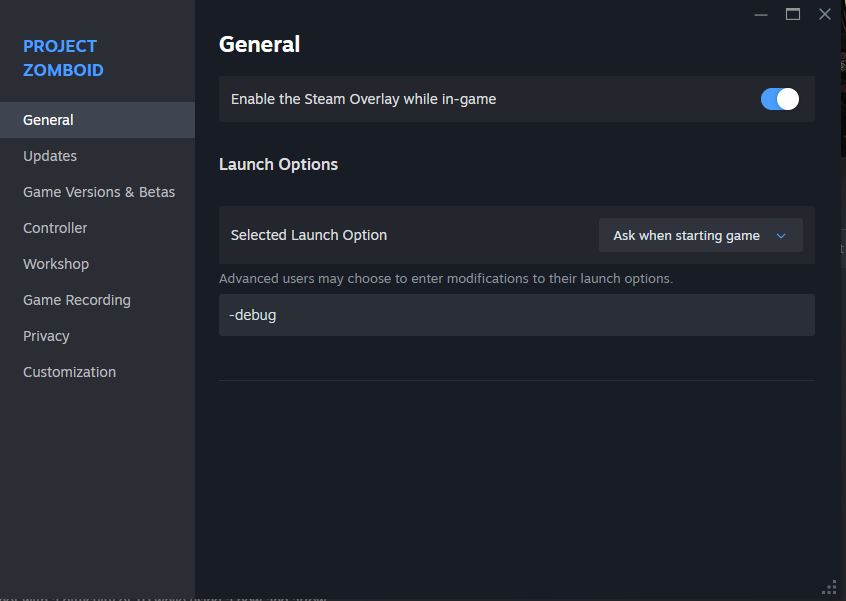
To enter your console commands in Project Zomboid, which can include various "cheats" like god mode and invisibility as well as spawning items, you'll first need to enable Debug Mode in Singleplayer, or ensure you're Admin level in Multiplayer.
- For Multiplayer, you can set your Admin Level via /setaccesslevel [YourUsername] admin.
- For Single Player, you can enter Debug Mode by right-clicking on Project Zomboid in your Steam Library, selecting Properties, going to the General tab, scrolling down to Launch Options, and typing the code -debug (pictured above). Launch the game afterward, and you're in!
All Project Zomboid Console Commands (Cheats)
additem
- Description: Spawns an item for a given player. Spawns the item to the user if no username is given.
- Syntax: /additem "username" "module.item”
- Example: /additem "rj" Base.Axe 5
addkey
- Description: Spawns a key to a given player. Spawns the item to the user if no username is given.
- Syntax: /addkey "username" "keyId" "name"
- Example: /addkey "rj" "7295" "Gift Key"
addsteamid
- Description: Add a SteamID to the list of allowed SteamIDs on the current Project Zomboid server.
- Syntax: /addSteamID "steamid"
- Example: /addSteamID “Player1”
adduser
- Description: Add a new user to the whitelisted Project Zomboid server.
- Syntax: /adduser "username" "password"
- Example: /adduser "Player1" "1234567890"
addvehicle
- Description: Spawn a vehicle.
- Syntax: /addvehicle "script" "user or x,y,z”
- Example: /addvehicle "Base.VanAmbulance" "rj"
addxp
- Description: Gives a specified amount of XP to a player.
- Syntax: /addxp "playername" perkname=xp
- Example: /addxp "rj" Woodwork=2
alarm
- Description: Sound a building alarm at the admin’s position. This admin command won’t work if the user isn’t in a room.
- Syntax: /alarm
- Example: /alarm
banid
- Description: Ban a SteamID from the Project Zomboid server.
- Syntax: /banid SteamID
- Example: /banid “Player1”
banip
- Description: Ban an IP from the Project Zomboid server.
- Syntax: /banip IP
- Example: /banip 127.0.0.1
banuser
- Description: Ban a user, which may include the IP and reason for the sanction.
- Syntax: /banuser "username" -ip -r "reason"
- Example: /banuser "rj" -ip -r "spawn kill"
changeoption
- Description: Change an option in the Project Zomboid server.
- Syntax: /changeoption optionName "newValue"
- Example: /changeoption “Vertical Sync” 1
checkModsNeedUpdate
- Description: Checks if a mod has been updated, and then prints the answer to a log file.
- Syntax: /checkModsNeedUpdate
- Example: /checkModsNeedUpdate
chopper
- Description: Trigger a helicopter event on a random player.
- Syntax: /chopper
- Example: /chopper
createhorde
- Description: Spawns a zombie horde near a player.
- Syntax: /createhorde count "username"
- Example: /createhorde 150 "rj"
godmod
- Description: Makes the specified player invincible. The user becomes invincible if no username is set.
- Syntax: /godmode "username" -value
- Example: /godmode -true
godmodplayer
- Description: Makes the specified player invincible.
- Syntax: /godmodplayer "username" -value
- Example: /godmodplayer "rj" –true
gunshot
- Description: A random player hears a gunshot sound.
- Syntax: /gunshot
- Example: /gunshot
help
- Description: List all Project Zomboid admin commands. Add a command’s name to display the tooltip for that specific entry.
- Syntax: /help “command”
- Example: /help “gunshot”
invisible
- Description: Makes the player undetectable by zombies. The user becomes invisible if no username is set.
- Syntax: /invisible "username" -value
- Example: /invisible "rj" -true
invisibleplayer
- Description: Makes a player undetectable by zombies.
- Syntax: /invisibleplayer "username" -value
- Example: /invisibleplayer "rj" -true
kick
- Description: Kicks a user from the Project Zomboid server.
- Syntax: /kickuser "username" -r "reason"
- Example: /kickuser "rj" -r "spawn kill"
lightning
- Description: Use lightning on a specified user.
- Syntax: /lightning “username”
- Example: /lightning “rj”
log
- Description: Sets log level.
- Syntax: /log "Type" "Level"
- Example: /log "Network" "Trace"
noclip
- Description: Toggles the player to pass through walls and structures.
- Syntax: /noclip "username"
- Example: /noclip "rj"
players
- Description: Lists all players in the current Project Zomboid server.
- Syntax: /players
- Example: /players
quit
- Description: Saves and quits the Project Zomboid server.
- Syntax: /quit
- Example: /quit
releasesafehouse
- Description: Releases the user's safehouse.
- Syntax: /releasesafehouse
- Example: /releasesafehouse
reloadalllua
- Description: Reloads all Lua scripts on the Project Zomboid server.
- Syntax: /reloadalllua
- Example: /reloadalllua
reloadlua
- Description: Reloads a specific Lua script on the Project Zomboid server.
- Syntax: /reloadlua "filename"
- Example: /reloadlua “healPlayerOnLevelUp”
reloadoptions
- Description: Reloads all options in the Project Zomboid server (ServerOptions.ini) and sends them to clients.
- Syntax: /reloadoptions
- Example: /reloadoptions
removeitem
- Description: Removes a specific item from the user. Removes all items of the specific type if the count is zero (0).
- Syntax: /removeitem "module.item" count
- Example: /removeitem Base.Axe 5
removemapsymbolsforuser
- Description: Removes all shared map symbols for the specified user.
- Syntax: /removemapsymbolsforuser "username"
- Example: /removemapsymbolsforuser "rj"
removesteamid
- Description: Removes a SteamID from the list of allowed users on the current Project Zomboid server.
- Syntax: /removeSteamID "steamid"
- Example: /removeSteamID "Player1"
removeuserfromwhitelist
- Description: Removes a specified user from the whitelist.
- Syntax: /removeuserfromwhitelist "username"
- Example: /removeuserfromwhitelist "rj"
removezombies
- Description: Eliminates all zombies in the currently loaded map.
- Syntax: /removezombies
- Example: /removezombies
save
- Description: Saves the current world.
- Syntax: /save
- Example: /save
servermsg
- Description: Broadcast a message to the Project Zomboid server for all players to see.
- Syntax: /servermsg "My Message"
- Example: /servermsg "Test"
setaccesslevel
- Description: Sets the access level of the specified player, which can be Admin, Moderator, Overseer, GM, Observer, or none.
- Syntax: /setaccesslevel "username" "accesslevel"
- Example: /setaccesslevel "rj" "moderator"
setpassword
- Description: Changes the password for the specified user.
- Syntax: /setpassword "username" "newpassword"
- Example: /setpassword “rj” “1234567890”
showoptions
- Description: Displays all options and values for the current Project Zomboid server.
- Syntax: /showoptions
- Example: /showoptions
startrain
- Description: Activate rainy weather in the current Project Zomboid server and set its intensity (from 1 to 100).
- Syntax: /startrain "intensity"
- Example: /startrain 50
startstorm
- Description: Activate stormy weather in the current Project Zomboid server and set its intensity (from 1 to 100).
- Syntax: /startstorm "intensity"
- Example: /startstorm 50
stats
- Description: Sets and clears the server’s statistics.
- Syntax: /stats none/file/console/all period
- Example: /stats file 10
stoprain
- Description: Stops raining on the Project Zomboid server.
- Syntax: /stoprain
- Example: /stoprain
stopweather
- Description: Stops the weather on the Project Zomboid server.
- Syntax: /stopweather
- Example: /stopweather
teleport
- Description: Teleports to the position of the specified player.
- Syntax: /teleport "playername" or /teleport "player1" "player2"
- Example: /teleport "rj" or /teleport "rj" "toUser"
teleportplayer
- Description: Teleports to the position of the specified player.
- Syntax: /teleport "playername" or /teleport "player1" "player2"
- Example: /teleport "rj" or /teleport "rj" "toUser"
teleportto
- Description: Teleports the user to the specified coordinates.
- Syntax: /teleportto x,y,z
- Example: /teleportto 10000,11000,0
thunder
- Description: The specified player hears thunder.
- Syntax: /thunder "username"
- Example: /thunder "rj"
unbanid
- Description: Unbans the specified SteamID.
- Syntax: /unbanid SteamID
- Example: /unbanid “Player1”
unbanip
- Description: Unbands the specified IP.
- Syntax: /unbanip IP
- Example: /unbanip 127.0.0.1
unbanuser
- Description: Unbans the specified username.
- Syntax: /unbanid “username”
- Example: /unbanid “rj”
voiceban
- Description: Blocks the specified user from using voice chat.
- Syntax: /voiceban "username" -value
- Example: /voiceban "rj" -true
worldgen
- Description: Activates and controls the server’s world generator.
- Syntax: /worldgen start, /worldgen recheck, /worldgen stop, or /worldgen status
- Example: /worldgen start, /worldgen recheck, /worldgen stop, or /worldgen status
Crie seu próprio
servidor Project Zomboid
servidor Project Zomboid
Escolha um plano, selecione um jogo e jogue com seus amigos!
Assine nosso boletim informativo
Assine para receber as novidades mais recentes do mundo dos jogos!

Entre no nosso Discord
Faça parte da nossa comunidade com mais de 20.000 membros com os mesmos interesses!
Como você avaliaria este blog?
Compartilhe sua opinião e nos ajude a melhorar ainda mais nossos blogs!
Não curti
Neutro
Curti

Precisa de um servidor de jogo?
Alugue um servidor de jogos onde você e seus amigos podem jogar em privacidade, com baixa latência e configurações personalizadas. Escolha entre 110+ jogos, convide pessoas de todo o mundo e desfrute de partidas privadas ou construa sua comunidade on-line com suas próprias regras.

Blogs relevantes







FIQUE POR DENTRO!
Assine nosso boletim informativo para receber novidades sobre nossos jogos hospedados, notícias sobre a empresa e ofertas exclusivas. Fique por dentro!













