

Windrose Console Commands Guide: How to Change Difficulty, World Name, Max Player Count, & more
Publicado el por

Compartir:

Compartir en X

Compartir en Facebook

Compartir en Threads

Compartir en Bluesky

Copiar al portapapeles

Compartir por correo electrónico
Perhaps as ye sail around the world of Windrose, ye might be wanting some extra control. Console commands are generally a great way to give yourself quick and easy access to items, teleportation, and more in most games. However, Windrose doesn't currently have traditional console commands. Instead, you'll have to use some direct file workarounds if you want to change your difficulty settings, max player count, and world modifiers on a Windrose dedicated server.
Here, we'll talk you through everything you need to know about entering effective Windrose console commands and how to change things like your difficulty settings, world name, enemy health, and more.
 Unfortunately, there aren't any Windrose console commands at this point in time. However, the game is still in Early Access. As a result, it could have true console commands added in the future. We say "true" console commands, because there are still some settings that you can change by rooting around in the game's files.
Rather than traditional console commands, these are server configuration settings. That means that if you're playing Windrose alone and without a dedicated server, you won't be able to access all of these settings.
Unfortunately, there aren't any Windrose console commands at this point in time. However, the game is still in Early Access. As a result, it could have true console commands added in the future. We say "true" console commands, because there are still some settings that you can change by rooting around in the game's files.
Rather than traditional console commands, these are server configuration settings. That means that if you're playing Windrose alone and without a dedicated server, you won't be able to access all of these settings.
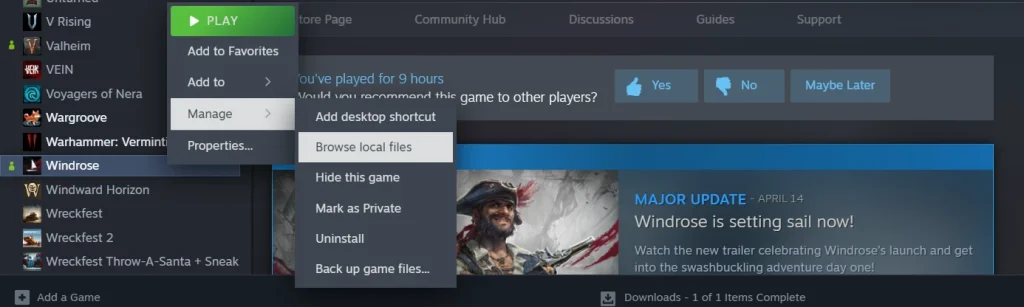
To access your Windrose server configurations, first open your Steam library and scroll to the game.
Once there, right-click Windrose, select the 'Manage' tab, then select 'Browse Local Files.'
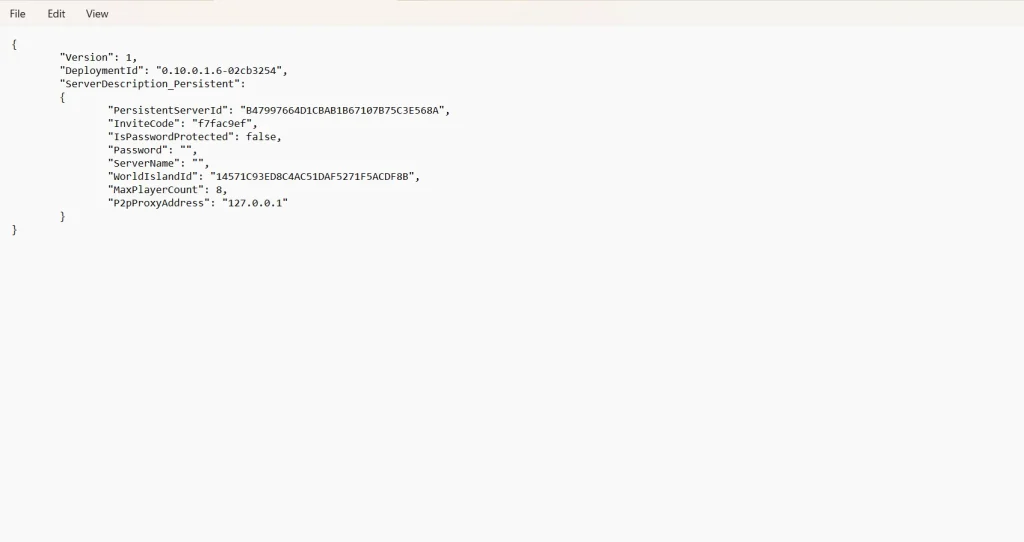
Your next destination is the folder 'R5.' Within this folder, you'll find your final destinations: ServerDescription & WorldDescription.
Cracking open ServerDescription gives you a short list of things you can tweak about your game. Meanwhile, the folder WorldDescription will only appear if you have actually created a new world file to explore in Windrose itself. If you have multiple Windrose files, you'll see multiple corresponding WorldDescription folders.
While ServerDescription will give you control over things such as invite codes and max player count, WorldDescription will allow you to make some adjustments to enemy damage, health modifiers, and a bit more. Again, there isn't a lot that can be altered at this stage of the game's development. For now, this is one of the only ways to exercise a little bit of executive control over your game, similar to traditional console commands.
Does Windrose Have Console Commands?
Unfortunately, there aren't any Windrose console commands at this point in time. However, the game is still in Early Access. As a result, it could have true console commands added in the future. We say "true" console commands, because there are still some settings that you can change by rooting around in the game's files.
Rather than traditional console commands, these are server configuration settings. That means that if you're playing Windrose alone and without a dedicated server, you won't be able to access all of these settings.
How to Access Windrose Server Configuration Settings
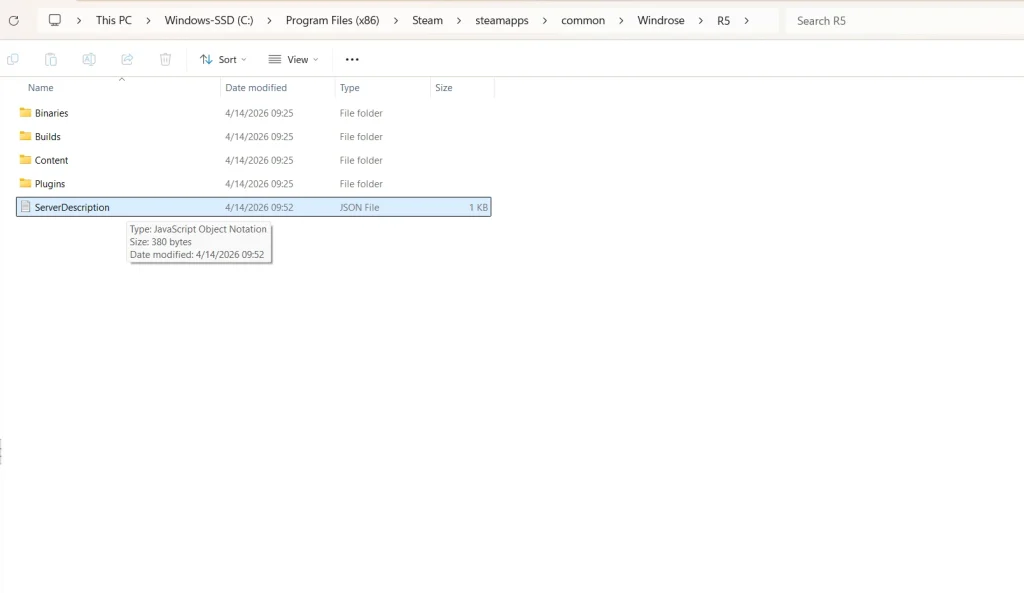
List of Available Server Configurations in Folder 'ServerDescription'
- InviteCode
- Allows you to customize a minimum 6-digit code for friends to join your Windrose server.
- IsPasswordProtected
- You can switch this between "true" and "false."
- Password
- Set a custom-made password for your server.
- ServerName
- Designate your server's specific name.
- MaxPlayerCount
- Adjust the size of how many players you can have on your server at one time.
List of Available Server Configurations in Folder 'WorldDescription'
- WorldName
- Change the name of your game's world.
- WorldPresetType
- Allows you to change the world's preset difficulty between Easy, Medium, & Hard.
- WorldSettings
- Allows you to customize the following list of settings:
- MobHealthMultiplier: Adjusts how much health enemies have.
- MobDamageMultiplier: Adjusts how much damage enemies deal.
- ShipHealthMultiplier: Adjusts how much health enemy ships have.
- ShipDamageMultiplier: Adjusts how much damage enemy ships deal.
- BoardingDifficultyMultiplier: Adjusts the number of enemies that need to be defeated in a boarding action.
- Coop_StatsCorrectionModifier: Adjusts the damage enemies deal based on the number of active players.
- Coop_ShipStatsCorrectionModifier: Adjusts the damage enemy ships deal based on the number of active players.
- CombatDifficulty: Adjusts overall enemy aggression during combat.
- Allows you to customize the following list of settings:
Crea tu propio
servidor de Windrose
servidor de Windrose
¡Elige un plan, escoge un juego y juega con tus amigos!
Suscríbete a nuestro boletín
¡Suscríbete para recibir las últimas novedades sobre todo lo relacionado con videojuegos!

Únete a nuestro Discord
¡Forma parte de nuestra comunidad de más de 20 000 miembros con los mismos intereses!
¿Cómo calificarías este blog?
¡Comparte tu opinión y ayúdanos a mejorar aún más nuestros blogs!
No me gustó
Neutral
Me gustó

¿Necesitas un servidor de juegos?
Alquila un servidor de juego donde tú y tus amigos podáis jugar en privado con baja latencia y ajustes personalizados. Elige entre 110+ juegos, invita a gente de todo el mundo y disfruta de partidas privadas, o crea tu propia comunidad en línea con tus propias reglas.

Blogs relevantes







¡ENTÉRATE DE TODO!
Suscríbete a nuestro boletín para recibir las novedades sobre nuestros juegos alojados, noticias de la empresa y ofertas exclusivas. ¡Mantente al tanto de todo!













