
Xbox Anniversary: How to Get the Minecraft Bedrock Edition OG Green Skin
Publicado el por

Compartir:

Compartir en X

Compartir en Facebook

Compartir en Threads

Compartir en Bluesky

Copiar al portapapeles

Compartir por correo electrónico
Xbox is celebrating 25 years with free items across many of its games, including Minecraft! So, today, we explain step by step how to get the Minecraft OG Green Skin before it is gone forever.
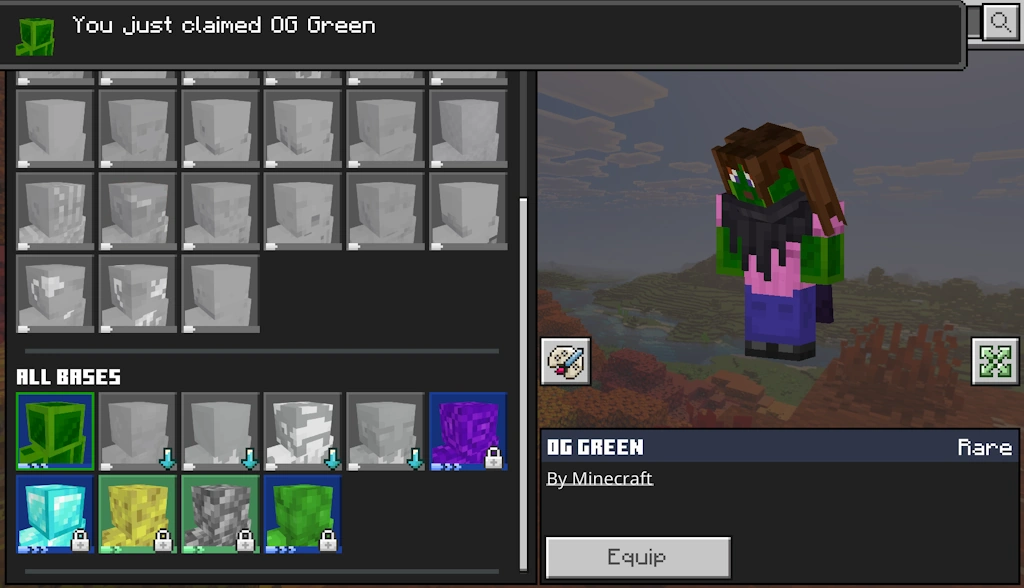 Available from November 10, 2026, at 10 AM PT to December 10, 2026, at 10 AM PT, the Minecraft OG Green Skin is a free full-body skin in the classic Xbox green color for Bedrock Edition players. To claim it, you need only a copy of Bedrock Edition and an internet connection.
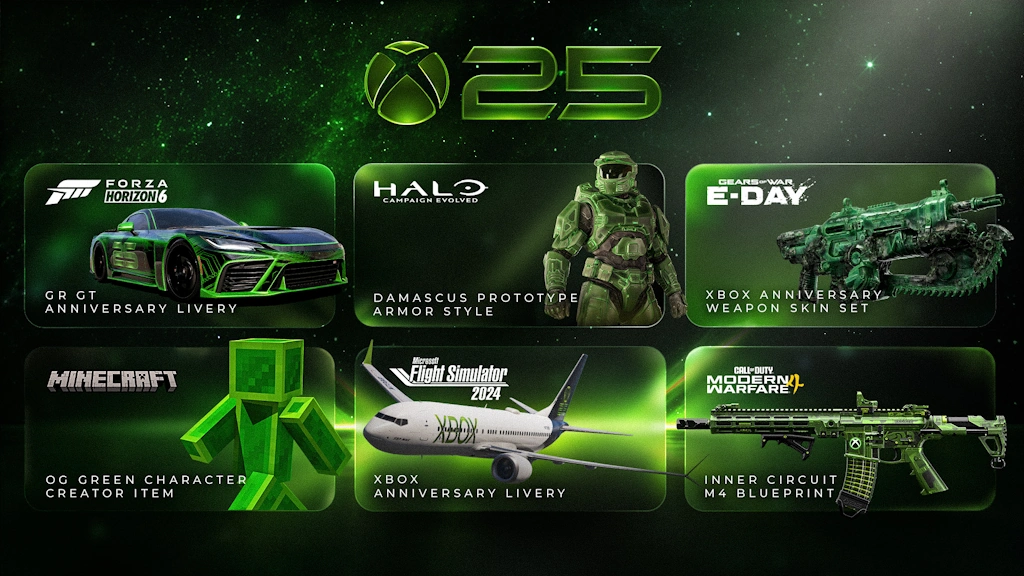 Alongside the OG Green Skin, Xbox players on console, PC, and mobile can claim the limited time Xbox 25th Anniversary badge for their profile. This reward only requires logging in for it to be automatically obtained. Other possible cosmetics include a weapons skin set for Gears of War E-Day, an anniversary GR GT livery for Forza Horizon 6, Halo Campaign Evolved prototype armor, Xbox livery for Flight Simulator 2024 planes, and an Xbox M4 skin in Call of Duty Modern Warfare 4. The dates and availability do, however, vary for each.
Finally, while it is not a cosmetic, Minecraft Bedrock Edition players can now take a look at their account statistics with Xbox Playback. It provides every detail from the first game on the account to the sometimes-frightening number of hours spent in each and every one, including Minecraft. If any of the numbers are too high, remember that “I forgot to close the game” is a valid excuse!
How to Get the Minecraft OG Green Skin
Available from November 10, 2026, at 10 AM PT to December 10, 2026, at 10 AM PT, the Minecraft OG Green Skin is a free full-body skin in the classic Xbox green color for Bedrock Edition players. To claim it, you need only a copy of Bedrock Edition and an internet connection.
- Launch Minecraft Bedrock Edition.
- Click or tap “Dressing Room”.
- Open the “Character Creator” tab.
- Expand the “Body” menu.
- Click or tap “Bases”.
- Under “All Bases” select OG Green.
- Click “Get”.
Other Xbox Anniversary Celebration Cosmetics
Alongside the OG Green Skin, Xbox players on console, PC, and mobile can claim the limited time Xbox 25th Anniversary badge for their profile. This reward only requires logging in for it to be automatically obtained. Other possible cosmetics include a weapons skin set for Gears of War E-Day, an anniversary GR GT livery for Forza Horizon 6, Halo Campaign Evolved prototype armor, Xbox livery for Flight Simulator 2024 planes, and an Xbox M4 skin in Call of Duty Modern Warfare 4. The dates and availability do, however, vary for each.
Finally, while it is not a cosmetic, Minecraft Bedrock Edition players can now take a look at their account statistics with Xbox Playback. It provides every detail from the first game on the account to the sometimes-frightening number of hours spent in each and every one, including Minecraft. If any of the numbers are too high, remember that “I forgot to close the game” is a valid excuse!Crea tu propio
servidor de Minecraft
servidor de Minecraft
¡Elige un plan, escoge un juego y juega con tus amigos!
Suscríbete a nuestro boletín
¡Suscríbete para recibir las últimas novedades sobre todo lo relacionado con videojuegos!

Únete a nuestro Discord
¡Forma parte de nuestra comunidad de más de 20 000 miembros con los mismos intereses!
¿Cómo calificarías este blog?
¡Comparte tu opinión y ayúdanos a mejorar aún más nuestros blogs!
No me gustó
Neutral
Me gustó

¿Necesitas un servidor de juegos?
Alquila un servidor de juego donde tú y tus amigos podáis jugar en privado con baja latencia y ajustes personalizados. Elige entre 110+ juegos, invita a gente de todo el mundo y disfruta de partidas privadas, o crea tu propia comunidad en línea con tus propias reglas.

Blogs relevantes







¡ENTÉRATE DE TODO!
Suscríbete a nuestro boletín para recibir las novedades sobre nuestros juegos alojados, noticias de la empresa y ofertas exclusivas. ¡Mantente al tanto de todo!













