

Hytale Update 4 Pre Release: Patch Notes, Proximity Voice, & More
Publicado el por

Compartir:

Compartir en X

Compartir en Facebook

Compartir en Threads

Compartir en Bluesky

Copiar al portapapeles

Compartir por correo electrónico
Another massive update is on the horizon, complete with proximity voice chat, an emote wheel, and many more features that are just as exciting! So, today, we explore the Hytale Update 4 pre release patch notes, the highlights it contains, and how you too can jump into the game.
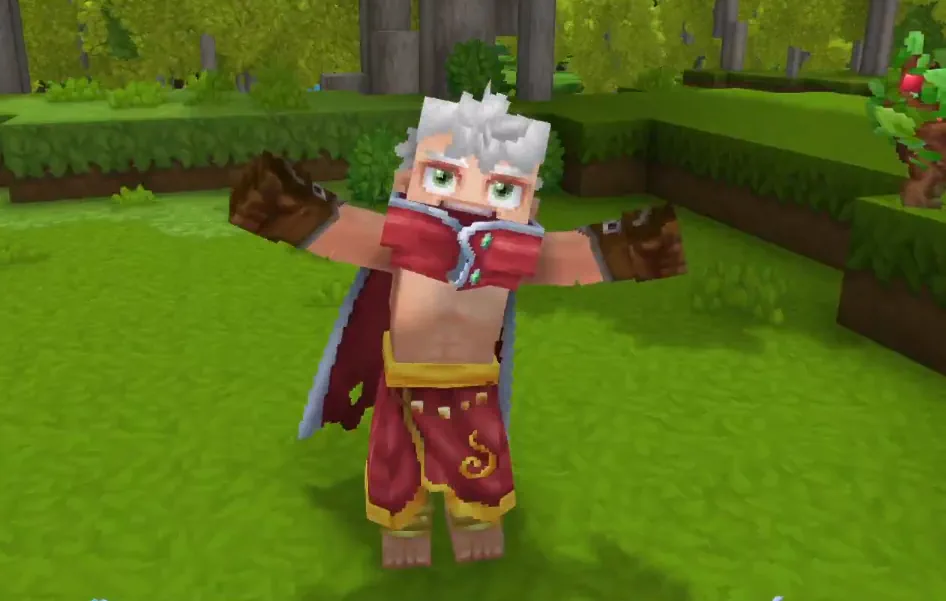 From the eeriness of a friend’s distant scream to a new encounter with a player never before seen, proximity voice chat enables countless immersive experiences perfect for both friends and content creation alike. One needs only enable it in the audio settings menu to give it a try! No mods required.
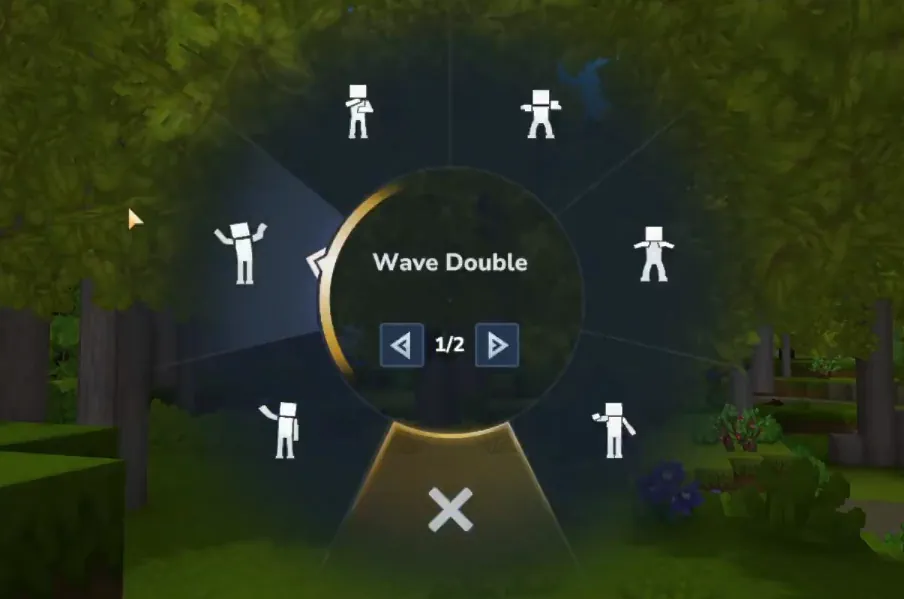 By holding down the “X” key in-game, players can now express themselves with a variety of default emotes. These include “Chicken”, “Kill”, “Laugh”, “Punch”, and “Tongue”, with many more on the way. Additionally, emotes can be created and shared by modders for players to expand what is available on their personal servers.
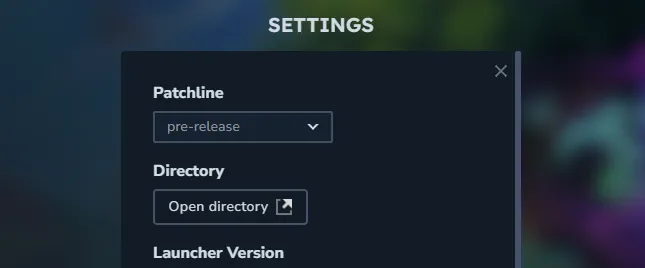 The Hytale Update 4 pre release can be installed from right inside the Hytale launcher, following the short few steps below. We highly recommend backing up any worlds you plan to use before proceeding, as corruption is always a possibility.
Update Highlights
Proximity Voice Chat
From the eeriness of a friend’s distant scream to a new encounter with a player never before seen, proximity voice chat enables countless immersive experiences perfect for both friends and content creation alike. One needs only enable it in the audio settings menu to give it a try! No mods required.
The Emote Wheel
By holding down the “X” key in-game, players can now express themselves with a variety of default emotes. These include “Chicken”, “Kill”, “Laugh”, “Punch”, and “Tongue”, with many more on the way. Additionally, emotes can be created and shared by modders for players to expand what is available on their personal servers.
Expanded Hairstyles
New- Afro
- Big Afro
- Frizzy Buns
- Long Dreadlocks
- Puffy Twin Dreads
- Dreads Fade
- Star Puffs
- Puffy Bubble Braids
- Afro Puffs
- Puffy Bun
How to Install Hytale Update 4 Pre Release
The Hytale Update 4 pre release can be installed from right inside the Hytale launcher, following the short few steps below. We highly recommend backing up any worlds you plan to use before proceeding, as corruption is always a possibility.
- Open the Hytale Launcher.
- Click the gear icon on the top left of the launcher.
- Open the dropdown menu under “Patchline”.
- Select “pre-release”.
- Close the settings.
- Click Install.
Hytale Update 4 Pre Release Patch Notes
Part 1
Headline Features
-Players may now have multiple instances of Hytale running simultaneously. To reduce the risk of save corruption, players are advised against opening the same world multiple times simultaneously. -The Mod Management UI has been updated and moved to its own section within the World Settings Screen. You can now view mod versions, icons, and other details. A warning icon is displayed when a mod targets a different game version. -Hosts can now specify a fallback server for when players disconnect unexpectedly. -Added a Backup management interface that will attempt to recover broken worlds.Avatar & Cosmetics
-One of the Basic Sandals cosmetics is now referred to as Leather Sandals. -Long Sleeved Tunic is now referred to as Cotton Tunic. -Puffy Ponytail is now referred to as Puffy Bun.Items & Equipment
-Fishing traps may now be placed closer to other blocks, in shallow water, and will now always display their placement preview. -The bow can no longer be drawn if you have no ammunition. -Hatchets, pickaxes, and shovels will now also lose durability if used on wood.World & Blocks
-The Lumberjack Lamp may now be placed facing different directions. -Blue Winter Seaweed now produces bubbles and the amount of oxygen it grants has been modified. -Decorative chains and brick beams can now support more decorative blocks hanging from them. -Windows and Cloth Roof blocks no longer require other blocks to support them. -Chandeliers can hang from more block types. -Dirt and Grass block variations now have a family assigned. -A template has been created for Soils.NPCs & Encounters
-Elemental Golems have had their animations and interactions updated. -Moose have been slowed down by 20%.Audio
-Audio emitters have been updated to allow users to better specify where sounds are played from. -Genesis has been returned to the game in Zone 4. -Traveling Band has been added to Zone 1 during the night.UI & Quality of Life
-You can now hold the Drop Item button and mouseover items in your inventory to drop stacks of items in Adventure Mode, or destroy them in Creative Mode. -Crafting Benches now display the rarity of items you can create. -Crafting Benches now display how many items are currently queued to be crafted. -Updated the charset to include the Latin Extended-A range. -Introduced a font fallback support cache. -Added additional translation support for map marker keys, the ui-gallery command window and backup frequency world settings. -Added additional translation support for the ui-gallery command window. -Updated the drag grip icon in the Creative Mode quick settings. -Added an option to the in-game reporting tool, granting permission to contact the user for more information. -Halved the bandwidth usage of the worldmap. -Cleaned up the input system.Modding & Tools
-Added a new debug flag, VisPath, enabling visualization of NPC pathing. -Updated the protocol, supporting formatted and translated messages being displayed upon being disconnected from a server. -Added support for config schema generation. Implemented high DPI for the asset editor. -Added undo group size quick settings for Builder Tools, allowing for easier undoing of larger edits. -Added support for prefabs to undo in scripted brushes. -Enhanced the material support for Builder Tools to now include holders, fillers, fluids and other storable types. -Players can now specify a default rotation angle and axis for Creative Brushes. -Scripted brushes can now rotate shapes using rotation angle, axis and origin of rotation. -Server exits due to ‘MOD_ERROR (code 9)’ will now provide an option to navigate directly to the new Mod Management UI screen. -Added an icon to clearly identify modded worlds. World Generation -Reconfigured the Oasis Portal Spawns to ensure players spawn within the oasis basin. -Updated the Oasis Biome to improve performance.Bug Fixes
Combat & Item Fixes -Fixed an edge case with NPCs getting stuck if they lost a jumping target under certain conditions. -Fixed some items, such as salt and tropical fences, dropping as something entirely different. -Tavern Planters now take multiple hits to break, and are broken faster with a hatchet. -Kebabs and Skewers will now be held properly in the hand. -Fixed a NullPointerException error that can occur with incorrectly configured gathering fields. World & Block Fixes -Stacked slabs should now consume and drop the correct number of items. -Fixed stalactites and rubble not belonging to the correct block sets. -Added some additional block set references to blocks that were missing them. -The T1 Furnace is now less transparent at certain angles. -Fixed an issue where portals could be invalidated by interacting with the device too quickly. -Fixed some incorrect references with the Rock_Shale_Cobble_Corner item. Creative Tool, Modding & Plugin Fixes -Fixed large previews rendering incorrectly with the Paste Tool. -Fixed the Machinima Tool’s ActiveKeyFrame being displayed when there was no active one. -Fixed entities not remaining frozen from the Entity Tool if the player leaves and rejoins the world. -The /importobj command once again allows singleplayer world owners to import any object from any path. -Fixed the /plugin reload command when a plugin has dependencies. UI & Display Fixes -Fixed various crashes that can occur if UI elements are missing. -Holding ENTER when opening the Chat no longer discards the next key pressed. -Fixed shutdown messages not being localized. -Magical Pigtails are no longer referred to as a Magical Ponytail. -Various typos have been removed. -Various incorrect translations have been rectified. Other Fixes -Fixed a crash that can occur when servers send null interface commands. -The Humanoid Detail Boxes have been updated to resolve a HitBox issue. -Added clamping to prevent fog from rendering inverted.Part 2
Headline Features
- Added an Emote Wheel! Express yourself in-game by holding down the ‘X’ key. This keybinding can be changed in the Settings menu. - Added a new Creative Tool: Revolve. This new tool allows you to paste rotations of your current selection any number of times or fully around a center point. - Overhauled the /replace command: - Moved swap and regex from flags into subcommands, allowing each variant to use arguments without conflicts - Added block mask support to the ‘from’ argument, enabling spatial mask syntax like >Block or !Block - Added additional validation. - Black and white wolves will now fight as a pack, periodically attempting to flank their prey and attempting to retreat when injured. - Implemented dual source blending with a center source to improve the audio experience with the Headphones (Stereo) setting. Positional audio should now feel less in one ear.Avatar & Cosmetics
- The player Avatar will now face the camera when using free camera or third person camera modes. - The player Avatar will now animate differently when falling from a great height. - Added the ‘Chicken’, ‘Kill’, ‘Laugh’, ‘Punch’ and ‘Tongue’ emotes. - Added the ability for some emotes to loop.Items & Equipment
- Numerous changes to how Watering Cans function: - They now use a Template parent and have configurable width and depth for area of effect watering - They can now be charged to water a 3x3 area - Their capacity has increased from 20 to 50 - They can be placed on the ground when crouching, returning empty Watering Cans if broken - They now water exclusively with the Secondary interaction key for consistency with the Hoe. - The Builder’s Workbench has had its crafting time reduced from 2 seconds to instant. - The Campfire, Crude Bedroll and Wooden Chest have had their crafting time reduced from 1 second to instant. - The Crude Torch has had its crafting time reduced from 0.5 seconds to instant. - ‘Seaweed - Middle’ is now referred to as ‘Stacked Seaweed’. - ‘Red Cobble Blocks’ are now referred to as ‘Red Sandstone Cobble Blocks’. - ‘White Cobble Blocks’ are now referred to as ‘White Sandstone Cobble Blocks’. - The previews for the ‘Crude Bed’, ‘Crude Repair Kit’ and ‘Iron Repair Kit’ have been updated. - The entity stat MagicCharges has been hidden from item tooltips.World & Blocks
- Improved handling of extreme coordinates. - Reworked item containers to block components, reducing lag and preventing issues with chests when unloading. - Workbenches will now continue processing items even if their chunks are unloaded. - Workbenches will now resume processing items if their full output slot is emptied. - Workbenches will now use the world game for their calculations instead of real time. - Workbench assets are now configured to have a BenchBlock component, rather than exist with a ‘crafting’ state.NPCs & Encounters
- Reduced the number of checks required to be performed whether an NPC was able to breathe. - Skrill can now lay eggs.Audio
- Recording and restoring memories now plays sound effects. - Zone 1 mountain ambience will now differ based on the player’s altitude. - Placeholder music and ambience has been added to Zone 4 caves and sewers.UI & Quality of Life
- Implemented support for CJK fonts. - Added localization support for the Machinima tool. - Personal, shared and player markers will now always be visible on the Map. - The backpack in the Player Inventory now shows how many item slots are currently being used. - Moved the Noesis UI folder from Game/ to Shared/ - Moved the Fonts/ folder into the Noesis UI project folder UI/Modding & Tools
- Error messaging has been added to the /copy command for when too many blocks are selected. - Added the ‘/pedit back’ command to quickly alternate to and from the prefab editor world. - Empty brush and tool edits no longer get registered to the tool history, or trigger notifications. - The deselect command will now be registered to the tool history. - Fluid changes now contribute towards the block count when saving Creative Tool edits to history. - The Laser Pointer tool may now be used to direct others’ attention towards the sky. - The Selection Tool will now allow you to select a region without holding down the left mouse button. - Updated the Selection Tool’s Rotation Gizmo to make rotating selections more intuitive. - Updated the size scaling and made it easier to select various Creative Tool Gizmos. - The ‘.mach speed’ command will now only target the active actor. - Added ‘Time of Day’ and ‘Weather’ to the Creative Mode Quick Settings menu that will adjust the environment for the client only. - Added a ‘Reset Environment’ button to the Creative Mode Quick Settings menu that resync’s the client and server’s environmental settings. - Added PlayerRemovedFromWorldEvent that allows plugin developers to create customisable, optional messages that can be broadcast when someone leaves the world. - Added ‘Spawn’ settings to the PortalType asset, including SpawnProviderOverride, allowing developers to specify where a return portal is placed. - Started work to move the server to use the JOML math library. - You can now use any unique substring of a command argument to access that command argument. For instance, if there are only the arguments ‘--cat’ and --dog’, ‘--at’ will return the former. - Players can now select which mods folder to create their asset pack in. - Added item HUD UI support, allowing for Custom UIs to be created for all items. - Significantly improved the performance of the Creative Tool’s previews. Accessibility - Implemented support for Windows ClickLock feature.Bug Fixes
Combat & Item Fixes - Wheat is no longer edible. - Stacked Seaweed can no longer be eaten to cause a missing interaction error. - Placed Cane Ornaments are no longer unbreakable. - Ammo is no longer consumed in Creative Mode. World & Block Fixes - All half blocks should now stack correctly and drop the correct number of items when broken. - Fixed Tamed Chickens not being recognised by Chicken Coops, they will now lay eggs in them just like their untamed counterparts. - Fixed a NPE that can occur when a Crafting Bench is broken whilst in use. - Mounts will no longer be able to sprint indefinitely in fluids. - NPCs will no longer follow items at an infinite range. - Gravel blocks made up of two vertical Gravel slabs will no longer unexpectedly break if adjacent blocks are broken. - Player avatars will now enter Minecarts instead of Minecarts teleporting under the player. - Fixed a bug where some encounters did not properly inherit the weather of surrounding areas. - Chunks will now correctly generate cave networks within Zone 4. - Lava will now correctly burn entities as entity effects no longer incorrectly overwrite themselves. - Portal devices will now refund fragments if the portal worlds fail to generate. - Decayed tilled soil will now update correctly once it has fully decayed. Creative Tool, Modding & Plugin Fixes - Fixed a crash that could occur when attempting to use Creative Tools with invalid or missing data. - Fixed a bug causing players to die in the Crossroads if the player exited out of the prefab editor. - Fixed a bug with the prefab editor menus causing players to sometimes be teleported to the wrong location. - Fixed a bug causing prefab anchors to incorrectly despawn. - Players can no longer find themselves rotated and translated with the Selection Tool. - Fixed interpolation issues with the Brush tool on the axis plane. - The Selection Tool’s selection box will now remain stationary when rotating its contents. - The Selection Tool’s Rotation Gizmo position will now correctly reset to center after undoing an action. - Fixed a bug where incorrect blocks would appear when rotating or translating fluids. - Fixed a bug with Single Player worlds and image importing permissions. - Fixed a bug preventing the .mach speed command from applying to the whole scene. - Fixed a bug preventing NPC scaling with the Entity Tool. UI & Display Fixes - Fixed a crash that could occur with nameless map markers. - Fixed a crash that can occur with Entity UI elements. - The Player Backpack is now hidden in Creative Mode. - Fixed various issues with localized text extending outside of the default UI. - Fixed plural localization for mod and asset packs that failed to load or are outdated. - Fixed map markers sometimes not appearing on the compass. - Cleared first person animations when mounting NPCs. - Fixed an issue where certain inputs could result in item stacks being dropped from the inventory rather than single items. - Fixed an issue with the Utility item wheel being offset when dragging and dropping stacks within the wheel. - Fixed an issue where player marker toggle settings didn’t persist across sessions.Part 3
Headline Features
- Proximity Voice Chat is here! You can now communicate with others via spatial, distance-attenuated voice in the game worlds! - Voice Chat is disabled by default. You may enable it from the Audio Settings menu. - New console commands for client and server can be found for Proximity Voice Chat at .voice and /voice respectively. - Modify your audio preferences, including input device, input level, noise suppression, and input mode. If you prefer using Push to Talk, you can also bind your preferred hotkey. - The farther you are from others, the more distant they'll sound, and these settings can be configured by a server op. - Players communicating within range of you will be displayed, along with how they currently appear. Talking will also animate your Avatar! - Players who find themselves submerged or in reverberant locations might notice that they sound a little different.Avatar & Cosmetics
- Added 7 new Hairstyles: - Afro, Big Afro, Frizzy Buns, Long Dreadlocks, Puffy Twin Dreads, Dreads Fade, and Star Puffs - Updated 3 Hairstyles: - Puffy Bubble Braids, Afro Puffs, and Puffy BunItems & Equipment
- A new Decorative_Potion_Template has been added. Blue, Green, Iridescent, Pink, Purple, and Orange Potions are now Decorative Potion items. - All consumable potions now use the Potion_Template and have item Quality levels. - Normal and Large potions have updated models. - Iridescent potions have updated textures. - The crafting requirements for Health, Stamina, and Energy potions have been reworked. - Health Potions: - Lesser Health Potions now restore 15% health instantly and another 15% after 5 seconds for 30% total restored. They have a stack size of 5. - Small Health Potions now restore 15% health instantly and another 30% after 5 seconds for 45% total restored. They have a stack size of 10. - Health Potions now restore 25% health instantly and another 35% after 5 seconds for 60% total restored. They have a stack size of 5. - Greater Health Potions now restore 25% health instantly and another 50% after 5 seconds for 75% total restored. They have a stack size of 10. - Large Health Potions now restore 35% health instantly and another 55% after 5 seconds for 90% total restored. They have a stack size of 1. - Stamina Potions: - All Stamina Potions are consumed faster to account for default stamina regeneration. - Lesser Stamina Potions now restore 30% stamina instantly and have a stack size of 5. - Small Stamina Potions now restore 45% stamina instantly and have a stack size of 10. - Stamina Potions now restore 60% stamina instantly and have a stack size of 5. - Greater Stamina Potions now restore 75% stamina instantly and have a stack size of 10. - Large Stamina Potions now restore 90% stamina instantly and have a stack size of 1. - Energy Potions: - Lesser Energy Potions now generate 30% signature energy over 30 seconds and have a stack size of 5. - Small Energy Potions now generate 45% signature energy over 30 seconds and have a stack size of 10. - Energy Potions now generate 60% signature energy over 30 seconds and have a stack size of 5. - Greater Energy Potions now generate 75% signature energy over 30 seconds and have a stack size of 10. - Large Energy Potions now generate 90% signature energy over 30 seconds and have a stack size of 1. - Added Copper and Iron Sickles, craftable at the Farming Workbench. - Sickles may now be swung repeatedly by holding down the input. - Added Pink Crystal Shards, dropped from Pink Crystals. - Added the Crystal Shard resource type, and parented all other Crystal Shard colours to Ingredient_Crystal_White. - Gold Ingots can now be converted to Gold Bricks using the Builder's Workbench. - Empty Small and Large Potion Bottles can now be crafted at the Alchemy Bench. - Blood, Storm and Azure crop seeds are now crafted at the Alchemy Bench and have had their crafting requirements changed. - Crystal Fertilizer has been added which is a requirement for Blood, Storm and Azure crops. - Blood Leaf, Storm Sapling and Azure Kelp now each have unique requirements to grow. - Blood, Storm and Azure plants no longer drop seed recipes as they are no longer required. - Blood, Storm and Azure plants can be salvaged at the Salvager's Workbench to produce their respective petals.World & Blocks
- Removed Tiers 9 and 10 from the Farming Bench. - Added Tiers 3, 4 and 5 to the Alchemy Bench. - Updated the Zone1 Plains biome weather patterns. Fireflies will now appear more regularly. - Overhauled world-gen's Prop system, adding new modular features and deprecating monolithic ones.Entities & Encounters
- Defeated NPCs will now trigger death particles and drop items when their body disappears. - Temple Golems now each drop their respective gem type. - Earth Crystal Golems drop Emeralds. - Flame Crystal Golems drop Rubies. - Frost Crystal Golems drop Sapphires. - Sand Crystal Golems drop Zephyrs. - Thunder Crystal Golems drop Topazes. - Implemented conditional entity effect systems. This enables entity effects to be configured enabling them to be conditionally applied or removed. - Implemented a non-scaled switch response curve for the Combat Action Evaluator. This will enable the returning of an initial state value before a defined switch point and a final state value upon reaching it.Audio
- Added block sound clustering so that looping ambient sounds can be applied to large bodies, such as raindrops on water. - Added conditional ambient sounds so that ambient sounds can be applied to blocks during certain conditions, such as raindrops on windows.UI & Quality of Life
- Introduced two configurable world map radius limits: per-world and server-wide. - Added the ability to configure a per-world override on minimap radius. - Added the ability to configure a server-wide clamp on minimap radius. - Gatherable items now result in a 'Pick' interaction hint. - Doors, fences and trapdoors now result in an 'Open' interaction hint. - The mouse wheel can now be used to navigate through the emote pages. - Items used for Creative Tooling may now be marked as 'Technical'. - Added the 'Tools' category for bug reports and feedback. - Updated the localization that takes place upon disconnecting to cover more cases. - Cleaned up localization code.Modding & Tools
- Added an Asset Pack Save Browser that lets users select or create asset packs to save prefabs into. This replaces the previous behaviour of always saving to the server's default prefabs directory. - Merged the Anchor Tool into the Prefab Selector Tool. You may now set an anchor with SHIFT+R. - Added a hotkey to travel between the Prefab Editor World and the last world visited. By default, this is ALT+T. - Improved the Paste Tool preview performance. - Tints now support blending and varying opacities - Changes made with tints are saved to the tool's history. - Updated the NodeEditor to Noesis 3.2.1 - Added the /npc descriptors command, which generates an NPC descriptors file. - NPC templates have had the following adjustments: - They now have the following parameters visible: DeathParticles, DropDeathItemsInstantly and DeathAnimationTime - Action elements can now be selectively disabled with the Enabled flag. - The Beacon action's Range field can now be computed from template variables.Bug Fixes
Combat, NPCs, & Item Fixes - Fixed a crash that could occur when a referenced entity effect was missing or had an invalid network index. - Tilling with hoes will now be prioritised over blocking if both a hoe and shield are equipped. - Updated farming tools to require specific items to build rather than specific resource types. - Watering cans should no longer skip valid blocks when watering. - Crude shovels now correctly reference Stone Rubble in their recipe. - Feedbags and Fertilizer are now categorized as Tools rather than Potions. - Updated the descriptions for Petal items. - Updated the descriptions for Rubble items to use the parent description only. - Burnt Praetorian Skeletons should now better adhere to gravity when using their charge attacks. - Mount movement settings should no longer linger if the mount is killed by a teleporter. - Spawn particles should now be fixed for NPCs. World & Block Fixes - Updated the River & Tile worldmap density to allow multiple biomes to be spawned. This should result in redwood biomes appearing within taiga portal worlds. - Floating torches may no longer be placed on the north side of Stone Pillars. - Furnaces should no longer attempt to process items when disabled. - Fixed an issue with Salvage Benches not processing items correctly. - Fixed BaseHeight positions not working with Offset Positions - Crops that are growing in the sunlight will no longer benefit from additional nearby artificial lights. Creative Tool, Modding, & Plugin Fixes - Fixed a crash when adding a number in the timeline editor. - Fixed a crash that occurred when selecting nodes on the Node Editor. - Fixed a number of stability issues relating to Undo/Redo with the Node Editor. - Fixed an issue preventing models being displayed within the Asset Previewer if the texture was too small. - Fixed an issue preventing 1x1x1 selections with the Selection Tool. UI & Display Fixes - Fixed a crash when swapping cameras during world transitions. - Fixed an issue where holding down the 'Invert camera' key and changing between items on the hotbar could cause the camera to reposition rapidly. - Map markers now take into account map scaling when determining if they are being hovered over. - Updated some emote names to better reflect the animations played. - Fixed various issues related to localization.Crea tu propio
servidor de Hytale
servidor de Hytale
¡Elige un plan, escoge un juego y juega con tus amigos!
Suscríbete a nuestro boletín
¡Suscríbete para recibir las últimas novedades sobre todo lo relacionado con videojuegos!

Únete a nuestro Discord
¡Forma parte de nuestra comunidad de más de 20 000 miembros con los mismos intereses!
¿Cómo calificarías este blog?
¡Comparte tu opinión y ayúdanos a mejorar aún más nuestros blogs!
No me gustó
Neutral
Me gustó

¿Necesitas un servidor de juegos?
Alquila un servidor de juego donde tú y tus amigos podáis jugar en privado con baja latencia y ajustes personalizados. Elige entre 110+ juegos, invita a gente de todo el mundo y disfruta de partidas privadas, o crea tu propia comunidad en línea con tus propias reglas.

Blogs relevantes







¡ENTÉRATE DE TODO!
Suscríbete a nuestro boletín para recibir las novedades sobre nuestros juegos alojados, noticias de la empresa y ofertas exclusivas. ¡Mantente al tanto de todo!













