
7 Days to Die Combine Station Guide: Overview, How to Use, & More
Veröffentlicht am von

Teilen:

Auf X teilen

Auf Facebook teilen

Auf Threads teilen

Auf Bluesky teilen

In die Zwischenablage kopieren

Per E-Mail teilen
The zombie apocalypse in Navezgone got even more interesting with the 7 Days to Die 3.0 update (also known as the Dead Hot Summer Update). In particular, developer The Fun Pimps introduced a game-changing workstation called the Combine Station, allowing players to merge the stats of similar items to optimize their combat and survival capabilities. Here we'll cover how to use the Combine Station and how to get the most out of it in the 3.0 update!
 Note: Image courtesy of Capp00.
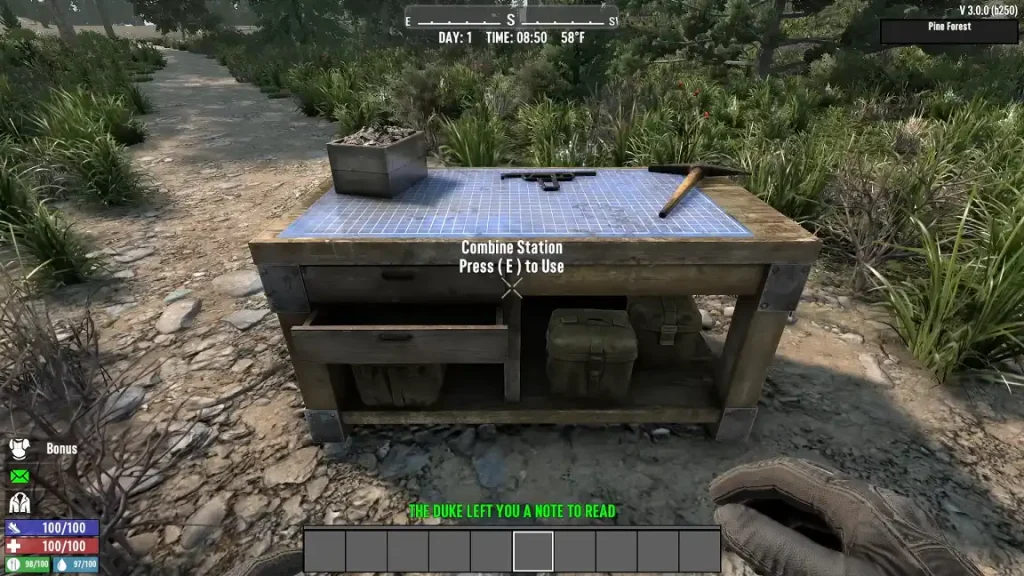
As mentioned earlier, the Combine Station is a new workstation introduced in the 7 Days to Die V3.0 Dead Hot Summer Update. Players in the Experimental Branch can take advantage of this functional structure since June 15. Its primary purpose is to allow survivors to combine the attributes of similar items, such as two shotguns, increasing their power. Doing so allows survivors to potentially min-max their equipment for optimum survivability.
Arguably, the Combine Station is the ultimate upgrade bench. Before this update, a player finding a Tier 6 weapon could see the item as the tool to use in the endgame. Now, this workstation can be the definitive starting point to endgame equipment. It also serves as an alternative repair method, promoting better control of gear maintenance.
Note: Image courtesy of Capp00.
As mentioned earlier, the Combine Station is a new workstation introduced in the 7 Days to Die V3.0 Dead Hot Summer Update. Players in the Experimental Branch can take advantage of this functional structure since June 15. Its primary purpose is to allow survivors to combine the attributes of similar items, such as two shotguns, increasing their power. Doing so allows survivors to potentially min-max their equipment for optimum survivability.
Arguably, the Combine Station is the ultimate upgrade bench. Before this update, a player finding a Tier 6 weapon could see the item as the tool to use in the endgame. Now, this workstation can be the definitive starting point to endgame equipment. It also serves as an alternative repair method, promoting better control of gear maintenance.
What is the Combine Station in 7 Days to Die?
Note: Image courtesy of Capp00.
As mentioned earlier, the Combine Station is a new workstation introduced in the 7 Days to Die V3.0 Dead Hot Summer Update. Players in the Experimental Branch can take advantage of this functional structure since June 15. Its primary purpose is to allow survivors to combine the attributes of similar items, such as two shotguns, increasing their power. Doing so allows survivors to potentially min-max their equipment for optimum survivability.
Arguably, the Combine Station is the ultimate upgrade bench. Before this update, a player finding a Tier 6 weapon could see the item as the tool to use in the endgame. Now, this workstation can be the definitive starting point to endgame equipment. It also serves as an alternative repair method, promoting better control of gear maintenance.
How to Use the Combine Station in 7 Days to Die
At first glance, using the Combine Station is a fairly straightforward endeavor. However, it requires some strategic thinking to maximize the output. For example, place two or more of the same item type into the Combine Station, such as two pickaxes. Confirming the operation merges the attributes of the tools, transferring the highest percentage stats to the final combined item regardless of quality. That way, combining a Quality 1 item with a boosted stat with a Quality 6 variant yields a Quality 6 tool with a higher base stat. With that, players can find boosted stats in loot as of the 3.0 Update. Known as the Magnitude System, these enhanced attributes are marked by an orange star. For example, a pickaxe may have increased block damage, or a shotgun might possess extended range. Some traders may also sell Magnitude-enhanced equipment for serious survivors. Aside from enhancing items, the Combine Station also serves as an alternate repair station. Interact with the workstation to use its repair and degradation settings. Here, players can choose from different options: no repair, repair kits only, combine-only repair, or a hybrid of both. It’s also possible to set permanent repair degradation to between 5% and 25% of the item’s maximum durability per operation (with the first instance being free).Erstelle deinen eigenen
7 Days to Die-Server
7 Days to Die-Server
Wähle einen Tarif, such dir ein Spiel aus und spiele mit deinen Freunden!
Abonniere unseren Newsletter
Abonniere für die neuesten Updates rund ums Gaming!

Tritt unserem Discord bei
Werde Teil unserer Community von über 20.000 gleichgesinnten Mitgliedern!
Wie würdest du diesen Blog bewerten?
Teile deine Meinung und hilf uns, unsere Blogs noch besser zu machen!
Hat mir nicht gefallen
Neutral
Hat mir gefallen

Brauchst du einen Spielserver?
Miete einen Spielserver, auf dem du und deine Freunde privat mit niedriger Latenz und benutzerdefinierten Einstellungen spielen könnt. Wähle aus 110+ Spielen, lade Leute aus der ganzen Welt ein und genieße private Matches oder baue deine eigene Online-Community mit deinen eigenen Regeln auf.

Relevante Blogs







HOL DIR DIE INSIDER-INFOS!
Melde dich für unsere E-Mails an, um Updates zu unseren gehosteten Spielen, Unternehmensnachrichten und exklusiven Angeboten zu erhalten. Bleib auf dem Laufenden!













