

Minecraft 1.20 Snapshot 23W18A Patch Notes & How to Install
发布于 ,作者

分享:

分享至 X

分享至 Facebook

分享至 Threads

分享至 Bluesky

复制到剪贴板

通过电子邮件分享
While many Minecraft players are looking forward to the upcoming 1.20 update and the cute mobs it brings, there's an opportunity to test some of this new content courtesy of the Minecraft 23W18A snapshot update. This snapshot takes aim at an 11-year-old bug and makes some other welcome adjustments along with it!
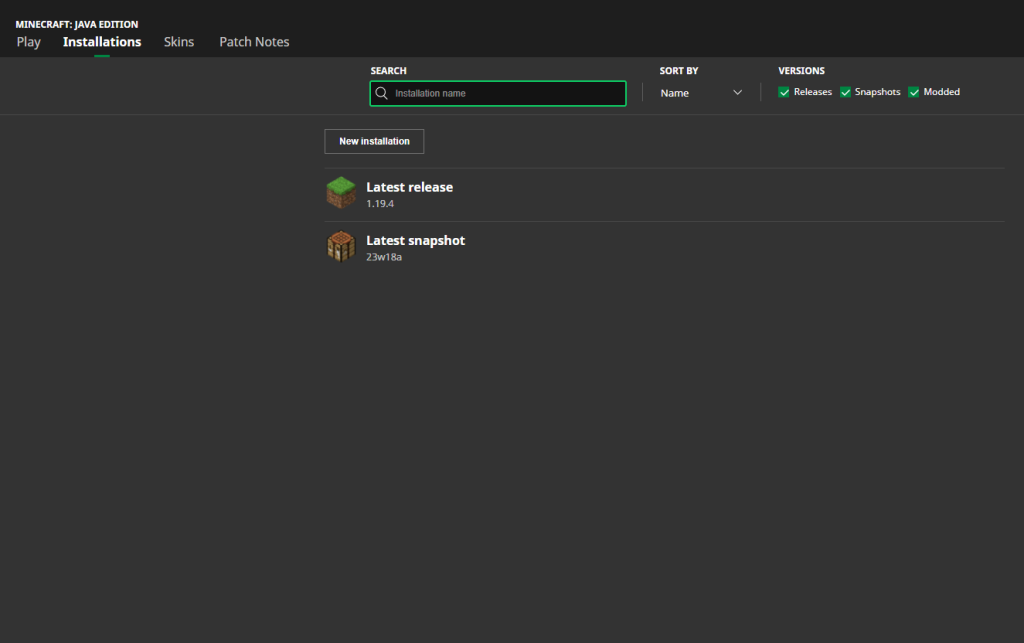 Start installing the Minecraft 1.20 Snapshot 23W18A patch by launching the Minecraft Launcher on your system. Then, navigate to the “Installation” tab and click “New Installation.” Next, select “Latest Snapshot,” which should reveal the 23W18A option.
Note that installing a Minecraft 1.20 snapshot has extra steps. You must enter the game, then click “Create New World.” Then, select “Datapacks” before enabling the built-in “bundle” and choosing “update_1_20” datapacks.
The last step is to click “Create New World” again. If successful, you should be able to enjoy the new features and changes in the Snapshot 23W18A.
Start installing the Minecraft 1.20 Snapshot 23W18A patch by launching the Minecraft Launcher on your system. Then, navigate to the “Installation” tab and click “New Installation.” Next, select “Latest Snapshot,” which should reveal the 23W18A option.
Note that installing a Minecraft 1.20 snapshot has extra steps. You must enter the game, then click “Create New World.” Then, select “Datapacks” before enabling the built-in “bundle” and choosing “update_1_20” datapacks.
The last step is to click “Create New World” again. If successful, you should be able to enjoy the new features and changes in the Snapshot 23W18A.
 Called the Trails and Tales update, Minecraft 1.20 brings a plethora of new content to the game. Here are some of the biggest things it brings to the table:

Minecraft 1.20 Snapshot Update 23W18A Patch Notes
https://twitter.com/slicedlime/status/1653753957104209922Like other snapshots, 23W18A brings various adjustments, bug fixes, and new features to Minecraft. Continue reading as we highlight the details of this update below!
The Power of Books
- Read power signals from Chiseled Bookshelves using Comparators.
Step Sounds
- Walking on a block will now always play a step sound
Additional Changes
- Smithing table no longer needs a template slot before placing an item stack into other slots
- Redstone Blocks now have the Jukebox
How To Install Minecraft Snapshot 23W18A
Start installing the Minecraft 1.20 Snapshot 23W18A patch by launching the Minecraft Launcher on your system. Then, navigate to the “Installation” tab and click “New Installation.” Next, select “Latest Snapshot,” which should reveal the 23W18A option.
Note that installing a Minecraft 1.20 snapshot has extra steps. You must enter the game, then click “Create New World.” Then, select “Datapacks” before enabling the built-in “bundle” and choosing “update_1_20” datapacks.
The last step is to click “Create New World” again. If successful, you should be able to enjoy the new features and changes in the Snapshot 23W18A.
What to Expect In the Minecraft 1.20 Update
Called the Trails and Tales update, Minecraft 1.20 brings a plethora of new content to the game. Here are some of the biggest things it brings to the table:
New Cherry Blossom Biome
This massive update brings a new Cherry Blossom biome, which is also a long-requested area by many fans. The biome also brings a new wood type, along with different crafting recipes. Although it doesn’t have new mobs, bees, sheep, pigs, and other creatures call this place home.Archaeology
Announced during Minecraft Live 2020, Archaeology is finally arriving in Minecraft as part of the 1.20 update. It brings various archeological dig sites but is only available around desert temples for now.New Mobs
Speaking of the desert, players will soon see camels as new mobs in the 1.20 update. You can also ride these animals, as well as the Sniffer.Chiseled Bookshelves
The Chiseled Bookshelf has been in different Minecraft snapshots, but it’ll officially arrive in update 1.20. It’s an interactive block that looks like a bookshelf. Players can use this opportunity to make hidden passages or make the block into a storage space for their enchanted books.Hanging Signs
Tired of the old look of the in-game sign? In 1.20, you’ll soon be able to hang them on different surfaces. Creative players can also customize their placed signs, decorating different structures like shops and streets.
您对这篇博客有何评价?
分享您的看法,帮助我们将博客做得更好!
不喜欢
一般
喜欢

需要游戏服务器吗?
租用一台游戏服务器,您可以和朋友们在极低延迟和自定义设置下私密游玩。从 110+ 款游戏中挑选您的最爱,邀请全球玩家,享受私密对战,或者按照您自己的规则建立属于您的在线社区。








获取第一手独家资讯!
订阅我们的电子邮件,获取有关我们托管游戏、公司新闻和独家优惠的最新动态。随时掌握一手资讯!













