

Minecraft 1.20 Snapshot 23W04A: How to Try Out Armor Trims
Pubblicato il da

Condividi:

Condividi su X

Condividi su Facebook

Condividi su Threads

Condividi su Bluesky

Copia negli Appunti

Condividi via email
Another drop of 1.20 content has gone live! This time an update to smithing tables, netherite, and armor customization that will bring player individuality to an all time high! So, without further ado, let us jump into all the new features and our step-by-step guide on how to give snapshot 23W04A a try!
 In Java Edition, installing Minecraft 1.20 Snapshot 23W04A is done right from the Minecraft client. Players need only open up the Minecraft Launcher and enable snapshots in the ‘Installations’ tab. From there, click “New Installation,” select “Latest Snapshot” in the drop-down menu, and click create. Your new Minecraft 1.20 snapshot installation will now be a selectable option before clicking play.
However, Minecraft 1.20 snapshots have a few extra steps. Once in the game, click “Create New World,” then select “Datapacks,” and enable the built-in “bundle” and “update_1_20” datapacks before clicking “Create New World” again. Finally, with the new world made, all that’s left is to select it and click play!
Please note snapshots and pre-releases can corrupt worlds! Ensure backups have been taken.
In Java Edition, installing Minecraft 1.20 Snapshot 23W04A is done right from the Minecraft client. Players need only open up the Minecraft Launcher and enable snapshots in the ‘Installations’ tab. From there, click “New Installation,” select “Latest Snapshot” in the drop-down menu, and click create. Your new Minecraft 1.20 snapshot installation will now be a selectable option before clicking play.
However, Minecraft 1.20 snapshots have a few extra steps. Once in the game, click “Create New World,” then select “Datapacks,” and enable the built-in “bundle” and “update_1_20” datapacks before clicking “Create New World” again. Finally, with the new world made, all that’s left is to select it and click play!
Please note snapshots and pre-releases can corrupt worlds! Ensure backups have been taken.
 Interested in finding the new smithing templates with friends? Snapshot servers can be created for free through home hosting, but we recommend paid hosting options for ease of use and performance. Especially with snapshots since they can be buggy!
Paid hosting is offered here at BisectHosting and many other places around the web. In either case, no less than 4GB of server RAM is recommended.
Interested in finding the new smithing templates with friends? Snapshot servers can be created for free through home hosting, but we recommend paid hosting options for ease of use and performance. Especially with snapshots since they can be buggy!
Paid hosting is offered here at BisectHosting and many other places around the web. In either case, no less than 4GB of server RAM is recommended.
Details and Adjustments
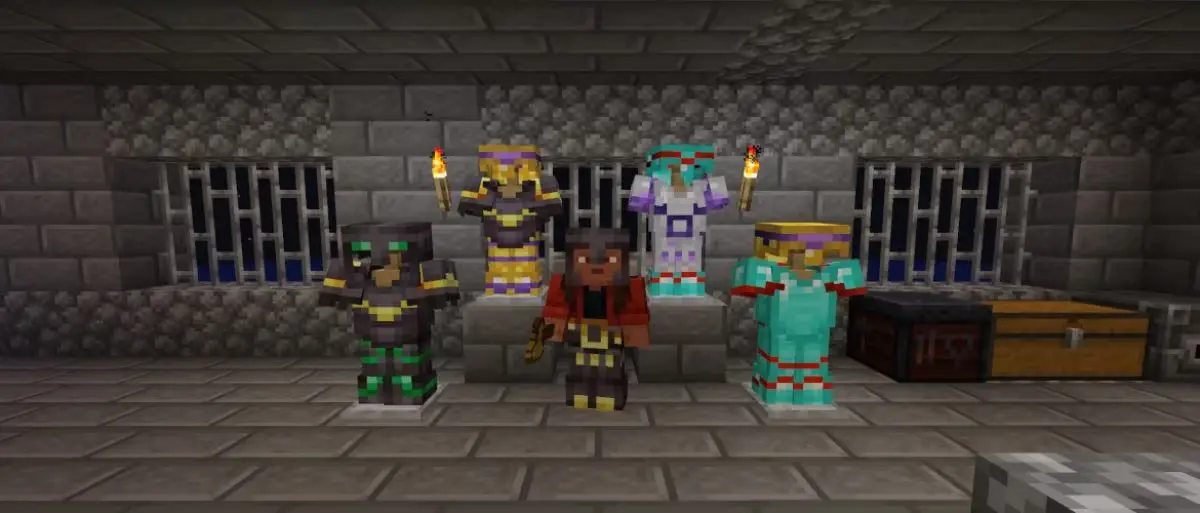
https://twitter.com/kingbdogz/status/1617915575896018946Alongside all the features shown during Minecraft live and those added in snapshot 22W46A, snapshot 23W04A includes updated smithing tables, netherite armor progression changes, and armor customization that will take players on a journey across the world. More details on each are found below!
New Items
- Pillager Outpost – Sentry Armor Trim Template
- Desert Pyramid – Dune Armor Trim Template
- Shipwreck – Coast Armor Trim Template
- Jungle Temple – Wild Armor Trim Template
- Ocean Monument – Tide Armor Trim Template
- Ancient City – Ward Armor Trim Template
- Woodland Mansion – Vex Armor Trim Template
- Nether Fortress – Rib Armor Trim Template
- Bastion Remnant – Snout Armor Trim Template
- Bastion Remnant – Netherite Upgrade Template
- Stronghold – Eye Armor Trim Template
- End City – Spire Armor Trim Template
New Features
- Smithing Table Rework
Gameplay Adjustments
- Netherite Armor Crafting
- Armor Stand Name Preservation
How to Install Minecraft 1.20 Snapshot 23W04A
In Java Edition, installing Minecraft 1.20 Snapshot 23W04A is done right from the Minecraft client. Players need only open up the Minecraft Launcher and enable snapshots in the ‘Installations’ tab. From there, click “New Installation,” select “Latest Snapshot” in the drop-down menu, and click create. Your new Minecraft 1.20 snapshot installation will now be a selectable option before clicking play.
However, Minecraft 1.20 snapshots have a few extra steps. Once in the game, click “Create New World,” then select “Datapacks,” and enable the built-in “bundle” and “update_1_20” datapacks before clicking “Create New World” again. Finally, with the new world made, all that’s left is to select it and click play!
Please note snapshots and pre-releases can corrupt worlds! Ensure backups have been taken.
How to make Minecraft 1.20 Snapshot 22W46A Servers
Interested in finding the new smithing templates with friends? Snapshot servers can be created for free through home hosting, but we recommend paid hosting options for ease of use and performance. Especially with snapshots since they can be buggy!
Paid hosting is offered here at BisectHosting and many other places around the web. In either case, no less than 4GB of server RAM is recommended.
Minecraft 1.20 Snapshot 23W04A: How to Try Out Armor Trims
Another Minecraft 1.20 feature-filled snapshot has come our way! What you’re your thoughts on the trimming options included with this update? From what we have found online, the reception for expanded customization has been an astounding “yay!” Until Next Time, BisectHosting =)Crea il tuo server
Minecraft
Minecraft
Scegli un piano, seleziona un gioco e gioca con i tuoi amici!
Iscriviti alla nostra Newsletter
Iscriviti per ricevere gli ultimi aggiornamenti sul mondo del gaming!

Unisciti al nostro Discord
Entra a far parte della nostra community con oltre 20.000 membri appassionati come te!
Come valuteresti questo blog?
Condividi la tua opinione e aiutaci a migliorare sempre di più i nostri blog!
Non mi è piaciuto
Neutrale
Mi è piaciuto

Hai bisogno di un server di gioco?
Noleggia un server di gioco dove tu e i tuoi amici potrete giocare in privato con bassa latenza e impostazioni personalizzate. Scegli tra 110+ giochi, invita persone da tutto il mondo, goditi le partite private o costruisci la tua community online con le tue regole.

Blog Pertinenti







SCOPRI LE ULTIME NOVITÀ!
Iscriviti alla nostra newsletter per ricevere aggiornamenti sui nostri giochi ospitati, novità aziendali e offerte esclusive. Rimani sempre aggiornato!













