

Minecraft 1.20 Snapshot Update 23W12A Patch Notes & How to Download
Publié le par

Partager :

Partager sur X

Partager sur Facebook

Partager sur Threads

Partager sur Bluesky

Copier dans le presse-papiers

Partager par e-mail
It’s time for another Minecraft 1.20 snapshot update! This time, players enjoy a host of new features introduced in the 23W12A snapshot, including a new archaeology site, vibration resonance in amethyst blocks, and more. With that, here's all the new features for Minecraft 1.20 you can try today.
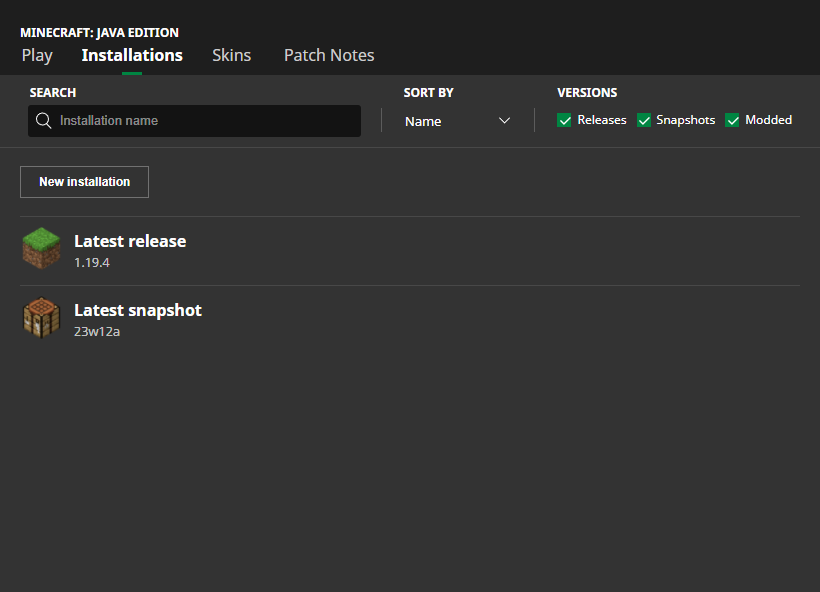 Interested in trying out the new features in Minecraft Snapshot 23W12A? You can install this update right from the Minecraft client.
Start by opening the Minecraft Launcher. Then, go to the “Installations” tab and enable snapshots from there.
Next, click “New Installation,” then select “Latest Snapshot” from the dropdown menu. Click the Create button, and you should see the 23W12A snapshot as part of the selectable options.
But be wary; testing new versions may corrupt a Minecraft world, so players should create a backup of their worlds in another folder in their system before running the snapshot installation.
Have fun playing around with the new features with one of our dedicated Minecraft servers here!
Interested in trying out the new features in Minecraft Snapshot 23W12A? You can install this update right from the Minecraft client.
Start by opening the Minecraft Launcher. Then, go to the “Installations” tab and enable snapshots from there.
Next, click “New Installation,” then select “Latest Snapshot” from the dropdown menu. Click the Create button, and you should see the 23W12A snapshot as part of the selectable options.
But be wary; testing new versions may corrupt a Minecraft world, so players should create a backup of their worlds in another folder in their system before running the snapshot installation.
Have fun playing around with the new features with one of our dedicated Minecraft servers here!
New Features in Minecraft 1.20 Snapshot Update 23W12A
https://twitter.com/Minecraft/status/1638574492787298306The 23W12A expands upon the experimental features and changes that the devs brought to the game from update 1.20. Details for each of the following parts of this snapshot are found below! DON'T MISS IT: What’s New in Minecraft 1.19.4?
Vibration Resonance
Amethyst blocks now have this feature. These items will vibrate and re-emit the frequency of the Sculk Sensors next to them. Doing so will allow players to recreate the vibration over long distances without remaking the vibration.Calibrated Sculk Sensors
Minecraft players can now make this new variant of Sculk Sensors by combining 1 x Sculk Sensor and 3 x Amethyst Shard at the Crafting Table. It’s also important to mention that the Calibrated Sculk Sensor can’t be found naturally. These upgraded Sculk Sensors allow players to filter vibrations based on frequency level. Take note that the side with the redstone signal will only receive the signal. That same side will also be the only sensor part that will generate the vibration frequency.Archaeology
The devs of Minecraft added the Trail Ruins archaeological site to the game. The official patch notes noted that this area is a “buried structure from a lost culture.” Players can also find four Armor trims in this location. Additionally, players can now find and gather the following items:- Suspicious Gravel block
- Suspicious Sand
- Four new Pottery Shards
New Armor Trims
Tired of how your Minecraft character’s armor looks? In this Minecraft 23W12A snapshot, the devs added five new Armor Trims to the game. These are:- Host Armor Trim
- Raiser Armor Trim
- Shaper Armor Trim
- Wayfinder Armor Trim
- Silence Armor Trim
Customization Options For Signs
Before, Minecraft players couldn’t edit their signs once they place them in the world. That changed with the 23W12A update. Now, players can interact with the placed sign and edit it even while it’s already in the world. Also, both sides of the sign can be edited, allowing for unique text, colors, and designs. Players can also make the sign’s look permanent by waxing it with Honeycomb.Sniffer Egg
Do you want to grow your Sniffer farm in Minecraft? Now, you can! Players can now let two Sniffers breed to produce an egg. The Sniffer Egg will hatch in about 10 minutes after being placed on Moss or approximately 20 minutes if placed on other surfaces.Pitcher Plant
A Sniffer can now occasionally find a Pitcher Pod item. Planting this Pod into a Farmland will grow into a Pitcher Crop. Caring and waiting for the Crop to grow will eventually turn it into the Pitcher Plant. DON'T MISS IT: Minecraft 1.20 Snapshot 23W04A: How to Try Out Armor TrimsHow To Install Minecraft 1.20 Snapshot 23W12A?
Interested in trying out the new features in Minecraft Snapshot 23W12A? You can install this update right from the Minecraft client.
Start by opening the Minecraft Launcher. Then, go to the “Installations” tab and enable snapshots from there.
Next, click “New Installation,” then select “Latest Snapshot” from the dropdown menu. Click the Create button, and you should see the 23W12A snapshot as part of the selectable options.
But be wary; testing new versions may corrupt a Minecraft world, so players should create a backup of their worlds in another folder in their system before running the snapshot installation.
Have fun playing around with the new features with one of our dedicated Minecraft servers here!Créez votre propre
serveur Minecraft
serveur Minecraft
Choisissez un plan, sélectionnez un jeu et jouez avec vos amis !
Abonnez-vous à notre newsletter
Abonnez-vous pour recevoir les dernières mises à jour sur l'univers du jeu vidéo !

Rejoignez notre Discord
Rejoignez notre communauté de plus de 20 000 membres passionnés !
Comment évalueriez-vous ce blog ?
Partagez votre avis et aidez-nous à améliorer nos blogs !
Pas aimé
Neutre
Aimé

Besoin d'un serveur de jeu ?
Louez un serveur de jeu où vous et vos amis pouvez jouer en privé avec une faible latence et des paramètres personnalisés. Choisissez parmi 110+ jeux, invitez des joueurs du monde entier et profitez de parties privées, ou créez votre propre communauté en ligne avec vos propres règles.

Blogs pertinents







OBTENEZ LES DERNIÈRES INFOS !
Inscrivez-vous à nos e-mails pour obtenir des mises à jour sur nos jeux hébergés, des nouvelles de l'entreprise et des offres exclusives. Restez au courant !













