
Xbox Anniversary: How to Get the Minecraft Bedrock Edition OG Green Skin
Veröffentlicht am von

Teilen:

Auf X teilen

Auf Facebook teilen

Auf Threads teilen

Auf Bluesky teilen

In die Zwischenablage kopieren

Per E-Mail teilen
Xbox is celebrating 25 years with free items across many of its games, including Minecraft! So, today, we explain step by step how to get the Minecraft OG Green Skin before it is gone forever.
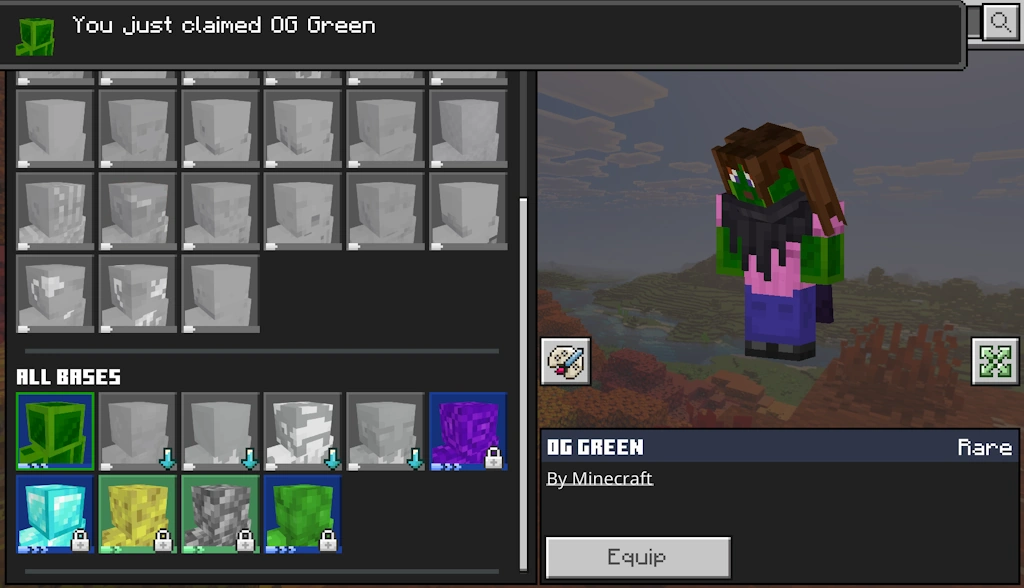 Available from November 10, 2026, at 10 AM PT to December 10, 2026, at 10 AM PT, the Minecraft OG Green Skin is a free full-body skin in the classic Xbox green color for Bedrock Edition players. To claim it, you need only a copy of Bedrock Edition and an internet connection.
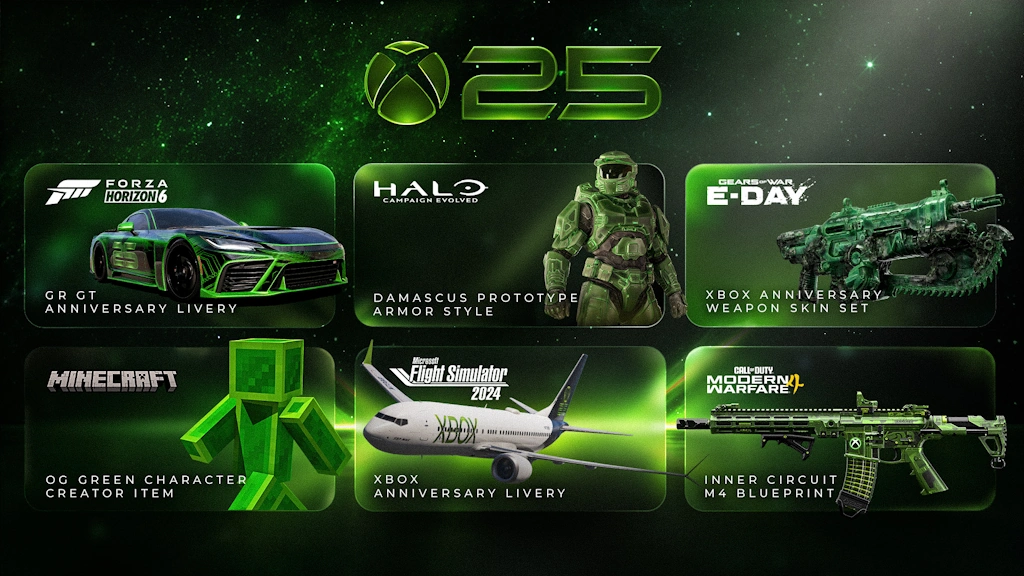 Alongside the OG Green Skin, Xbox players on console, PC, and mobile can claim the limited time Xbox 25th Anniversary badge for their profile. This reward only requires logging in for it to be automatically obtained. Other possible cosmetics include a weapons skin set for Gears of War E-Day, an anniversary GR GT livery for Forza Horizon 6, Halo Campaign Evolved prototype armor, Xbox livery for Flight Simulator 2024 planes, and an Xbox M4 skin in Call of Duty Modern Warfare 4. The dates and availability do, however, vary for each.
Finally, while it is not a cosmetic, Minecraft Bedrock Edition players can now take a look at their account statistics with Xbox Playback. It provides every detail from the first game on the account to the sometimes-frightening number of hours spent in each and every one, including Minecraft. If any of the numbers are too high, remember that “I forgot to close the game” is a valid excuse!
How to Get the Minecraft OG Green Skin
Available from November 10, 2026, at 10 AM PT to December 10, 2026, at 10 AM PT, the Minecraft OG Green Skin is a free full-body skin in the classic Xbox green color for Bedrock Edition players. To claim it, you need only a copy of Bedrock Edition and an internet connection.
- Launch Minecraft Bedrock Edition.
- Click or tap “Dressing Room”.
- Open the “Character Creator” tab.
- Expand the “Body” menu.
- Click or tap “Bases”.
- Under “All Bases” select OG Green.
- Click “Get”.
Other Xbox Anniversary Celebration Cosmetics
Alongside the OG Green Skin, Xbox players on console, PC, and mobile can claim the limited time Xbox 25th Anniversary badge for their profile. This reward only requires logging in for it to be automatically obtained. Other possible cosmetics include a weapons skin set for Gears of War E-Day, an anniversary GR GT livery for Forza Horizon 6, Halo Campaign Evolved prototype armor, Xbox livery for Flight Simulator 2024 planes, and an Xbox M4 skin in Call of Duty Modern Warfare 4. The dates and availability do, however, vary for each.
Finally, while it is not a cosmetic, Minecraft Bedrock Edition players can now take a look at their account statistics with Xbox Playback. It provides every detail from the first game on the account to the sometimes-frightening number of hours spent in each and every one, including Minecraft. If any of the numbers are too high, remember that “I forgot to close the game” is a valid excuse!Erstelle deinen eigenen
Minecraft-Server
Minecraft-Server
Wähle einen Tarif, such dir ein Spiel aus und spiele mit deinen Freunden!
Abonniere unseren Newsletter
Abonniere für die neuesten Updates rund ums Gaming!

Tritt unserem Discord bei
Werde Teil unserer Community von über 20.000 gleichgesinnten Mitgliedern!
Wie würdest du diesen Blog bewerten?
Teile deine Meinung und hilf uns, unsere Blogs noch besser zu machen!
Hat mir nicht gefallen
Neutral
Hat mir gefallen

Brauchst du einen Spielserver?
Miete einen Spielserver, auf dem du und deine Freunde privat mit niedriger Latenz und benutzerdefinierten Einstellungen spielen könnt. Wähle aus 110+ Spielen, lade Leute aus der ganzen Welt ein und genieße private Matches oder baue deine eigene Online-Community mit deinen eigenen Regeln auf.

Relevante Blogs







HOL DIR DIE INSIDER-INFOS!
Melde dich für unsere E-Mails an, um Updates zu unseren gehosteten Spielen, Unternehmensnachrichten und exklusiven Angeboten zu erhalten. Bleib auf dem Laufenden!













