What is the Minecraft2Shell Vulnerability?
Veröffentlicht am von

Teilen:

Auf X teilen

Auf Facebook teilen

Auf Threads teilen

Auf Bluesky teilen

In die Zwischenablage kopieren

Per E-Mail teilen
In the digital age, cybersecurity is more important than ever. But threats can come from areas least expected, even with great caution. Today, we answer the question “What is the Minecraft2Shell Vulnerability?”
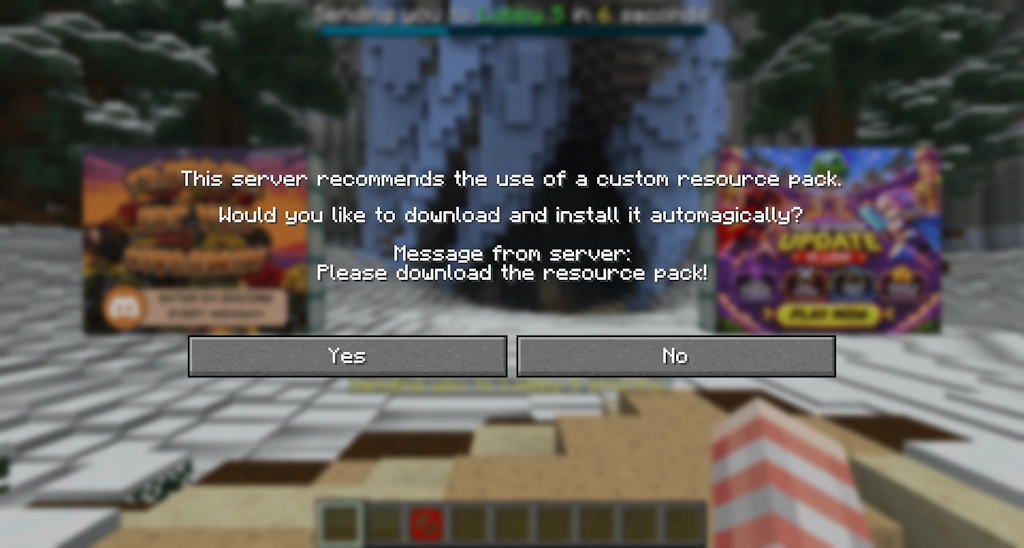 The Minecraft2Shell vulnerability allowed Java Edition server operators to use server-side resource packs, which players can opt to download when joining their servers, to run commands on the downloader’s PC. For example, a command could be run by the malicious operator to open multiple programs. Thankfully, Mojang has since fixed this vulnerability, and it is no longer a threat to those using the latest version on the official Minecraft launcher.
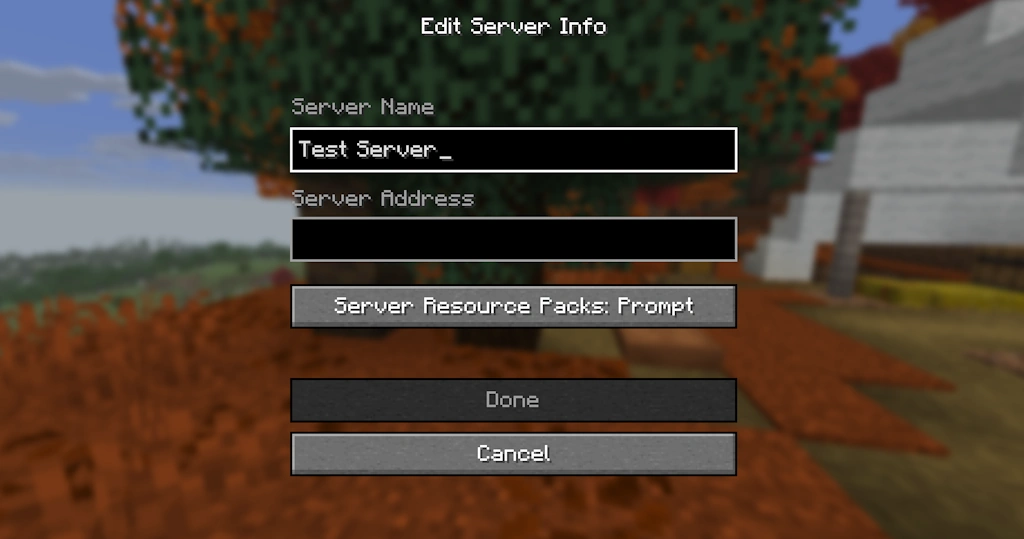 Minecraft is largely safe to trust, and resource packs, despite being third-party, typically are as well. But it is always best to proceed with some caution. Avoid joining servers or downloading resource packs from servers you do not know or trust. And, most importantly, always ensure servers must ask your permission before downloading anything.
Asking to download resource packs is the default setting for Minecraft. However, if allowed for an individual server, that specific server retains permission to install resource packs in the future. The steps below can be used to change these servers back to the prompt setting so that they must continue to ask.
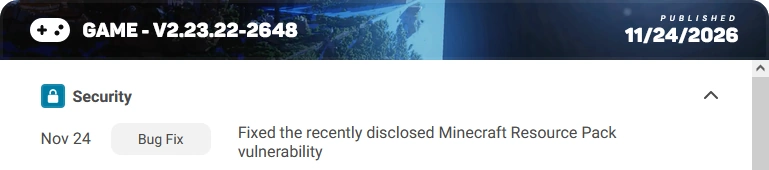 We recommend those on third-party clients confirm that the developers have applied the latest security update from Mojang. Most large clients will have an announcement regarding progress for serious issues such as this within the client, through their social media, or on their website. Lunar client, for example, confirmed the fix within their changelog for client version 2.23.22-2648 on November 24, 2026.
What is the Minecraft2Shell Vulnerability?
The Minecraft2Shell vulnerability allowed Java Edition server operators to use server-side resource packs, which players can opt to download when joining their servers, to run commands on the downloader’s PC. For example, a command could be run by the malicious operator to open multiple programs. Thankfully, Mojang has since fixed this vulnerability, and it is no longer a threat to those using the latest version on the official Minecraft launcher.
Safety & Security
Minecraft is largely safe to trust, and resource packs, despite being third-party, typically are as well. But it is always best to proceed with some caution. Avoid joining servers or downloading resource packs from servers you do not know or trust. And, most importantly, always ensure servers must ask your permission before downloading anything.
Asking to download resource packs is the default setting for Minecraft. However, if allowed for an individual server, that specific server retains permission to install resource packs in the future. The steps below can be used to change these servers back to the prompt setting so that they must continue to ask.
- Open Minecraft Java Edition.
- Click “Multiplayer”.
- Select a server.
- Click “Edit”.
- If Server Resource Packs are “Enabled”, click the button until it becomes “Prompt”.
- Return to step 3 and repeat the process for the next saved server.
Third Party Clients
We recommend those on third-party clients confirm that the developers have applied the latest security update from Mojang. Most large clients will have an announcement regarding progress for serious issues such as this within the client, through their social media, or on their website. Lunar client, for example, confirmed the fix within their changelog for client version 2.23.22-2648 on November 24, 2026.Erstelle deinen eigenen
Minecraft-Server
Wähle einen Tarif, such dir ein Spiel aus und spiele mit deinen Freunden!
Abonniere unseren Newsletter
Abonniere für die neuesten Updates rund ums Gaming!

Tritt unserem Discord bei
Werde Teil unserer Community von über 20.000 gleichgesinnten Mitgliedern!
Wie würdest du diesen Blog bewerten?
Teile deine Meinung und hilf uns, unsere Blogs noch besser zu machen!
Hat mir nicht gefallen
Neutral
Hat mir gefallen

Brauchst du einen Spielserver?
Miete einen Spielserver, auf dem du und deine Freunde privat mit niedriger Latenz und benutzerdefinierten Einstellungen spielen könnt. Wähle aus 120+ Spielen, lade Leute aus der ganzen Welt ein und genieße private Matches oder baue deine eigene Online-Community mit deinen eigenen Regeln auf.

Relevante Blogs





HOL DIR DIE INSIDER-INFOS!
Melde dich für unsere E-Mails an, um Updates zu unseren gehosteten Spielen, Unternehmensnachrichten und exklusiven Angeboten zu erhalten. Bleib auf dem Laufenden!