

How to Find Sulfur Caves in Minecraft
Veröffentlicht am von

Teilen:

Auf X teilen

Auf Facebook teilen

Auf Threads teilen

Auf Bluesky teilen

In die Zwischenablage kopieren

Per E-Mail teilen
Underground biomes are not always easy to find, but Sulfur Caves come with a few hints that, if known, save a lot of time! So, today, we answer how to find sulfur caves in Minecraft.

 Added as part of Minecraft 26.2 Chaos Cubed, Sulfur Caves are an underground biome made primarily of yellow sulfur blocks, red cinnabar blocks, and pools of water that visibly emit gas and explosions of steam. Sulfur caves also have an exclusive entity called the Sulfur Cube. Sulfur cubes can be fed a block, and depending on the type, the sulfur cube gains various ball-like properties that can facilitate player-made minigames.
Additionally, sulfur caves have the very rare chance of being able to generate partially on the surface. In these instances, the biome is relatively flat and filled with an abundance of gassy pools and geysers.
Added as part of Minecraft 26.2 Chaos Cubed, Sulfur Caves are an underground biome made primarily of yellow sulfur blocks, red cinnabar blocks, and pools of water that visibly emit gas and explosions of steam. Sulfur caves also have an exclusive entity called the Sulfur Cube. Sulfur cubes can be fed a block, and depending on the type, the sulfur cube gains various ball-like properties that can facilitate player-made minigames.
Additionally, sulfur caves have the very rare chance of being able to generate partially on the surface. In these instances, the biome is relatively flat and filled with an abundance of gassy pools and geysers.
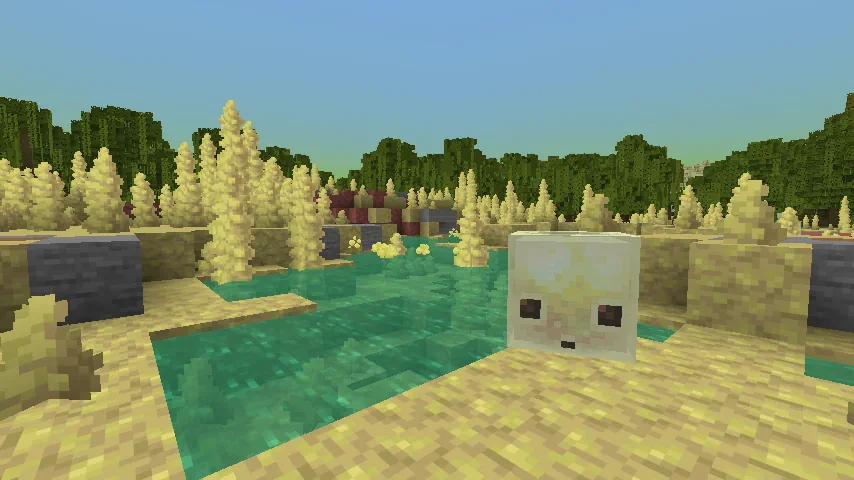 Sulfur caves are primarily an underground biome that can generate below most terrain, excluding oceans and high mountains. When it does generate, it will usually be indicated on the surface by a sulfur spring, which is a singular pool with a geyser surrounded by sulfur, cinnabar, and stone blocks. A sulfur spring will never generate without a sulfur caves beneath it.
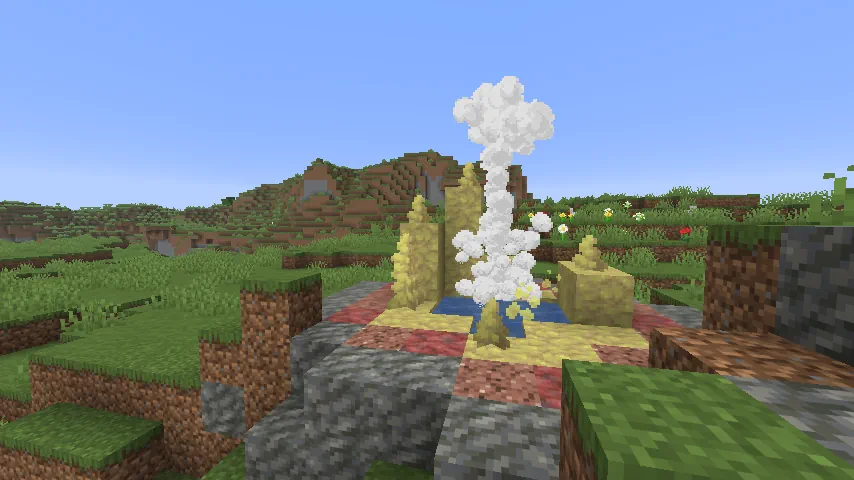 Despite being mostly underground, those searching for a sulfur caves biome will have the most success by quickly traversing the overworld’s surface. This is because finding a sulfur spring on the surface means there is a sulfur caves somewhere beneath it. A quick trip with an elytra will typically lead to finding one, if not more.
Surface sulfur caves, however, are significantly harder to find. This form of generation rarely occurs, and even in the instances where it is possible, sulfur caves must be connected to the surface through ravines and caves. Areas where surface sulfur caves can occur are when the hidden weirdness value is below -1.0. A typical indicator of this is mangrove swamps, which are rare in and of themselves.
The existence of surface sulfur caves stems from a bug that Mojang opted to leave in the game at the request of fans, and this unintended nature sadly leaves it as something few will see through natural means. Those looking to find one will need to be prepared for a long and extensive trip.
Despite being mostly underground, those searching for a sulfur caves biome will have the most success by quickly traversing the overworld’s surface. This is because finding a sulfur spring on the surface means there is a sulfur caves somewhere beneath it. A quick trip with an elytra will typically lead to finding one, if not more.
Surface sulfur caves, however, are significantly harder to find. This form of generation rarely occurs, and even in the instances where it is possible, sulfur caves must be connected to the surface through ravines and caves. Areas where surface sulfur caves can occur are when the hidden weirdness value is below -1.0. A typical indicator of this is mangrove swamps, which are rare in and of themselves.
The existence of surface sulfur caves stems from a bug that Mojang opted to leave in the game at the request of fans, and this unintended nature sadly leaves it as something few will see through natural means. Those looking to find one will need to be prepared for a long and extensive trip.
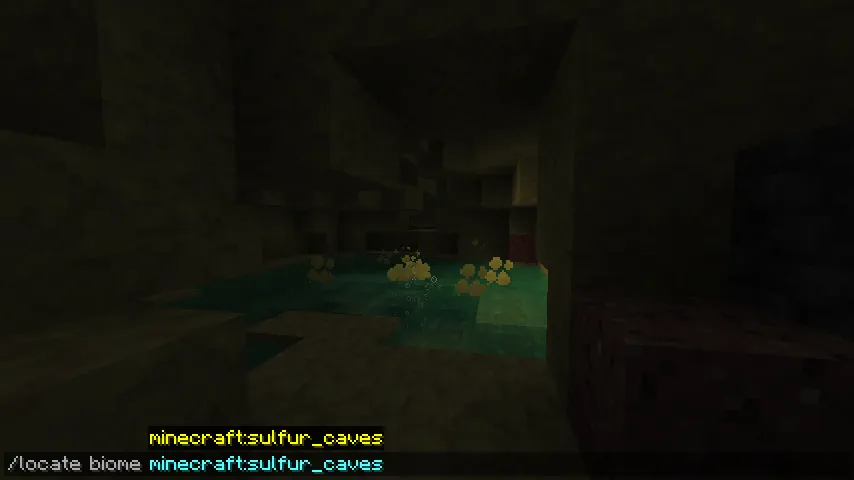 Should it be preferred, there is also the option of using the “/locate” command. This nifty tool provides the exact coordinates of the nearest biome (or structure) of the desired type, and by clicking them, teleports the player there.
The full command is as follows:
Should it be preferred, there is also the option of using the “/locate” command. This nifty tool provides the exact coordinates of the nearest biome (or structure) of the desired type, and by clicking them, teleports the player there.
The full command is as follows:
A Summary of Sulfur Caves
How to Find Sulfur Caves in Minecraft
Sulfur Cave Generation
Sulfur caves are primarily an underground biome that can generate below most terrain, excluding oceans and high mountains. When it does generate, it will usually be indicated on the surface by a sulfur spring, which is a singular pool with a geyser surrounded by sulfur, cinnabar, and stone blocks. A sulfur spring will never generate without a sulfur caves beneath it.
Finding Sulfur Caves Without Commands
Despite being mostly underground, those searching for a sulfur caves biome will have the most success by quickly traversing the overworld’s surface. This is because finding a sulfur spring on the surface means there is a sulfur caves somewhere beneath it. A quick trip with an elytra will typically lead to finding one, if not more.
Surface sulfur caves, however, are significantly harder to find. This form of generation rarely occurs, and even in the instances where it is possible, sulfur caves must be connected to the surface through ravines and caves. Areas where surface sulfur caves can occur are when the hidden weirdness value is below -1.0. A typical indicator of this is mangrove swamps, which are rare in and of themselves.
The existence of surface sulfur caves stems from a bug that Mojang opted to leave in the game at the request of fans, and this unintended nature sadly leaves it as something few will see through natural means. Those looking to find one will need to be prepared for a long and extensive trip.
Finding Sulfur Caves with Commands
Should it be preferred, there is also the option of using the “/locate” command. This nifty tool provides the exact coordinates of the nearest biome (or structure) of the desired type, and by clicking them, teleports the player there.
The full command is as follows:
- /locate biome Minecraft:sulfur_caves
Erstelle deinen eigenen
Minecraft-Server
Minecraft-Server
Wähle einen Tarif, such dir ein Spiel aus und spiele mit deinen Freunden!
Abonniere unseren Newsletter
Abonniere für die neuesten Updates rund ums Gaming!

Tritt unserem Discord bei
Werde Teil unserer Community von über 20.000 gleichgesinnten Mitgliedern!
Wie würdest du diesen Blog bewerten?
Teile deine Meinung und hilf uns, unsere Blogs noch besser zu machen!
Hat mir nicht gefallen
Neutral
Hat mir gefallen

Brauchst du einen Spielserver?
Miete einen Spielserver, auf dem du und deine Freunde privat mit niedriger Latenz und benutzerdefinierten Einstellungen spielen könnt. Wähle aus 110+ Spielen, lade Leute aus der ganzen Welt ein und genieße private Matches oder baue deine eigene Online-Community mit deinen eigenen Regeln auf.

Relevante Blogs







HOL DIR DIE INSIDER-INFOS!
Melde dich für unsere E-Mails an, um Updates zu unseren gehosteten Spielen, Unternehmensnachrichten und exklusiven Angeboten zu erhalten. Bleib auf dem Laufenden!













