
Valheim Cheats Guide: All Console Commands and How to Use Them
发布于 ,作者

分享:

分享至 X

分享至 Facebook

分享至 Threads

分享至 Bluesky

复制到剪贴板

通过电子邮件分享
Sometimes you need a helping hand in Valheim to fight enemies, farm items, and complete objectives, as the game can take significant hours of progressing and grinding along the way. For players who are looking to save time or simply cut corners, here we'll go over all of the Valheim console commands and cheats that players can take advantage of.
 It’s important to mention that Valheim cheats only work in single-player settings. Attempting to use console commands meant for single-player mode in multiplayer scenarios will typically only result in sending normal chats. Players can install mods to extend this functionality but do so at your own risk.
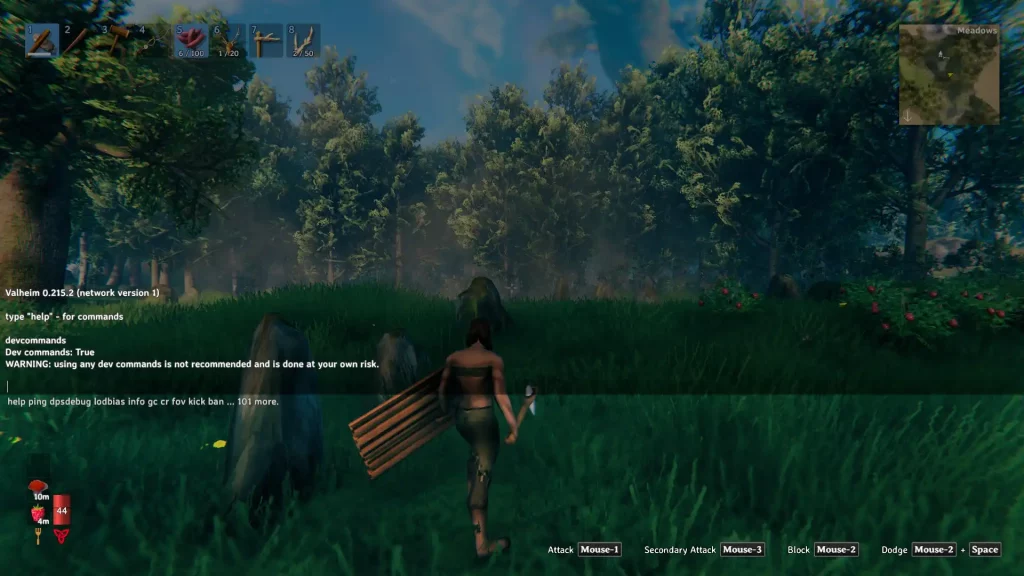
Before utilizing cheats and console commands in Valheim, you must first activate Valheim’s console. Generally, you only need to press the “F5” key on your keyboard to make the console appear. But if it doesn’t work, follow these steps:
It’s important to mention that Valheim cheats only work in single-player settings. Attempting to use console commands meant for single-player mode in multiplayer scenarios will typically only result in sending normal chats. Players can install mods to extend this functionality but do so at your own risk.
Before utilizing cheats and console commands in Valheim, you must first activate Valheim’s console. Generally, you only need to press the “F5” key on your keyboard to make the console appear. But if it doesn’t work, follow these steps:
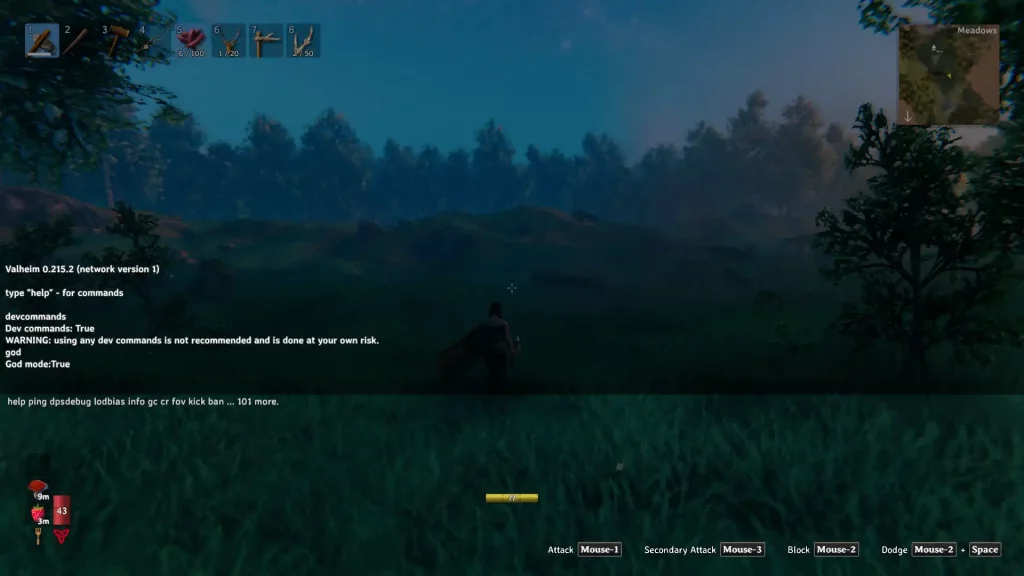 Below are all the lists available in vanilla Valheim. Players can also type “help” without the quotes in the console for a list of enterable commands.
How to Use Cheats in Valheim
It’s important to mention that Valheim cheats only work in single-player settings. Attempting to use console commands meant for single-player mode in multiplayer scenarios will typically only result in sending normal chats. Players can install mods to extend this functionality but do so at your own risk.
Before utilizing cheats and console commands in Valheim, you must first activate Valheim’s console. Generally, you only need to press the “F5” key on your keyboard to make the console appear. But if it doesn’t work, follow these steps:
- Close Valheim if it’s running
- Go to the Valheim folder in your Steam library
- Right-click on the game’s name in the sidebar, then select “Properties”
- In the Properties window, select “General,” then go to “Launch Options”
- Type “-console” without the quotes under the Launch Options field
Valheim Cheat List
Below are all the lists available in vanilla Valheim. Players can also type “help” without the quotes in the console for a list of enterable commands.
Character Cheats
- god: Makes the character invincible
- ghost: Makes the character invisible
- heal: Restores health to full
- puke: Resets hunger, health, and stamina to default
- pos: Shows the character’s current position
- hair: Change the character’s hair or removes it
- beard: Change the character’s beard or removes it
- model [0/1]: Switches your character between masculine and feminine bodies.
- resetcharacter: Resets character data
- raiseskill [skill] [amount]: Raises a specific skill’s level
- resetskill [skill]: Resets a specific skill to 0
- clearstatus: Removes all status effects
- heal: Restores health and stamina to full
- nocost: Building has zero costs
- puke: Empties stomach
- setpower: Sets current guardian power and resets cooldown
Map Cheats
- exploremap: Reveals the entire map
- find [text] [pingmax]: Searches specified areas and places pins on them
- genloc: Resets all locations
- goto [x,z]: Teleports the character to the specific coordinates
- location [location]: Spawns a particular location
- nextseed: Forces the next dungeon to a seed
- nomap: Disables the map for all players
- optterrain: Optimize terrain mods
- pos: Display the player’s current position
- printlocations: Displays the count of all loaded locations
- printseeds: Displays the seeds of all loaded dungeons
- recall [name]: Recalls all players in the server to the specified player
- resetmap: Resets map exploration
- resetsharedmap: Resets shared map data
- resetspawn: Resets spawn location to default
Mob Cheats
- aggravate: Aggro all nearby neutral creatures
- killall: Kill all nearby creatures
- killenemies: Kill all nearby enemies
- killtame: Kill all nearby tamable creatures
- printcreatures: Shows the count and level of all active creatures
- removebirds: Removes all birds
- removefish: Removes all fish
- tame: Tame all nearby tamable creatures
World Cheats
- env [weather]: Override environment based on weather parameter
- event [event]: Trigger specified event
- noportals: Disables all portals for current server
- players [number]: Force the world’s difficulty to scale based on the number of set players
- event: Trigger a random event
- resetenv: Disables the environment override command
- resetwind: Resets wind behavior to default
- save: Force saves the world
- skiptime [seconds]: Moves time forward based on the number of in-game seconds specified
- sleep: Skips in-game time to next morning
- stopevent: Stops any current event
- time: Displays the current in-game time
- timescale [target] [fadetime]: Sets timescale
- tod: Sets time of day based on specified variable
Server Admin Commands
- ban [name/ip/usedID]: Ban specified user
- banned: Display list of banned users
- kick [name/ip/userID]: Kick specified user
- ping: Displays ping
- restartparty: Restarts playfab party network
- unban [ip/userID]: Unban specified user
- lodbias: Set draw distance for server
Miscellaneous Commands
- bind [keycode] [command and parameters]: Binds a set key to a console command
- clear: Clear the text in the console command window
- debugmode: Enter debug mode
- dpsdebug: Toggle DPS debug print
- exclusivefullscreen: Switches between fullscreen or borderless window settings
- gc: Displays garbage collector information
- help: Displays list of all console commands
- info: Displays system information
- maxfps [FPS]: Sets maximum FPS limit
- printbinds: Displays current key binds
- resetbinds: Resets all custom key binds to default
- resetkeys: Clear all global keys
- setkey [name]: Sets a global key to specified name
- tutorialreset: Resets the tutorial data
- tutorialtoggle:Toggles all of Hugin’s hints
Camera Commands
- fly: Toggles fly mode
- freefly: Toggles free camera mode
- ffsmooth: Adds ore removes free camera smooth movement
- fov [number]: Changes the field of view based on the set number
Emote Commands
- blowkiss
- bow
- challenge
- cheer
- comehere
- cower
- cry
- dance
- despair
- flex
- headbang
- kneel
- laugh
- nonono
- point
- roar
- shrug
- sit
- thumbsup
- wave

您对这篇博客有何评价?
分享您的看法,帮助我们将博客做得更好!
不喜欢
一般
喜欢

需要游戏服务器吗?
租用一台游戏服务器,您可以和朋友们在极低延迟和自定义设置下私密游玩。从 110+ 款游戏中挑选您的最爱,邀请全球玩家,享受私密对战,或者按照您自己的规则建立属于您的在线社区。








获取第一手独家资讯!
订阅我们的电子邮件,获取有关我们托管游戏、公司新闻和独家优惠的最新动态。随时掌握一手资讯!













