

Minecraft 1.21 Snapshot 24W07A: Patch Notes & How to Play
发布于 ,作者

分享:

分享至 X

分享至 Facebook

分享至 Threads

分享至 Bluesky

复制到剪贴板

通过电子邮件分享
(Estimated Read Time: 7 Minutes)
A monster covered in mud and mushrooms is coming to a Swamp biome near you! Today, we explore Minecraft 1.21 Snapshot 24W07A, the new mob it brings to the game, and how you too can test these features and play.Overview
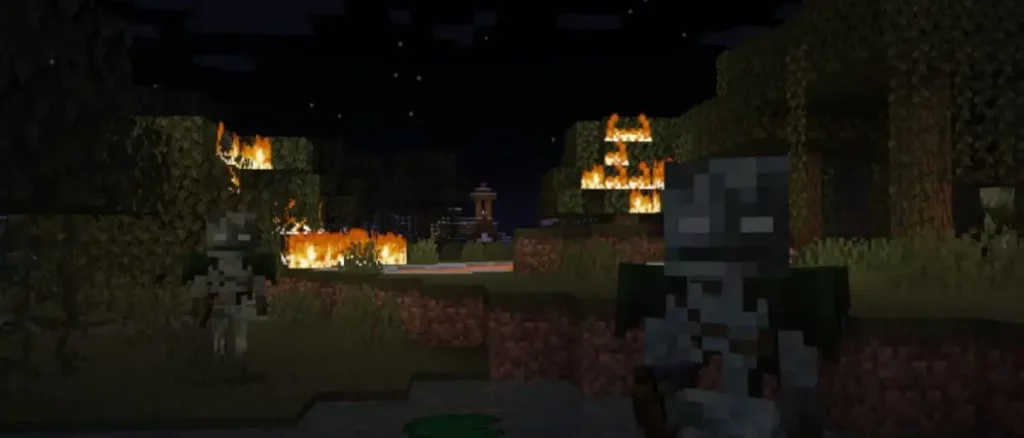 Alongside all the Minecraft 1.21 features released so far, Minecraft 1.21 Snapshot 24W07A adds a new skeleton variant called the Bogged. This frightening monster spawns naturally in Swamp and Mangrove Swamp biomes and from Trial Spawners in Trial Chambers. No matter where the Bogged is found, watch out for its deadly poison arrows!
Patch Notes
Known Issues
- The fall damage reduction for the Wind Charge is not working
Experimental features
Bogged- A new variant of Skeletons that shoot poisonous arrows
- They're faster to take down with 16 health instead of 20 health
- They attack at a slower interval of 3.5 seconds instead of 2 seconds
- Has a chance to drop Arrows of Poison when killed by players
- These mossy and mushroom covered Skeletons spawn naturally in Swamps and Mangrove Swamps
- Can also be found spawning from Trial Spawners in some Trial Chambers
Changes
- Hoppers can once again pick up items from beehives and beenests, but other full blocks still block them
Technical Changes
- The Data Pack version is now 32
Data Pack Version 32
- Added #minecraft:does_not_block_hoppers for blocks that will never disable a Hopper when placed above one
- Added gameplay/panda_sneeze loot table for drops when Pandas sneeze
Fixed Bugs In 24w07a
- MC-266570 - Wind charges can't go through non solid blocks
- MC-267732 - /place jigsaw still caps max depth at 7
- MC-267866 - Panda slimeball drop is hardcoded
- MC-268080 - When the projectiles are reflected from the breeze, the projectiles will deflect in the opposite direction in Bedrock, but in Java they will always deflect downward
- MC-268339 - "Japanese" is misspelled as "Japanse" in options.japaneseGlyphVariants.tooltip
- MC-268342 - Breeze can be damaged by wind charge
- MC-268344 - Breezes are not affected by the looting enchantment
- MC-268349 - Hopper minecarts with a full block above them no longer search for item entities to pick up
- MC-268353 - Tick Freeze randomizes next AI tick type
- MC-268355 - Tick freeze lets chunk tickets expire
- MC-268362 - Blocks which typically negate fall damage fail to do so from falls after using wind charges
- MC-268368 - Wind charge bounces cause fall damage after exiting water
- MC-268383 - Wind Charges negate all fall damage that does not occur below the hit point, regardless of whether the fall was caused by the charge or not
- MC-268389 - Fall damage is conserved between game modes with Wind Charge
- MC-268418 - Pre-1.9 chunks get regenerated seemingly randomly when upgrading
- MC-268426 - Wind charges shot from breezes no longer explode and instead are deleted upon hitting breezes after being deflected
- MC-268451 - Hoppers can't pull honey bottles from bee hives or bee nests
How to Install Minecraft 1.21 Snapshot 24W07A
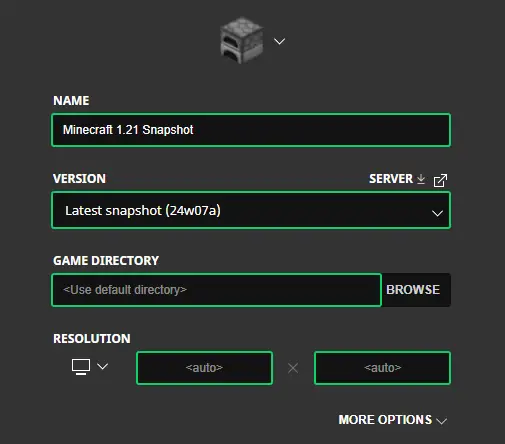 Installing Minecraft 1.21 Snapshot 24W07A begins right inside the Minecraft Launcher before clicking play. Below, we detail each step, including those needed to enable experimental features once in-game.
- First, open the Minecraft Launcher and enable snapshots under the ‘Installations’ tab.
- Second, click ‘New Installation’ and then ‘Latest Snapshot’ in the drop-down menu.
- Third, click ‘Create.’
- First, click ‘Create New World’ and then ‘Experiments.’
- Second, enable all the experimental features you would like to see in your game. ‘Update 1.21’ is the only one required for the features of Minecraft 1.21 Snapshot 24W07A.
- Third, click ‘Done,’ and after giving your world a fun name, select ‘Create New World’ again.
How to make Minecraft 1.21 Snapshot 24W07A Servers
 Bogged Skeletons are easier to fight with friends! Minecraft 1.21 Snapshot 24W07A servers can be created for free through home hosting, but we recommend paid hosting options for ease of use and performance, especially since snapshots can be buggy!
Paid hosting is offered here at BisectHosting and many other places around the web. No less than 4GB of server RAM is recommended.
Bogged Skeletons are easier to fight with friends! Minecraft 1.21 Snapshot 24W07A servers can be created for free through home hosting, but we recommend paid hosting options for ease of use and performance, especially since snapshots can be buggy!
Paid hosting is offered here at BisectHosting and many other places around the web. No less than 4GB of server RAM is recommended.
Minecraft 1.21 Snapshot 24W07A: Patch Notes & How to Play
Swamps have been receiving a ton of love these last few patches, ranging from frogs to potentially mending villagers! Perhaps this is foreshadowing of a full biome update or Witch Hut rework? Until Next Time, BisectHosting =)
您对这篇博客有何评价?
分享您的看法,帮助我们将博客做得更好!
不喜欢
一般
喜欢

需要游戏服务器吗?
租用一台游戏服务器,您可以和朋友们在极低延迟和自定义设置下私密游玩。从 110+ 款游戏中挑选您的最爱,邀请全球玩家,享受私密对战,或者按照您自己的规则建立属于您的在线社区。








获取第一手独家资讯!
订阅我们的电子邮件,获取有关我们托管游戏、公司新闻和独家优惠的最新动态。随时掌握一手资讯!













