

Minecraft 1.21 Snapshot 24W05A: Patch Notes & How to Play
发布于 ,作者

分享:

分享至 X

分享至 Facebook

分享至 Threads

分享至 Bluesky

复制到剪贴板

通过电子邮件分享
(Estimated Read Time: 9 Minutes)
After the exciting announcement earlier this week, the Vault has arrived, complete with all the details we will soon add to our Vault guide! So, today, we explore Minecraft 1.21 Snapshot 24W05A, what the Vault hides within its cage, and how you too can try the latest update to the game.Overview
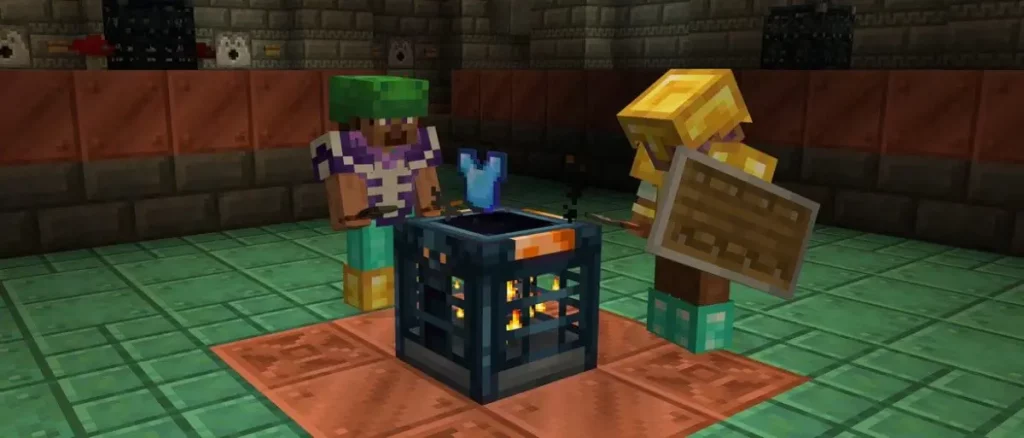 Alongside all the Minecraft 1.21 features released so far, Minecraft 1.21 Snapshot 24W05A adds the Vault block to Trial Chambers, which offers players a new way to earn rewards. Every player can open a Vault block once, using any Trial Keys they have earned.
Patch Notes
Technical Changes
- The Data Pack version is now 30
- The Resource Pack version is now 25
- Added a reserved region file compression id for third-party servers to use for custom compression implementations
- Added an option to not compress region files
- Allowed server operators to view dedicated server TPS debug chart
- Added a third value to the dedicated server configuration property region-file-compression:
- none does not compress the data. Consumes significantly more space and requires significant time to read and write, even though CPU is used less. Might make sense together with filesystem level compression
- Compression id 127 can now be used for custom implementations of region file compression
- When used, the version id must be followed by a namespaced string representing the custom algorithm used
Data Pack Version 30
- Potion effects stored in items or entities will no longer encode their default values
- amplifier: 0
- duration: 0
- ambient: false
- show_particles: true
- Added body_armor_item and body_armor_drop_chance to all entities that currently have HandItems and ArmorItems, and handle the same way as HandItems and ArmorItems
- Handling of Horses ArmorItem, Llamas DecorItem, and Wolf's armor has been changed to use body_armod_item and body_armor_drop_chance instead
- In commands, removed horse.armor slot argument, and added instead armor.body slot argument, applicable now to all mobs
- Added vault_connection particle
- Added Vault block with a variety of NBT elements which can be configured for custom content
- config
- loot_table The loot table that will be ejected upon being unlocked
- Default value: "minecraft:chests/trial_chambers/reward"
- activation_range The range any player who hasn't unlocked the Vault must be within for it to open its keyhole
- Default value: 4
- deactivation_range The range all viable players must be outside of for the Vault to close its keyhole
- Default value: 4.5
- key_item An itemstack that is required to unlock the Vault
- NBT and stack count is used for comparison
- Default value: "minecraft:trial_key"
- override_loot_table_to_display An optional loot table which will be used for displaying items inside the cage instead of results from the config's loot_table
- Default value: No value
- loot_table The loot table that will be ejected upon being unlocked
- shared_data
- connected_particles_range The range players who have not unlocked the Vault must be within before particles will flow from them
- Default value: 4.5
- connected_particles_range The range players who have not unlocked the Vault must be within before particles will flow from them
- config
Resource Pack Version 25
- The unused attributes array in core shader definitions has been removed
- The unused position_color_normal and position_tex_lightmap_color shaders have been removed
- The position_tex_color_normal shader (only used by clouds) has been replaced by rendertype_clouds
- The IViewRotMat uniform has been removed, and the Position attribute for entities is now in (camera relative) world space
- Light direction uniforms are no longer premultiplied by the view matrix
- Added texture and model files for Vault block
- Changed texture for the Trial Key item
- Added texture and particle file for vault_connection particle
Experimental Features
- Added Vault block
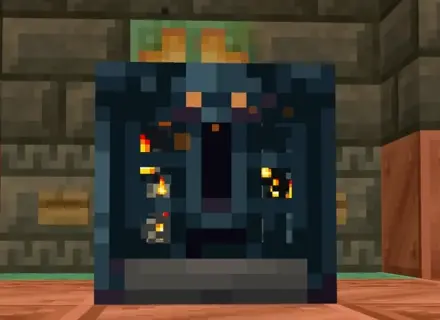
- A block that holds locked treasure and loot - find the right key to eject its rewards
- Found throughout Trial Chambers, containing the structures' most valuable loot
- Vaults in Trial Chambers require a Trial Key to be unlocked
- Can be unlocked by an unlimited amount of players
- After a player has unlocked a Vault, they cannot unlock that Vault again
- If a player has not unlocked that Vault before, an orange stream of particles will flow from the player to the Vault when nearby
- Has a keyhole that will be open or closed depending on the players nearby
- If any nearby player has not unlocked that Vault, the keyhole will be open
- If all nearby players have unlocked that Vault, the keyhole will be closed
- Within its cage, it will cycle through and display items which are possible to eject from its loot table
- The rewards it ejects are randomized from its loot table each time it is unlocked
- Cannot be crafted or obtained in Survival, and does not drop anything when mined
- Explosion-resistant and cannot be moved
- Vaults currently reuse the same loot table that reward chests previously used in the Trial Chambers
- This loot table is temporary and will be completely revised as development continues
- Updated texture to reflect new Vault visuals
Fixed Bugs In Snapshot 24w05a
- MC-225170 - Normal matrix scaling broken in some situations
- MC-260099 - Sniffer's snout shading changes during sniffing
- MC-264821 - The fog on armor worn by entities occurs too early
- MC-267922 - Wolf armor loses custom display name and other NBT when equipped
How to Install Minecraft 1.21 Snapshot 24W05A
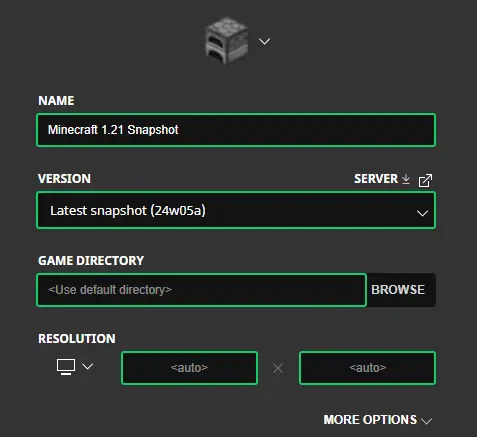 Installing Minecraft 1.21 Snapshot 24W05A begins right inside the Minecraft Launcher before clicking play. Below, we detail each step, including those needed for experimental features once in-game.
- First, open the Minecraft Launcher and enable snapshots under the ‘Installations’ tab.
- Second, click ‘New Installation’ and then ‘Latest Snapshot’ in the drop-down menu.
- Third, click ‘Create.’
- First, click ‘Create New World’ and then ‘Experiments.’
- Second, enable all the experimental features you would like to see in your game. ‘Update 1.21’ is the only one required for the features of Minecraft 1.21 Snapshot 24W05A.
- Third, click ‘Done,’ and after giving your world a fun name, select ‘Create New World’ again.
How to make Minecraft 1.21 Snapshot 24W05A Servers
 With Vaults added, players on servers will all get their fair share of the loot! Minecraft 1.21 Snapshot 24W05A servers can be created for free through home hosting, but we recommend paid hosting options for ease of use and performance, especially since snapshots can be buggy!
Paid hosting is offered here at BisectHosting and many other places around the web. No less than 4GB of server RAM is recommended.
With Vaults added, players on servers will all get their fair share of the loot! Minecraft 1.21 Snapshot 24W05A servers can be created for free through home hosting, but we recommend paid hosting options for ease of use and performance, especially since snapshots can be buggy!
Paid hosting is offered here at BisectHosting and many other places around the web. No less than 4GB of server RAM is recommended.
Minecraft 1.21 Snapshot 24W05A: Patch Notes & How to Play
Vaults have the potential to make exploring structures valuable to every player long after they have been discovered. Perhaps we will see them added to older structures such as End Cities? While it would be quite the development undertaking, it would be a valuable feature for servers! Until Next Time, BisectHosting =)
您对这篇博客有何评价?
分享您的看法,帮助我们将博客做得更好!
不喜欢
一般
喜欢

需要游戏服务器吗?
租用一台游戏服务器,您可以和朋友们在极低延迟和自定义设置下私密游玩。从 110+ 款游戏中挑选您的最爱,邀请全球玩家,享受私密对战,或者按照您自己的规则建立属于您的在线社区。








获取第一手独家资讯!
订阅我们的电子邮件,获取有关我们托管游戏、公司新闻和独家优惠的最新动态。随时掌握一手资讯!













