

Minecraft 1.21 Snapshot 23W46A: Patch Notes & How to Install
发布于 ,作者

分享:

分享至 X

分享至 Facebook

分享至 Threads

分享至 Bluesky

复制到剪贴板

通过电子邮件分享
(Estimated Read Time: 6 minutes)
After the massive Trial Chamber release, a smaller patch has appeared! Today, we explore Minecraft 1.21 Snapshot 23W46A, the redstone changes it brings, and how to try out the latest update with family and friends.Overview
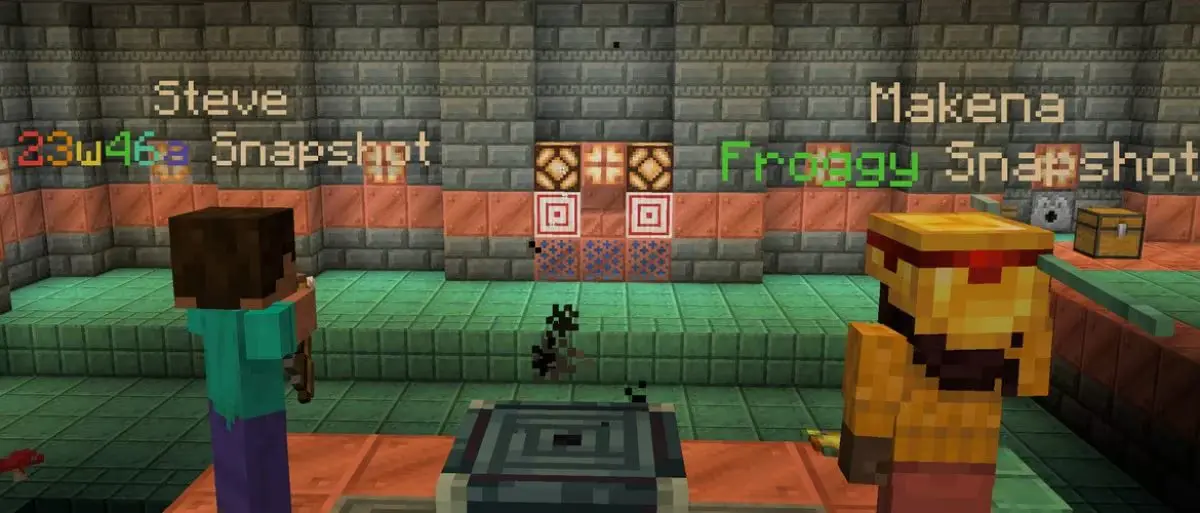 Alongside all the Minecraft 1.21 features released so far, Minecraft 1.21 Snapshot 23W46A adjusts the tick delay for auto crafters and copper bulbs. Unfortunately, Mojang has warned that this change will cause some redstone contraptions with those blocks to no longer function.
Patch Notes
Changes
- Updated Crafter textures
Technical Changes
- The Data Pack version is now 25
Data Pack Version 25
- Added individual display names for scoreboard entries
Commands
Scoreboard
Display names- Each entry in a scoreboard can now have a custom display name
- Those values are kept separate per objective and score holder
- If the name is not present, the score holder name is used (i.e. the old behavior)
- If the score is reset or the whole objective is removed, the name is not preserved
- Team decorations will still be applied to names as normal
- Subcommands for managing names:
- scoreboard players display name <targets> <objective> <text component> - set display name
- scoreboard players display name <targets> <objective> - clear display name
- To make display name management easier, objectives can also be configured to auto-update display names on every score update
- This option is disabled by default
- If a score holder has no display name (because it can't be attributed to any currently loaded entity), the current name is preserved
- Command to control auto-update for objective:
- scoreboard objectives modify <scoreboard> displayautoupdate [true|false]
- Scores in numeric form can now be formatted
- Formats can be set for both objectives and individual scores
- Scores with set formats will render the same in all context (sidebar, under player name, etc.)
- Subcommands for managing formats:
- scoreboard objectives modify <objective> numberformat <format> - for setting default format for an objective
- scoreboard objectives modify <objective> numberformat - for clearing default format for an objective
- scoreboard players display numberformat <targets> <score> <format> - for setting format for a specific score holder
- scoreboard players display numberformat <targets> <score> - for clearing format for a specific score holder
- styled <style> - score will be displayed with selected style (like {"bold":true})
- fixed <text component> - score will be replaced with text
- blank - score will not be displayed
Fixed Bugs In Snapshot 23w46a
- MC-259321 - Spawner counts related entities against MaxNearbyEntities
- MC-265662 - "Cannot kick server owner in LAN game" message when trying to kick yourself from non-LAN singleplayer world
- MC-265873 - Narrator Hotkey description mentions the wrong modifier key on macOS
- MC-265910 - Crafter block has a one game tick cooldown
- MC-265950 - Crafters will stack items when outputting into chiseled bookshelf
- MC-266076 - Copper Grates can't be waterlogged
- MC-266099 - Spectating an entity that takes damage makes the camera shake
- MC-266120 - Some advancements for 1.21 block recipes are in the regular datapack
- MC-266148 - Some Crafting recipes for the new copper blocks appear when Experiment is disabled
- MC-266190 - Tuff blockset color palette is inconsistent with itself
- MC-266437 - Wind charge subtitles are improperly capitalized
- MC-266445 - Breeze mob doesn't count to Monster Hunter
- MC-266455 - Breeze spawn eggs are in the incorrect place in the creative inventory
- MC-266459 - The hitboxes and models of wind charges are misaligned
- MC-266538 - Trial spawners can be replaced by lava pools and other features
- MC-266622 - Wind Charges can't switch levers off
How to Install Minecraft 1.21 Snapshot 23W46A
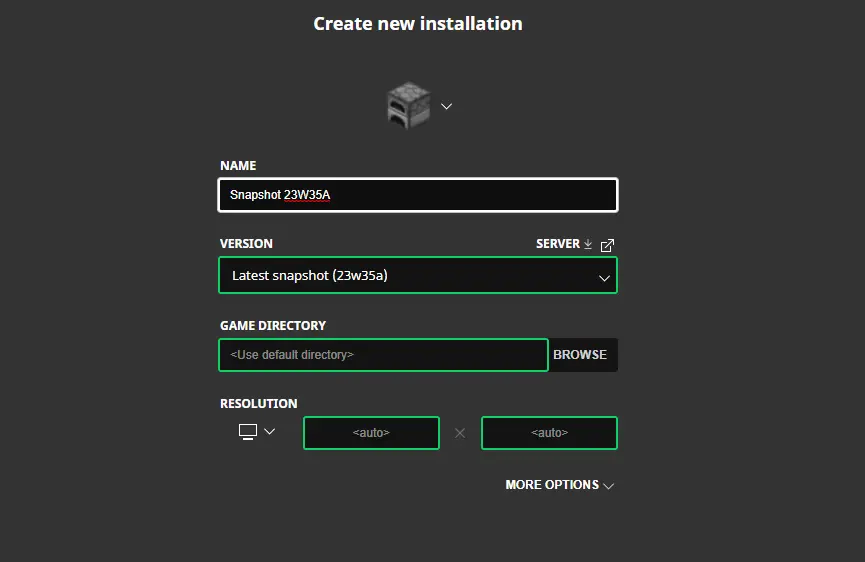 Installing Minecraft 1.21 Snapshot 23W46A requires only a few steps, all inside the Minecraft launcher.
- Open the Minecraft Launcher and enable snapshots under the ‘Installations’ tab.
- Click ‘New Installation’ and then ‘Latest Snapshot’ in the drop-down menu.
- Click ‘Create.’
- Click ‘Create New World’ and then ‘Experiments.’
- Enable all the experimental features you would like to see in your game. ‘Update 1.21’ is the only one required for the features of Minecraft 1.21 Snapshot 23W46A.
- Click ‘Done,’ and after giving your world a name, select ‘Create New World’ again.
How to make Minecraft 1.21 Snapshot 23W46A Servers
 Repairing all those redstone contraptions may require a few extra hands! Minecraft 1.21 Snapshot 23W46A servers can be created for free through home hosting, but we recommend paid hosting options for ease of use and performance, especially since snapshots can be buggy!
Paid hosting is offered here at BisectHosting and many other places around the web. No less than 4GB of server RAM is recommended.
Repairing all those redstone contraptions may require a few extra hands! Minecraft 1.21 Snapshot 23W46A servers can be created for free through home hosting, but we recommend paid hosting options for ease of use and performance, especially since snapshots can be buggy!
Paid hosting is offered here at BisectHosting and many other places around the web. No less than 4GB of server RAM is recommended.
Minecraft 1.21 Snapshot 23W46A: Patch Notes & How to Install
Not every snapshot will be as big as last week’s, but even smaller patches can be controversial. Many redstone enjoyers disagree with the tick changes to auto crafters and copper bulbs. What are your thoughts on it all? Until Next Time, BisectHosting =)
您对这篇博客有何评价?
分享您的看法,帮助我们将博客做得更好!
不喜欢
一般
喜欢

需要游戏服务器吗?
租用一台游戏服务器,您可以和朋友们在极低延迟和自定义设置下私密游玩。从 110+ 款游戏中挑选您的最爱,邀请全球玩家,享受私密对战,或者按照您自己的规则建立属于您的在线社区。








获取第一手独家资讯!
订阅我们的电子邮件,获取有关我们托管游戏、公司新闻和独家优惠的最新动态。随时掌握一手资讯!













