

Minecraft 1.20 Release Candidate 1: Patch Notes & Servers
发布于 ,作者

分享:

分享至 X

分享至 Facebook

分享至 Threads

分享至 Bluesky

复制到剪贴板

通过电子邮件分享
The first release candidate has arrived just one week before Trails & Tales goes live! So, today we explore Minecraft 1.20 Release Candidate 1, the bugs it will fix, and how you can set up a server for Trails & Tale’s official release.
 Fixed Bugs In 1.20 Release Candidate 1
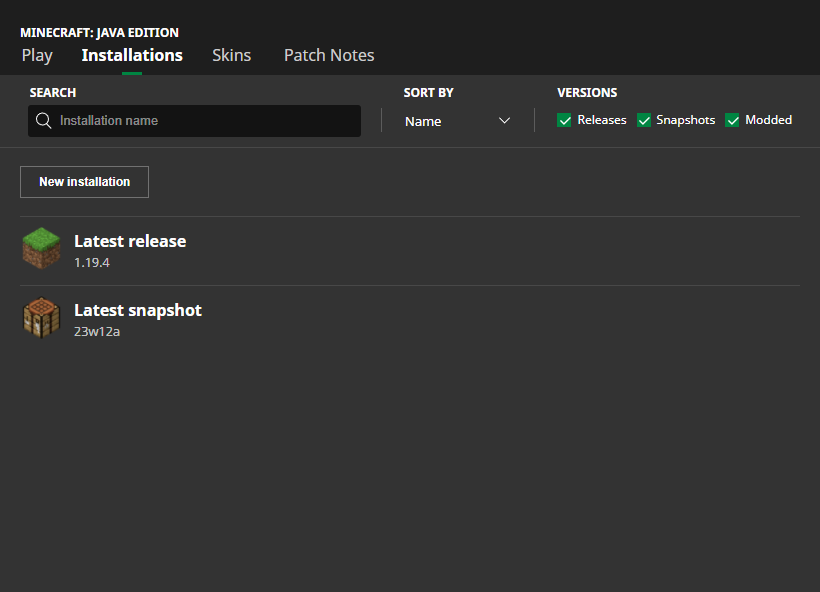 In Java Edition, installing Minecraft 1.20 Release Candidate 1 is done right from the Minecraft client. Players need only open up the Minecraft Launcher and enable snapshots in the ‘Installations’ tab. From there, click “New Installation,” select “Latest Snapshot” in the drop-down menu, and click create. Your new Minecraft 1.20 Trails & Tales installation will now be a selectable option before clicking play.
Please note snapshots, pre-releases, and release candidates can corrupt worlds! Ensure backups have been taken.
In Java Edition, installing Minecraft 1.20 Release Candidate 1 is done right from the Minecraft client. Players need only open up the Minecraft Launcher and enable snapshots in the ‘Installations’ tab. From there, click “New Installation,” select “Latest Snapshot” in the drop-down menu, and click create. Your new Minecraft 1.20 Trails & Tales installation will now be a selectable option before clicking play.
Please note snapshots, pre-releases, and release candidates can corrupt worlds! Ensure backups have been taken.
 Interested in trying the Trails & Tales with friends? Minecraft 1.20 Release Candidate 1 servers can be created for free through home hosting, but we recommend paid hosting options for ease of use and performance. Especially with pre-releases since they can be buggy!
Paid hosting is offered here at BisectHosting and many other places around the web. In either case, no less than 4GB of server RAM is recommended.
Interested in trying the Trails & Tales with friends? Minecraft 1.20 Release Candidate 1 servers can be created for free through home hosting, but we recommend paid hosting options for ease of use and performance. Especially with pre-releases since they can be buggy!
Paid hosting is offered here at BisectHosting and many other places around the web. In either case, no less than 4GB of server RAM is recommended.
Details and Adjustments
https://twitter.com/slicedlime/status/1663904298223247360Minecraft 1.20 Release Candidate 1 is the final testing stage before the release date of June 7th. This means last-minute bug fixes and experiencing the 1.20 update in what could very well be its finished state. Here is hoping a release candidate 2 is not needed!
Patch Notes
Fixed Bugs In 1.20 Release Candidate 1
- MC-256477 - Knowledge books can’t be placed in chiseled bookshelves
- MC-262853 - Pitcher plant breaks and floats when growing without enough light
How to Install Minecraft 1.20 Release Candidate 1
In Java Edition, installing Minecraft 1.20 Release Candidate 1 is done right from the Minecraft client. Players need only open up the Minecraft Launcher and enable snapshots in the ‘Installations’ tab. From there, click “New Installation,” select “Latest Snapshot” in the drop-down menu, and click create. Your new Minecraft 1.20 Trails & Tales installation will now be a selectable option before clicking play.
Please note snapshots, pre-releases, and release candidates can corrupt worlds! Ensure backups have been taken.
How to make Minecraft 1.20 Release Candidate 1 Servers
Interested in trying the Trails & Tales with friends? Minecraft 1.20 Release Candidate 1 servers can be created for free through home hosting, but we recommend paid hosting options for ease of use and performance. Especially with pre-releases since they can be buggy!
Paid hosting is offered here at BisectHosting and many other places around the web. In either case, no less than 4GB of server RAM is recommended.
Minecraft 1.20 Trails & Tales Anticipation!
Excitement is in the air as the release date grows near! What’s your most anticipated feature of Minecraft 1.20 Trails & Tales? It is most definitely sniffers for me! Until Next Time, BisectHosting =)
您对这篇博客有何评价?
分享您的看法,帮助我们将博客做得更好!
不喜欢
一般
喜欢

需要游戏服务器吗?
租用一台游戏服务器,您可以和朋友们在极低延迟和自定义设置下私密游玩。从 110+ 款游戏中挑选您的最爱,邀请全球玩家,享受私密对战,或者按照您自己的规则建立属于您的在线社区。








获取第一手独家资讯!
订阅我们的电子邮件,获取有关我们托管游戏、公司新闻和独家优惠的最新动态。随时掌握一手资讯!













