

What Mods Come With Lunar Client?
发布于 ,作者

分享:

分享至 X

分享至 Facebook

分享至 Threads

分享至 Bluesky

复制到剪贴板

通过电子邮件分享
Lunar Client brings plenty to the table for Minecraft players across unique cosmetics, boosted frames, and more. It also comes with its own set of 50+ mods for players to enjoy.
Here we’ll go over all of the Minecraft mods that come with Lunar Client as of the time of writing. And if you know of a mod you want to see in this list, feel free to suggest it to the Lunar Client team here or via their social channels!
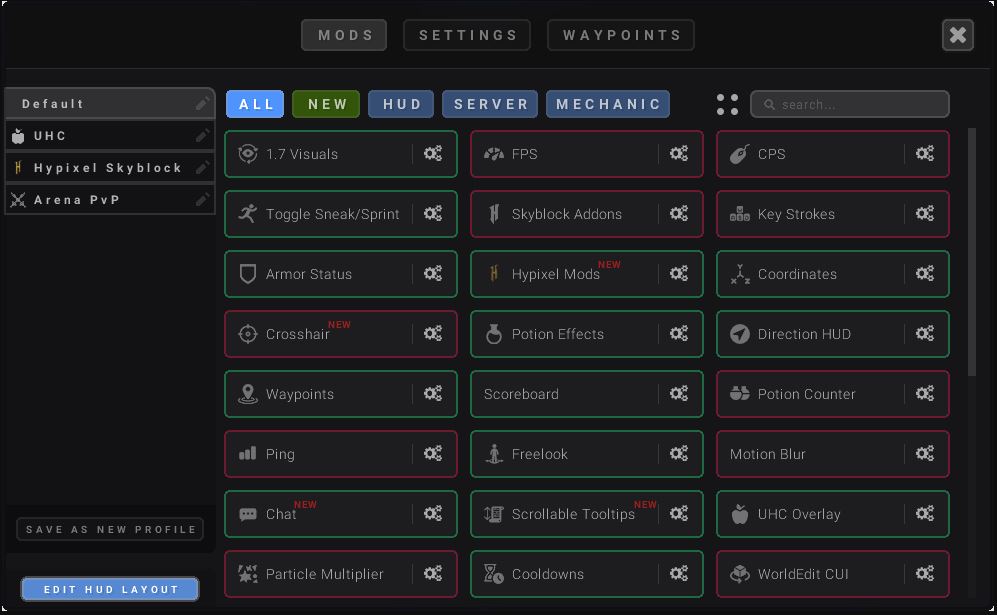
Minecraft Mods in Lunar Client (Defaultly Active)
These Minecraft mods make up the default configuration of Lunar Client at the time of writing. That means they are active right away after downloading the client, but each can be deactivated easily by clicking them over to red should you choose to.- 1.7 Visuals
- Armor Status
- Boss Bar
- Chat
- Cooldowns
- Coordinates
- Direction HUD
- Freelook
- Hypixel Bedwars
- Hypixel Mods
- Lighting
- Menu Blur
- NameTags
- Pack Organizer
- Potion Effects
- Saturation
- Scoreboard
- Screenshot Uploader
- Scrollable Tooltips
- Tab Editor
- Team View
- Titles
- Toggle Sneak/Sprint
- Waypoints
- Zoom
Minecraft Mods in Lunar Client (Defaultly Inactive)
These Minecraft mods are included in Lunar Client, but by default, they’re inactive. It’s easy to activate these mods in the client, however, if you’re looking to try them out! Simply visit the full mod list in the client and click them over to green.- 2D Items
- 3D Skins
- Auto Text Hot Key
- Better Sounds
- Block Outline
- Chunk Borders
- Clock
- Color Saturation
- Combo Counter
- CPS
- Crosshair
- Day Counter
- Fog Customizer
- FOV Changer
- FPS
- Glint Colorizer
- Hitbox
- Hit Color
- Hurt Cam
- Hypixel Quickplay
- Item Counter
- Item Physics
- Item Tracker
- Key Strokes
- Memory Usage
- Momentum Mod
- Motion Blur
- Mumble Link
- Nick Hider
- Pack Display
- Particle Changer
- Ping
- Playtime
- PvP Info
- Reach Display
- Replay Mod
- Server Address
- Shiny Pots
- Snaplook
- Stopwatch
- Time Changer
- TNT Countdown
- UHC Overlay
- WAILA
- Weather Changer
- WorldEdit CUI
Can You Use Your Own Mods?
You cannot currently use your own mods in Lunar Client at the time of writing, with players limited to its default selection. With 50+ mods to activate, however, the current list covers some amazing performance enhancers, quality-of-life mods, and exciting feature mods fitting all types of players. The team at Lunar Client is also constantly reviewing its mod list and looking for new options, so this list will evolve over time. Unlike mods, you can use your own texture packs at will when playing Minecraft via Lunar Client. You can also play previous versions of Minecraft in Lunar Client to revisit some of its most influential (and nostalgic) updates! As the official hosting partner of Lunar Client, you can set up your very own Minecraft server with us here and use code LUNAR at checkout for 25% off your first purchase.
您对这篇博客有何评价?
分享您的看法,帮助我们将博客做得更好!
不喜欢
一般
喜欢

需要游戏服务器吗?
租用一台游戏服务器,您可以和朋友们在极低延迟和自定义设置下私密游玩。从 110+ 款游戏中挑选您的最爱,邀请全球玩家,享受私密对战,或者按照您自己的规则建立属于您的在线社区。








获取第一手独家资讯!
订阅我们的电子邮件,获取有关我们托管游戏、公司新闻和独家优惠的最新动态。随时掌握一手资讯!













