

Minecraft 1.20 Release Date REVEALED
tarihinde yazan:

Paylaş:

X'te Paylaş

Facebook'ta Paylaş

Threads'te Paylaş

Bluesky'da Paylaş

Panoya Kopyala

E-posta ile Paylaş
The Minecraft 1.20 release date has finally officially been revealed, and it's sooner than you might think!
Let's dive right into the latest news on the Trails and Tales update and when players can finally expect to jump in for real.
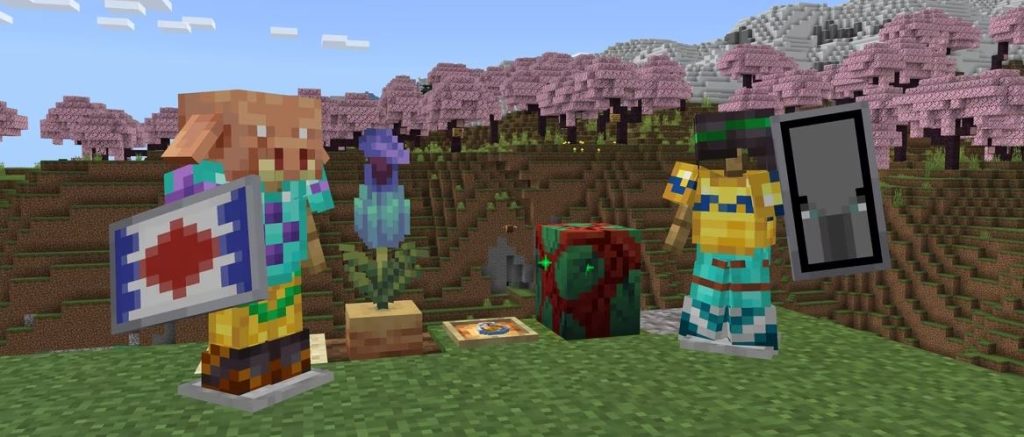 This gives players just over a week to prepare for the new adventures the update offers with its new biome, new mobs, new blocks, new systems, and plenty more.
Minecraft 1.20 Release Date REVEALED
The Minecraft 1.20 update will officially launch on June 7th, as Mojang announced on May 26th.
This gives players just over a week to prepare for the new adventures the update offers with its new biome, new mobs, new blocks, new systems, and plenty more.
What's Coming in Minecraft 1.20?
Minecraft 1.20 will introduce the following new features and changes upon its launch:- New Systems - Archaeology, Armor Trims, Smithing (overhaul)
- New Biome - Cherry Blossom
- New Mobs - Camels, Sniffers, Vex (visual overhaul)
- New Items - Brush, Ancient Flowers, New Spawn Eggs, Smithing and Armor Trim templates, Pottery Shards, Pink Flowers, Pink Petals, Sniffer Eggs, Piglin Heads
- New Blocks - Chiseled Bookshelves, Pots, Cherry Tree wood set, Bamboo wood set, Hanging Signs, Pots
How to Try Minecraft 1.20 Now
While Minecraft 1.20 isn't here quite yet, players can still check out some of the update's features ahead of time courtesy of Mojang's many snapshot and pre-release updates. These updates have come out over the last few months to help test new features coming on launch day, and players can even bring current worlds over to test these new features once properly set up. Just be warned that you should back up any and all saves when testing snapshot and pre-release updates, as they have the potential to corrupt worlds. To install the latest Minecraft 1.20 pre-release update, pre-release #6, simply follow the instructions below!- Open the Minecraft launcher
- Enable snapshots in the Installations tab
- From this tab, select "New Installation", then "Latest Snapshot", then "Create"
- Before clicking Play, simply select the pre-release installation
Kendi
Minecraft sunucunuzu oluşturun
Minecraft sunucunuzu oluşturun
Bir plan seçin, bir oyun belirleyin ve arkadaşlarınızla oynayın!
Bültenimize Katılın
Oyun dünyasındaki en son güncellemeler için abone olun!

Discord'umuza Katılın
20.000'den fazla kafa dengi üyeden oluşan topluluğumuzun bir parçası olun!
Bu blogu nasıl değerlendirirsiniz?
Fikrinizi paylaşın ve bloglarımızı daha da iyi hale getirmemize yardımcı olun!
Beğenmedim
Nötr
Beğendim

Bir oyun sunucusuna mı ihtiyacınız var?
Siz ve arkadaşlarınızın düşük gecikme süresi ve özel ayarlarla özel olarak oynayabileceğiniz bir oyun sunucusu kiralayın. 110+ oyun arasından seçim yapın, dünyanın dört bir yanından insanları davet edin ve özel maçların keyfini çıkarın veya kendi kurallarınızla kendi çevrimiçi topluluğunuzu oluşturun.

İlgili Bloglar







İLK SENİN HABERİN OLSUN!
Barındırdığımız oyunlar, şirket haberleri ve özel fırsatlar hakkında güncellemeler için e-posta listemize katılın. Haberdar olun!













