

Minecraft 1.20.3 Pre-Release 2: Patch Notes & How to Install
tarihinde yazan:

Paylaş:

X'te Paylaş

Facebook'ta Paylaş

Threads'te Paylaş

Bluesky'da Paylaş

Panoya Kopyala

E-posta ile Paylaş
With all the hype surrounding Minecraft 1.21, we nearly forgot Minecraft 1.20.3 was on its way! So, today, we explore Minecraft 1.20.3 Pre-Release 2, what changes it brings, and how to install it step by step so you can jump into the game.
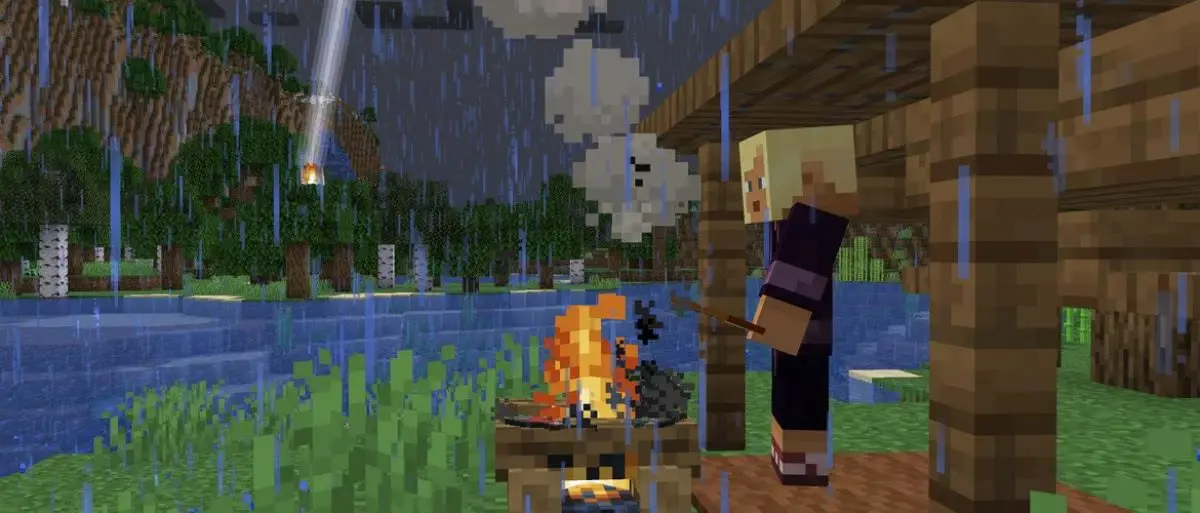 Minecraft 1.20.3 Pre-Release 2 mainly includes bug fixes, but it is not without experimental options for Minecraft 1.21! Players looking to install this pre-release can enjoy either version by enabling Minecraft 1.21 in the experimental options.
Additionally, fans may notice Minecraft 1.21’s breeze mob is a little more destructive! Wind charges now break decorated pots, chorus flowers, and pointed dripstone.
Minecraft 1.20.3 Pre-Release 2 mainly includes bug fixes, but it is not without experimental options for Minecraft 1.21! Players looking to install this pre-release can enjoy either version by enabling Minecraft 1.21 in the experimental options.
Additionally, fans may notice Minecraft 1.21’s breeze mob is a little more destructive! Wind charges now break decorated pots, chorus flowers, and pointed dripstone.
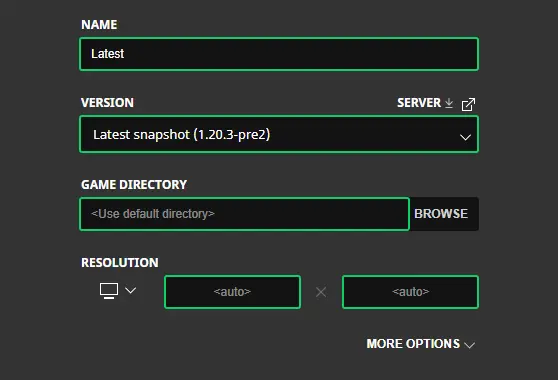 Having trouble installing Minecraft 1.20.3 Pre-Release 2? Below, we go over the entire process step by step, and by its end, you will be enjoying the latest update, too!
 Pre-releases are always better with friends! Minecraft 1.20.3 Pre-Release 2 servers can be created for free through home hosting, but we recommend paid hosting options for ease of use and performance. Especially with pre-releases since they can be buggy!
Paid hosting is offered here at BisectHosting and many other places around the web. In either case, no less than 4GB of server RAM is recommended.
Pre-releases are always better with friends! Minecraft 1.20.3 Pre-Release 2 servers can be created for free through home hosting, but we recommend paid hosting options for ease of use and performance. Especially with pre-releases since they can be buggy!
Paid hosting is offered here at BisectHosting and many other places around the web. In either case, no less than 4GB of server RAM is recommended.
Details and Adjustments
Minecraft 1.20.3 Pre-Release 2 mainly includes bug fixes, but it is not without experimental options for Minecraft 1.21! Players looking to install this pre-release can enjoy either version by enabling Minecraft 1.21 in the experimental options.
Additionally, fans may notice Minecraft 1.21’s breeze mob is a little more destructive! Wind charges now break decorated pots, chorus flowers, and pointed dripstone.
Patch Notes
Changes
- Breeze wind charges now break decorated pots, chorus flowers, and pointed dripstone blocks upon collision
Fixed Bugs In 1.20.3 Pre-Release 2
- MC-265291 - Command suggestions within the command block interface don't disappear when the console command field is unselected
- MC-265426 - Certain inputs pressed whilst in F3+Esc Pause will be carried out after game is unpaused
- MC-265772 - A command with multiple redirect modifiers can ignore "maxCommandChainLength"
- MC-265788 - The "Start free Snapshot Realm" element can be selected or remain selected causing its tooltip to erroneously be visible when other interfaces are open
- MC-266075 - "Player teleports" not shown in subtitles when an ender pearl lands far from the thrower
- MC-266206 - Renamed arrows are reffered as just "Arrow" in the death message
- MC-266380 - Rain texture doesn't loop correctly
- MC-266439 - Decorated pots with loot table desync item consumption if it cannot be inserted in the pot
- MC-266496 - Wind Charge can not break Decorated Pots
- MC-266516 - Arrows on fire set breezes on fire, despite being deflected
- MC-266728 - The "styled" number format uses the resource location "result"
- MC-266886 - Backspace in Anvil no longer works when renaming an item
- MC-266890 - The minecraft:grass item does not get upgraded to minecraft:short_grass
How to Install Minecraft 1.20.3 Pre-Release 2
Having trouble installing Minecraft 1.20.3 Pre-Release 2? Below, we go over the entire process step by step, and by its end, you will be enjoying the latest update, too!
- Open the Minecraft Launcher.
- Select the ‘Installations’ tab at the top.
- Click ‘New Installation.’
- Choose a name and select ‘Latest Snapshot’ from the dropdown menu beneath ‘Version.’
- Click save.
How to make Minecraft 1.20.3 Pre-Release 2 Servers
Pre-releases are always better with friends! Minecraft 1.20.3 Pre-Release 2 servers can be created for free through home hosting, but we recommend paid hosting options for ease of use and performance. Especially with pre-releases since they can be buggy!
Paid hosting is offered here at BisectHosting and many other places around the web. In either case, no less than 4GB of server RAM is recommended.
Minecraft 1.20.3 Pre-Release 2: Patch Notes & How to Install
While not as exciting as new additions to Minecraft 1.21, bug fixes should always be appreciated. After all, a stable gaming experience is a happy gaming experience, much like the servers we proudly host. Until Next Time, BisectHosting =)Kendi
Minecraft sunucunuzu oluşturun
Minecraft sunucunuzu oluşturun
Bir plan seçin, bir oyun belirleyin ve arkadaşlarınızla oynayın!
Bültenimize Katılın
Oyun dünyasındaki en son güncellemeler için abone olun!

Discord'umuza Katılın
20.000'den fazla kafa dengi üyeden oluşan topluluğumuzun bir parçası olun!
Bu blogu nasıl değerlendirirsiniz?
Fikrinizi paylaşın ve bloglarımızı daha da iyi hale getirmemize yardımcı olun!
Beğenmedim
Nötr
Beğendim

Bir oyun sunucusuna mı ihtiyacınız var?
Siz ve arkadaşlarınızın düşük gecikme süresi ve özel ayarlarla özel olarak oynayabileceğiniz bir oyun sunucusu kiralayın. 110+ oyun arasından seçim yapın, dünyanın dört bir yanından insanları davet edin ve özel maçların keyfini çıkarın veya kendi kurallarınızla kendi çevrimiçi topluluğunuzu oluşturun.

İlgili Bloglar







İLK SENİN HABERİN OLSUN!
Barındırdığımız oyunlar, şirket haberleri ve özel fırsatlar hakkında güncellemeler için e-posta listemize katılın. Haberdar olun!













