
7 Days to Die Difficulty Settings: Stats, Differences, & How to Change
tarihinde yazan:

Paylaş:

X'te Paylaş

Facebook'ta Paylaş

Threads'te Paylaş

Bluesky'da Paylaş

Panoya Kopyala

E-posta ile Paylaş
Are you constantly dying from Blood Moon hordes? Perhaps the world seed you generated seems too easy, and you're looking for a challenge. If so, you can change the difficulty in your 7 Days to Die world seed, and we’re here to show you how!
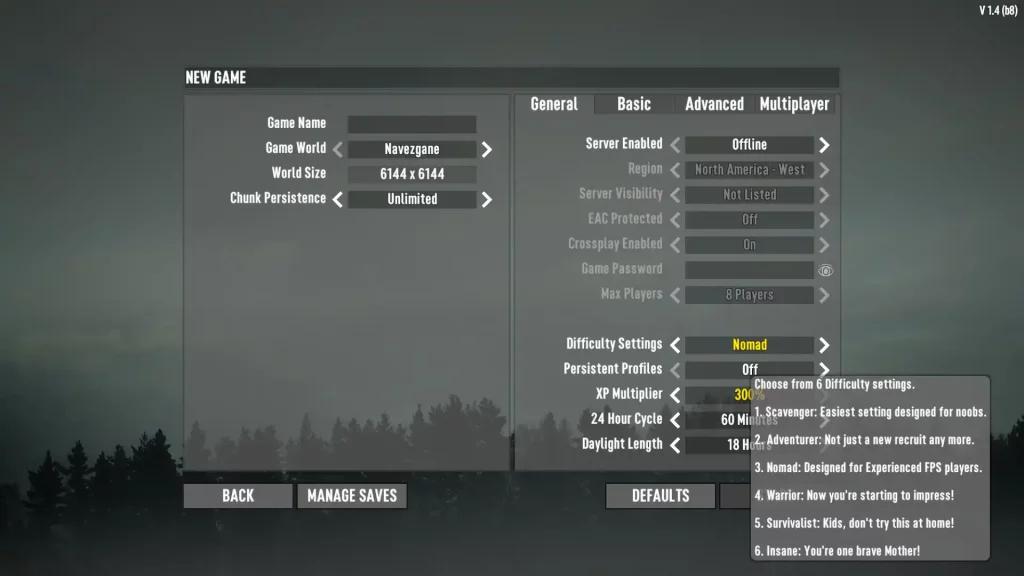 7 Days to Die has six different difficulty settings: Scavenger, Adventurer, Nomad, Warrior, Survivalist, and Insane. Raising the difficulty level increases the damage done by zombies to players and reduces the damage done by players to zombies. Note that as of Alpha 19, changing the difficulty setting doesn't affect the world's game stage, which means the undead still gets progressively more difficult as normal.
Below is a detailed comparison of the different difficulty settings in 7 Days to Die, which includes information on each option's damage values:
7 Days to Die has six different difficulty settings: Scavenger, Adventurer, Nomad, Warrior, Survivalist, and Insane. Raising the difficulty level increases the damage done by zombies to players and reduces the damage done by players to zombies. Note that as of Alpha 19, changing the difficulty setting doesn't affect the world's game stage, which means the undead still gets progressively more difficult as normal.
Below is a detailed comparison of the different difficulty settings in 7 Days to Die, which includes information on each option's damage values:
 Changing the difficulty in 7 Days to Die is possible by setting up a new game. Find this option below the Max Players menu item in the General tab. Here, scroll through the six difficulty settings until you reach your preferred choice.
It’s also possible to change the difficulty setting in a particular 7 Days to Die server or save the file after creating the world seed. Do so by returning to the game's main menu and selecting Continue Game. From here, select your server or save file, which should show the settings you can change, including the difficulty settings.
Changing the difficulty in 7 Days to Die is possible by setting up a new game. Find this option below the Max Players menu item in the General tab. Here, scroll through the six difficulty settings until you reach your preferred choice.
It’s also possible to change the difficulty setting in a particular 7 Days to Die server or save the file after creating the world seed. Do so by returning to the game's main menu and selecting Continue Game. From here, select your server or save file, which should show the settings you can change, including the difficulty settings.
All 7 Days to Die Difficulty Settings & Effects
7 Days to Die has six different difficulty settings: Scavenger, Adventurer, Nomad, Warrior, Survivalist, and Insane. Raising the difficulty level increases the damage done by zombies to players and reduces the damage done by players to zombies. Note that as of Alpha 19, changing the difficulty setting doesn't affect the world's game stage, which means the undead still gets progressively more difficult as normal.
Below is a detailed comparison of the different difficulty settings in 7 Days to Die, which includes information on each option's damage values:
Scavenger
- Difficulty Level: Easiest
- In-Game Description: Easiest setting designed for noobs.
- Damage from Zombies: 50%
- Damage from Players: 200%
Adventurer
- Difficulty Level: Easy
- In-Game Description: Not just a new recruit any more.
- Damage from Zombies: 75%
- Damage from Players: 150%
Nomad
- Difficulty Level: Normal
- In-Game Description: Designed for experienced FPS players.
- Damage from Zombies: 100%
- Damage from Players: 100%
Warrior
- Difficulty Level: Hard
- In-Game Description: Now you’re starting to impress.
- Damage from Zombies: 150%
- Damage from Players: 83%
Survivalist
- Difficulty Level: Harder
- In-Game Description: Kids don’t try this at home!
- Damage from Zombies: 200%
- Damage from Players: 66%
Insane
- Difficulty Level: Hardest
- In-Game Description: You’re one brave Mother!
- Damage from Zombies: 250%
- Damage from Players: 50%
How to Change Difficulty Settings
Changing the difficulty in 7 Days to Die is possible by setting up a new game. Find this option below the Max Players menu item in the General tab. Here, scroll through the six difficulty settings until you reach your preferred choice.
It’s also possible to change the difficulty setting in a particular 7 Days to Die server or save the file after creating the world seed. Do so by returning to the game's main menu and selecting Continue Game. From here, select your server or save file, which should show the settings you can change, including the difficulty settings.Kendi
7 Days to Die sunucunuzu oluşturun
7 Days to Die sunucunuzu oluşturun
Bir plan seçin, bir oyun belirleyin ve arkadaşlarınızla oynayın!
Bültenimize Katılın
Oyun dünyasındaki en son güncellemeler için abone olun!

Discord'umuza Katılın
20.000'den fazla kafa dengi üyeden oluşan topluluğumuzun bir parçası olun!
Bu blogu nasıl değerlendirirsiniz?
Fikrinizi paylaşın ve bloglarımızı daha da iyi hale getirmemize yardımcı olun!
Beğenmedim
Nötr
Beğendim

Bir oyun sunucusuna mı ihtiyacınız var?
Siz ve arkadaşlarınızın düşük gecikme süresi ve özel ayarlarla özel olarak oynayabileceğiniz bir oyun sunucusu kiralayın. 110+ oyun arasından seçim yapın, dünyanın dört bir yanından insanları davet edin ve özel maçların keyfini çıkarın veya kendi kurallarınızla kendi çevrimiçi topluluğunuzu oluşturun.

İlgili Bloglar







İLK SENİN HABERİN OLSUN!
Barındırdığımız oyunlar, şirket haberleri ve özel fırsatlar hakkında güncellemeler için e-posta listemize katılın. Haberdar olun!













