

Minecraft 1.20 Release Candidate 1: Patch Notes & Servers
Опубликовано автором

Поделиться:

Поделиться в X

Поделиться в Facebook

Поделиться в Threads

Поделиться в Bluesky

Скопировать в буфер обмена

Поделиться по email
The first release candidate has arrived just one week before Trails & Tales goes live! So, today we explore Minecraft 1.20 Release Candidate 1, the bugs it will fix, and how you can set up a server for Trails & Tale’s official release.
 Fixed Bugs In 1.20 Release Candidate 1
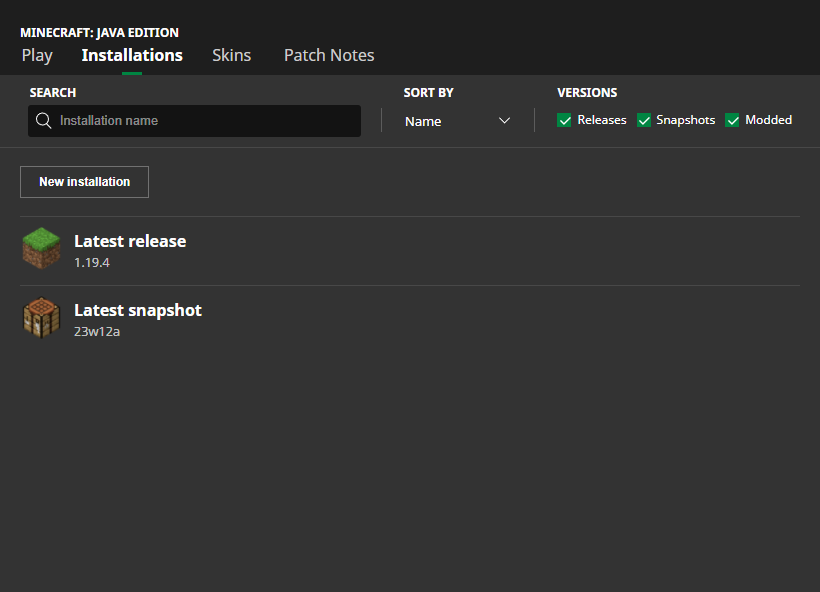 In Java Edition, installing Minecraft 1.20 Release Candidate 1 is done right from the Minecraft client. Players need only open up the Minecraft Launcher and enable snapshots in the ‘Installations’ tab. From there, click “New Installation,” select “Latest Snapshot” in the drop-down menu, and click create. Your new Minecraft 1.20 Trails & Tales installation will now be a selectable option before clicking play.
Please note snapshots, pre-releases, and release candidates can corrupt worlds! Ensure backups have been taken.
In Java Edition, installing Minecraft 1.20 Release Candidate 1 is done right from the Minecraft client. Players need only open up the Minecraft Launcher and enable snapshots in the ‘Installations’ tab. From there, click “New Installation,” select “Latest Snapshot” in the drop-down menu, and click create. Your new Minecraft 1.20 Trails & Tales installation will now be a selectable option before clicking play.
Please note snapshots, pre-releases, and release candidates can corrupt worlds! Ensure backups have been taken.
 Interested in trying the Trails & Tales with friends? Minecraft 1.20 Release Candidate 1 servers can be created for free through home hosting, but we recommend paid hosting options for ease of use and performance. Especially with pre-releases since they can be buggy!
Paid hosting is offered here at BisectHosting and many other places around the web. In either case, no less than 4GB of server RAM is recommended.
Interested in trying the Trails & Tales with friends? Minecraft 1.20 Release Candidate 1 servers can be created for free through home hosting, but we recommend paid hosting options for ease of use and performance. Especially with pre-releases since they can be buggy!
Paid hosting is offered here at BisectHosting and many other places around the web. In either case, no less than 4GB of server RAM is recommended.
Details and Adjustments
https://twitter.com/slicedlime/status/1663904298223247360Minecraft 1.20 Release Candidate 1 is the final testing stage before the release date of June 7th. This means last-minute bug fixes and experiencing the 1.20 update in what could very well be its finished state. Here is hoping a release candidate 2 is not needed!
Patch Notes
Fixed Bugs In 1.20 Release Candidate 1
- MC-256477 - Knowledge books can’t be placed in chiseled bookshelves
- MC-262853 - Pitcher plant breaks and floats when growing without enough light
How to Install Minecraft 1.20 Release Candidate 1
In Java Edition, installing Minecraft 1.20 Release Candidate 1 is done right from the Minecraft client. Players need only open up the Minecraft Launcher and enable snapshots in the ‘Installations’ tab. From there, click “New Installation,” select “Latest Snapshot” in the drop-down menu, and click create. Your new Minecraft 1.20 Trails & Tales installation will now be a selectable option before clicking play.
Please note snapshots, pre-releases, and release candidates can corrupt worlds! Ensure backups have been taken.
How to make Minecraft 1.20 Release Candidate 1 Servers
Interested in trying the Trails & Tales with friends? Minecraft 1.20 Release Candidate 1 servers can be created for free through home hosting, but we recommend paid hosting options for ease of use and performance. Especially with pre-releases since they can be buggy!
Paid hosting is offered here at BisectHosting and many other places around the web. In either case, no less than 4GB of server RAM is recommended.
Minecraft 1.20 Trails & Tales Anticipation!
Excitement is in the air as the release date grows near! What’s your most anticipated feature of Minecraft 1.20 Trails & Tales? It is most definitely sniffers for me! Until Next Time, BisectHosting =)Создайте свой собственный
сервер Minecraft
сервер Minecraft
Выберите тариф, укажите игру и играйте с друзьями!
Подпишитесь на нашу рассылку
Подпишитесь, чтобы получать последние новости из мира игр!

Присоединяйтесь к нашему Discord
Станьте частью нашего сообщества, в котором уже более 20000 единомышленников!
Как бы вы оценили этот блог?
Поделитесь своим мнением и помогите нам сделать наши блоги еще лучше!
Не понравилось
Нейтрально
Понравилось

Нужен игровой сервер?
Арендуйте игровой сервер, где вы и ваши друзья сможете играть в закрытом режиме с низкой задержкой и собственными настройками. Выбирайте из 110+ игр, приглашайте людей со всего мира и наслаждайтесь приватными матчами или создайте свое собственное онлайн-сообщество со своими правилами.

Похожие статьи







УЗНАЙТЕ ВСЕ ПЕРВЫМИ!
Подпишитесь на нашу рассылку, чтобы получать обновления о наших играх, новости компании и эксклюзивные предложения. Будьте в курсе!













