

Minecraft 1.20 Pre-Release 6: Bug Fixes, Loot Tables, & More
Опубликовано автором

Поделиться:

Поделиться в X

Поделиться в Facebook

Поделиться в Threads

Поделиться в Bluesky

Скопировать в буфер обмена

Поделиться по email
One by one, new pre-releases arrive, bringing us ever closer to the day Trails & Tales goes live. But until that time, we explore Minecraft 1.20 Pre-Release 6, the bugs that it will fix, and how you too can play pre-release 6.
 Technical Changes In 1.20 Pre-Release 6
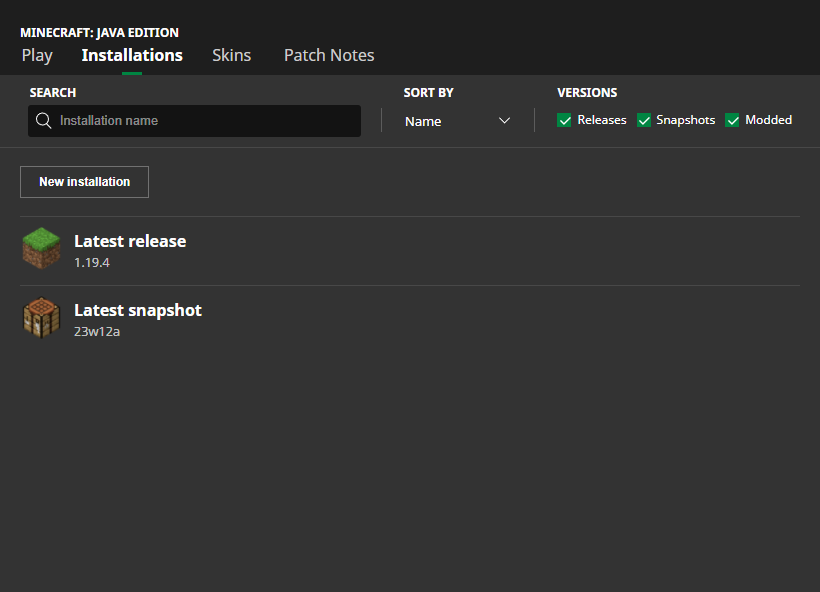 In Java Edition, installing Minecraft 1.20 Pre-Release 6 is done right from the Minecraft client. Players need only open up the Minecraft Launcher and enable snapshots in the ‘Installations’ tab. From there, click “New Installation,” select “Latest Snapshot” in the drop-down menu, and click create. Your new Minecraft 1.20 pre-release installation will now be a selectable option before clicking play.
Please note snapshots and pre-releases can corrupt worlds! Ensure backups have been taken.
In Java Edition, installing Minecraft 1.20 Pre-Release 6 is done right from the Minecraft client. Players need only open up the Minecraft Launcher and enable snapshots in the ‘Installations’ tab. From there, click “New Installation,” select “Latest Snapshot” in the drop-down menu, and click create. Your new Minecraft 1.20 pre-release installation will now be a selectable option before clicking play.
Please note snapshots and pre-releases can corrupt worlds! Ensure backups have been taken.
 Interested in trying the pre-release with friends? Minecraft 1.20 Pre-Release 6 servers can be created for free through home hosting, but we recommend paid hosting options for ease of use and performance. Especially with pre-releases since they can be buggy!
Paid hosting is offered here at BisectHosting and many other places around the web. In either case, no less than 4GB of server RAM is recommended.
Interested in trying the pre-release with friends? Minecraft 1.20 Pre-Release 6 servers can be created for free through home hosting, but we recommend paid hosting options for ease of use and performance. Especially with pre-releases since they can be buggy!
Paid hosting is offered here at BisectHosting and many other places around the web. In either case, no less than 4GB of server RAM is recommended.
Details and Adjustments
https://twitter.com/slicedlime/status/1661814440138878976Minecraft 1.20 Pre-Release 6 adds countless bug fixes alongside a few quality-of-life changes. No longer will commands be needed to put jack-o-lanterns on armor stands, iron golems can now spawn within transparent blocks, and end gateways will not appear more than once. No new features, but exciting nonetheless!
Patch Notes
Technical Changes In 1.20 Pre-Release 6
- “item”: “minecraft:air” can no longer be used in datapack recipes
- Ingredients in array form are now also allowed in smithing_trim and smithing_transform recipes on fields template, base and addition
- Those fields also allow empty arrays, which signalize that slot needs to be left empty
- Random Sequences - The ID of the random sequence is now an optional field. If no sequence name is given, loot is drawn using a non-deterministic random source.
- MC-237042 - Killing players in the sneaking state that have their sneak option set to “Toggle” in their accessibility settings, results in other players not being able to see them in this state when they respawn
- MC-241326 - Thomas Guimbretière’s name is listed twice and misspelt in the credits
- MC-260411 - Re-summoned dragons don’t spawn end gateways when exiting the world before killing the dragon
- MC-262340 - Iron Golems can spawn on transparent blocks
- MC-262575 - Company names are still inconsistent in the credits
- uniform font has been updated to use Unifont 15.0.03 (was 15.0.01 last pre-release)
- MC-120158 - Anvils and other falling_blocks with HurtEntities set to true kill items and xp orbs
- MC-261294 - Jack o’lantern can be placed on the player or armor stand head without commands and without appearing the blur
- MC-262334 - Item display entities have wrong lighting when they’re rotated
- MC-262504 - Recipes for colored wool, carpets, and beds in the recipe book are not grouped
- MC-262513 - Blocks placed in the spot of a previously broken block will display the first frame of the breaking animation until updated
- MC-262514 - Unbreakable blocks display the first breaking animation frame when attempting to mine them
- MC-262690 - The player can still jump from the edge of the honey block
- MC-262730 - Biomes being partially overwritten / regenerated in 1.20pre2 inside old world
- MC-262773 - Markers, interaction, and display entities prevent weighted pressure plates from deactivating
- MC-262778 - Losing control of a ridden mob with levitation and then re-gaining control causes levitation to persist indefinitely
- MC-262797 - Book model not rendering in Enchanting Table GUI
- MC-262801 - Z-fighting occurs on trimmed enchanted armor in the inventory
How to Install Minecraft 1.20 Pre-Release 6
In Java Edition, installing Minecraft 1.20 Pre-Release 6 is done right from the Minecraft client. Players need only open up the Minecraft Launcher and enable snapshots in the ‘Installations’ tab. From there, click “New Installation,” select “Latest Snapshot” in the drop-down menu, and click create. Your new Minecraft 1.20 pre-release installation will now be a selectable option before clicking play.
Please note snapshots and pre-releases can corrupt worlds! Ensure backups have been taken.
How to make Minecraft 1.20 Pre-Release 6 Servers
Interested in trying the pre-release with friends? Minecraft 1.20 Pre-Release 6 servers can be created for free through home hosting, but we recommend paid hosting options for ease of use and performance. Especially with pre-releases since they can be buggy!
Paid hosting is offered here at BisectHosting and many other places around the web. In either case, no less than 4GB of server RAM is recommended.
Minecraft 1.20 Pre-Release 6: Bug Fixes, Loot Tables, & More
Minecraft 1.20’s official release appears to be just on the horizon, but without a date, we can only speculate. When do you think Minecraft 1.20 will arrive? Surely before summertime! Until Next Time, BisectHosting =)Создайте свой собственный
сервер Minecraft
сервер Minecraft
Выберите тариф, укажите игру и играйте с друзьями!
Подпишитесь на нашу рассылку
Подпишитесь, чтобы получать последние новости из мира игр!

Присоединяйтесь к нашему Discord
Станьте частью нашего сообщества, в котором уже более 20000 единомышленников!
Как бы вы оценили этот блог?
Поделитесь своим мнением и помогите нам сделать наши блоги еще лучше!
Не понравилось
Нейтрально
Понравилось

Нужен игровой сервер?
Арендуйте игровой сервер, где вы и ваши друзья сможете играть в закрытом режиме с низкой задержкой и собственными настройками. Выбирайте из 110+ игр, приглашайте людей со всего мира и наслаждайтесь приватными матчами или создайте свое собственное онлайн-сообщество со своими правилами.

Похожие статьи







УЗНАЙТЕ ВСЕ ПЕРВЫМИ!
Подпишитесь на нашу рассылку, чтобы получать обновления о наших играх, новости компании и эксклюзивные предложения. Будьте в курсе!













