How to Repair Items in Minecraft
Publicado em por

Partilhar:

Partilhar no X

Partilhar no Facebook

Partilhar no Threads

Partilhar no Bluesky

Copiar para a Área de Transferência

Partilhar por e-mail
A treasured item never needs to go away! A little love and care, and it is as good as the day it was made. So, today, we explain every Minecraft repair option in “How to Repair Items in Minecraft.”
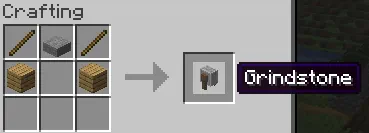 The first of the three options for repairing in Minecraft is exclusively for non-enchanted items. Simply put two identical tools, weapons, or pieces of armor into the crafting grid, and it will combine the durability. This can also be done within a grindstone, which removes enchantments, granting a little XP as well.
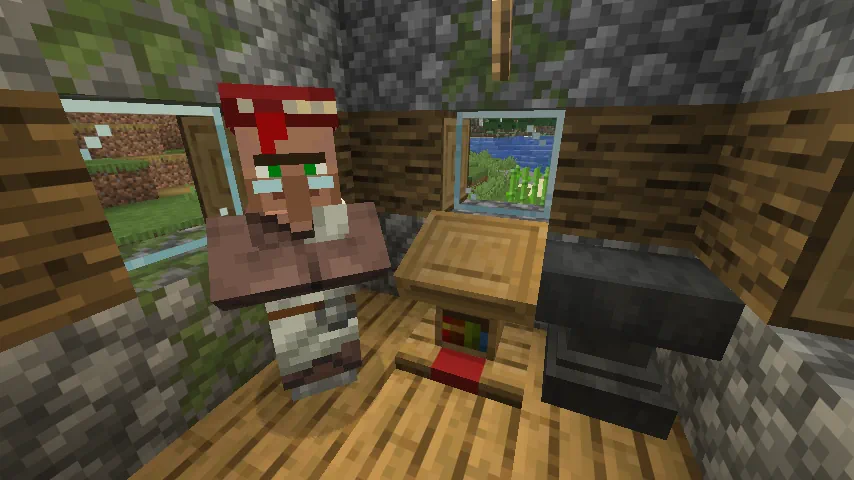 The next option for repairing items within Minecraft is the mending enchantment. Arguably the strongest in the game, it automatically consumes XP points to repair the tool, weapon, or armor it has been applied to, effectively making it last forever. This effect is intended to be balanced by having mending books be quite rare, but by repeatedly breaking and placing the lectern job block of a librarian villager, the trades can be reset until mending appears. The exact steps for this are as follows:
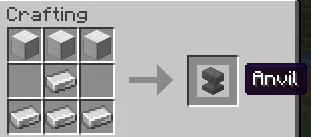 The final method for repairing in Minecraft is placing an item within an anvil alongside a second identical item. Unlike the first option, this allows enchanted items to be repaired or merged for an XP cost. However, every repair done in this way will gradually make the cost increase until it surpasses 50 levels. After that, the item can no longer be repaired as the anvil will state the level cost is too high.
How to Repair Items in Minecraft
Non-Enchanted Items
The first of the three options for repairing in Minecraft is exclusively for non-enchanted items. Simply put two identical tools, weapons, or pieces of armor into the crafting grid, and it will combine the durability. This can also be done within a grindstone, which removes enchantments, granting a little XP as well.
Mending Enchantment
The next option for repairing items within Minecraft is the mending enchantment. Arguably the strongest in the game, it automatically consumes XP points to repair the tool, weapon, or armor it has been applied to, effectively making it last forever. This effect is intended to be balanced by having mending books be quite rare, but by repeatedly breaking and placing the lectern job block of a librarian villager, the trades can be reset until mending appears. The exact steps for this are as follows:
- Block in a jobless villager.
- Place a lectern block.
- After the villager becomes a librarian, check its trades.
- If no mending trade is present, break the lectern job block.
- Repeat steps 1 through 4 until a mending trade appears.
Anvil Repairing
The final method for repairing in Minecraft is placing an item within an anvil alongside a second identical item. Unlike the first option, this allows enchanted items to be repaired or merged for an XP cost. However, every repair done in this way will gradually make the cost increase until it surpasses 50 levels. After that, the item can no longer be repaired as the anvil will state the level cost is too high.Cria o teu próprio servidor de
Minecraft
Minecraft
Escolhe um plano, seleciona um jogo e joga com os teus amigos!
Subscreve a nossa Newsletter
Subscreve para receber as últimas atualizações sobre tudo do mundo dos jogos!

Junta-te ao nosso Discord
Entra na nossa comunidade com mais de 20.000 membros com os mesmos interesses!
Como avaliarias este blog?
Partilha a tua opinião e ajuda-nos a tornar os nossos blogs ainda melhores!
Não gostei
Neutro
Gostei

Precisas de um servidor de jogo?
Aluga um servidor de jogo onde tu e os teus amigos podem jogar em privado com baixa latência e definições personalizadas. Escolhe entre 100+ jogos, convida pessoas de todo o mundo e desfruta de partidas privadas, ou constrói a tua própria comunidade online com as tuas próprias regras.

Blogs Relevantes







FICA A PAR DE TUDO!
Junta-te ao nosso e-mail para receberes atualizações sobre os nossos jogos alojados, notícias da empresa e promoções exclusivas. Fica a par!