

Hytale Teleporter Guide: How to Build & Use Teleporters
Publicado em por

Partilhar:

Partilhar no X

Partilhar no Facebook

Partilhar no Threads

Partilhar no Bluesky

Copiar para a Área de Transferência

Partilhar por e-mail
There's more than one way to zip around the world of Hytale. You can use a glider, you can (kind of) tromp around on mounts, and you can also use teleporters. Here we'll tell you everything you need to know about how to build and use teleporters in Hytale so you can spend more time adventuring than walking!
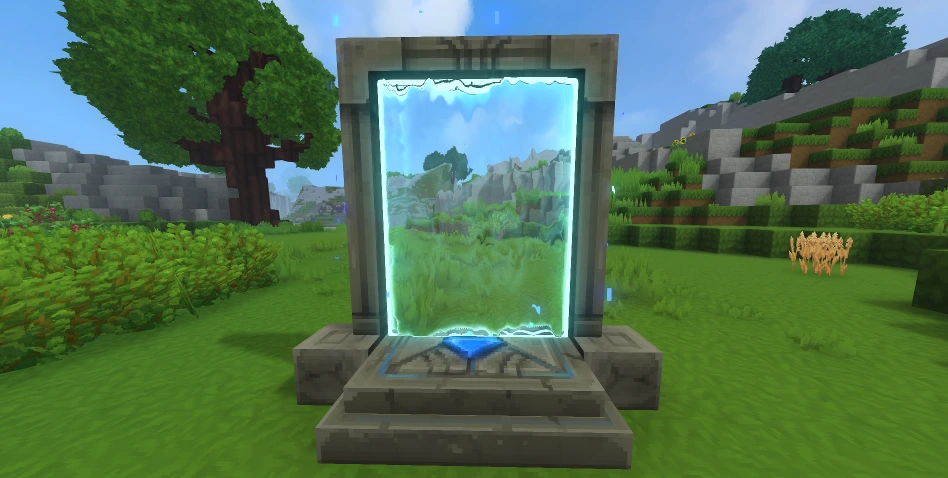 First things first: you need a teleporter before you can use a teleporter. Some of the materials you'll need are fairly rare. As a result, don't expect to hop in and start crafting teleporters right away. Before you can bend the fabric of space to your will, you'll need an Arcanist's Workbench.
First, you need to upgrade a standard Workbench to Tier 2 with the following:
First things first: you need a teleporter before you can use a teleporter. Some of the materials you'll need are fairly rare. As a result, don't expect to hop in and start crafting teleporters right away. Before you can bend the fabric of space to your will, you'll need an Arcanist's Workbench.
First, you need to upgrade a standard Workbench to Tier 2 with the following:
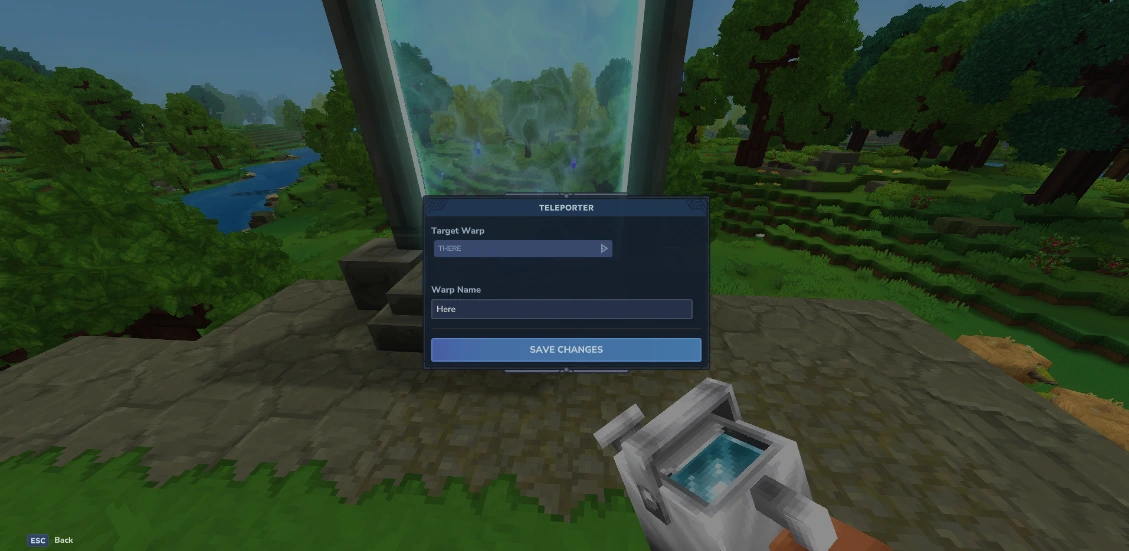 Once you've crafted your teleporter, you're still not ready to zip around. You need at least two teleporters planted in the world before you can use one. Once you have your teleporters planted, simply interact with them. Then, a small teleporter menu will open. Here you can set the name of the current teleporter you're using in the bar labeled "Warp Name," and you can choose the teleporter you'll travel to from the drop-down menu labeled "Target Warp."
Having a drop-down menu for only two teleporters might seem strange, but that's because you can place up to eight teleporters once you meet the right conditions. To earn the ability to place more teleporters, you need to gather memories using the Forgotten Temple.
This is how many memories you need to unlock more teleporters:
Once you've crafted your teleporter, you're still not ready to zip around. You need at least two teleporters planted in the world before you can use one. Once you have your teleporters planted, simply interact with them. Then, a small teleporter menu will open. Here you can set the name of the current teleporter you're using in the bar labeled "Warp Name," and you can choose the teleporter you'll travel to from the drop-down menu labeled "Target Warp."
Having a drop-down menu for only two teleporters might seem strange, but that's because you can place up to eight teleporters once you meet the right conditions. To earn the ability to place more teleporters, you need to gather memories using the Forgotten Temple.
This is how many memories you need to unlock more teleporters:
How to Build Hytale Teleporters
First things first: you need a teleporter before you can use a teleporter. Some of the materials you'll need are fairly rare. As a result, don't expect to hop in and start crafting teleporters right away. Before you can bend the fabric of space to your will, you'll need an Arcanist's Workbench.
First, you need to upgrade a standard Workbench to Tier 2 with the following:
- Copper Ingot: 30
- Iron Ingot: 20
- Linen Scraps: 20
- Thorium Ingot: 10
- Linen Scraps: 30
- Essence of Void: 20
- Azure Kelp: 2
- Azure Logs: 8
- Stone of Any Kind: 10
How to Use Hytale Teleporters
Once you've crafted your teleporter, you're still not ready to zip around. You need at least two teleporters planted in the world before you can use one. Once you have your teleporters planted, simply interact with them. Then, a small teleporter menu will open. Here you can set the name of the current teleporter you're using in the bar labeled "Warp Name," and you can choose the teleporter you'll travel to from the drop-down menu labeled "Target Warp."
Having a drop-down menu for only two teleporters might seem strange, but that's because you can place up to eight teleporters once you meet the right conditions. To earn the ability to place more teleporters, you need to gather memories using the Forgotten Temple.
This is how many memories you need to unlock more teleporters:
- 2 Teleporters: 0 Memories
- 3 Teleporters: 25 Memories
- 4 Teleporters: 50 Memories
- 6 Teleporters: 100 Memories
- 8 Teleporters: 200 Memories
Cria o teu próprio servidor de
Hytale
Hytale
Escolhe um plano, seleciona um jogo e joga com os teus amigos!
Subscreve a nossa Newsletter
Subscreve para receber as últimas atualizações sobre tudo do mundo dos jogos!

Junta-te ao nosso Discord
Entra na nossa comunidade com mais de 20.000 membros com os mesmos interesses!
Como avaliarias este blog?
Partilha a tua opinião e ajuda-nos a tornar os nossos blogs ainda melhores!
Não gostei
Neutro
Gostei

Precisas de um servidor de jogo?
Aluga um servidor de jogo onde tu e os teus amigos podem jogar em privado com baixa latência e definições personalizadas. Escolhe entre 110+ jogos, convida pessoas de todo o mundo e desfruta de partidas privadas, ou constrói a tua própria comunidade online com as tuas próprias regras.

Blogs Relevantes







FICA A PAR DE TUDO!
Junta-te ao nosso e-mail para receberes atualizações sobre os nossos jogos alojados, notícias da empresa e promoções exclusivas. Fica a par!













