

Minecraft 1.20 Snapshot: How to Try Out the Latest Update
Opublikowano przez

Udostępnij:

Udostępnij na X

Udostępnij na Facebooku

Udostępnij na Threads

Udostępnij na Bluesky

Skopiuj do schowka

Udostępnij przez e-mail
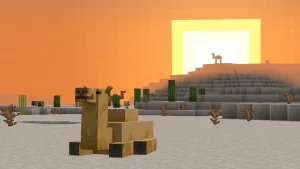
On October 19th, the very first Minecraft 1.20 snapshot goes live! Thankfully we already have the steps you will need to be the first player on Minecraft 1.20 riding a camel and hanging signs. So, without further ado, let us jump into how to install the latest snapshot one step at a time.
 In Java Edition, installing the Minecraft 1.20 Snapshot is done right from the Minecraft client. To quote the previous official snapshot blogs, players need only “open up the Minecraft Launcher and enable snapshots in the ‘Installations’ tab.”
Once done, click “New Installation,” select “Latest Snapshot” from the drop-down menu, and click create. Your new Minecraft 1.20 snapshot installation will now be a selectable option before clicking play. Once in game, click "Create New World," select "Datapacks," and enable the built in "bundle" and "update_1_20" datapacks before clicking "Create New World" again. Then, with the new world made, all that's left is selecting it and clicking play!
But be warned! Snapshots and pre-releases can corrupt worlds! Ensure backups are regularly taken.
In Java Edition, installing the Minecraft 1.20 Snapshot is done right from the Minecraft client. To quote the previous official snapshot blogs, players need only “open up the Minecraft Launcher and enable snapshots in the ‘Installations’ tab.”
Once done, click “New Installation,” select “Latest Snapshot” from the drop-down menu, and click create. Your new Minecraft 1.20 snapshot installation will now be a selectable option before clicking play. Once in game, click "Create New World," select "Datapacks," and enable the built in "bundle" and "update_1_20" datapacks before clicking "Create New World" again. Then, with the new world made, all that's left is selecting it and clicking play!
But be warned! Snapshots and pre-releases can corrupt worlds! Ensure backups are regularly taken.
 Interested in trying out the new features with friends? Snapshot servers can be created for free through home hosting, but we recommend paid hosting options for ease of use and performance. Especially with snapshots since they can be buggy!
Paid hosting is offered here at BisectHosting and many other places around the web. In either case, no less than 4GB of server RAM is recommended.
Interested in trying out the new features with friends? Snapshot servers can be created for free through home hosting, but we recommend paid hosting options for ease of use and performance. Especially with snapshots since they can be buggy!
Paid hosting is offered here at BisectHosting and many other places around the web. In either case, no less than 4GB of server RAM is recommended.
Details and Adjustments
The first Minecraft 1.20 snapshot will include the features showcased during Minecraft Live 2022. Unfortunately, that does not include the sniffer, which won the mob vote. For the specific additions, please see below.New Item
- Bundles
New Blocks
- Hanging Signs
- Chiseled Bookshelves
New Wood Set
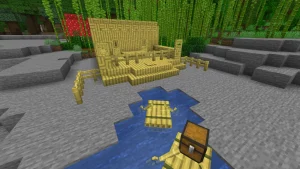
- Bamboo Wood Blocks
- Bamboo Excusive Block: Bamboo Mosaic
- Bamboo Exclusive Boat Re-Skin: Bamboo Rafts
New Mob
- Camels
How to Install the Minecraft 1.20 Snapshot
In Java Edition, installing the Minecraft 1.20 Snapshot is done right from the Minecraft client. To quote the previous official snapshot blogs, players need only “open up the Minecraft Launcher and enable snapshots in the ‘Installations’ tab.”
Once done, click “New Installation,” select “Latest Snapshot” from the drop-down menu, and click create. Your new Minecraft 1.20 snapshot installation will now be a selectable option before clicking play. Once in game, click "Create New World," select "Datapacks," and enable the built in "bundle" and "update_1_20" datapacks before clicking "Create New World" again. Then, with the new world made, all that's left is selecting it and clicking play!
But be warned! Snapshots and pre-releases can corrupt worlds! Ensure backups are regularly taken.
How to make Minecraft 1.20 Snapshot Servers
Interested in trying out the new features with friends? Snapshot servers can be created for free through home hosting, but we recommend paid hosting options for ease of use and performance. Especially with snapshots since they can be buggy!
Paid hosting is offered here at BisectHosting and many other places around the web. In either case, no less than 4GB of server RAM is recommended.
Minecraft 1.20 Snapshot: How to Try Out the Latest Update
The first of many Minecraft 1.20 features are nearly here! We hope they are as fun as they seem and camels are as cute as they appear to be. Yet, we among many can’t help but wonder what future Minecraft 1.20 content still awaits us. Hopefully, the next snapshot will include the update’s name and theme! Until Next Time, BisectHosting =)Zapisz się do newslettera
Subskrybuj, aby otrzymywać najnowsze informacje ze świata gier!

Dołącz do naszego Discorda
Zostań częścią naszej społeczności ponad 20,000 podobnie myślących członków!
Jak oceniasz ten wpis?
Podziel się swoją opinią i pomóż nam tworzyć jeszcze lepsze artykuły!
Nie podobał mi się
Neutralnie
Podobał mi się

Potrzebujesz serwera do gry?
Wynajmij serwer gier, na którym Ty i Twoi znajomi możecie grać prywatnie z niskim opóźnieniem i własnymi ustawieniami. Wybieraj spośród 110+ gier, zaproś ludzi z całego świata i ciesz się prywatnymi rozgrywkami lub zbuduj własną społeczność online z własnymi zasadami.

Powiązane wpisy







BĄDŹ NA BIEŻĄCO!
Dołącz do naszego newslettera, aby otrzymywać informacje o naszych hostowanych grach, nowościach firmowych i ekskluzywnych ofertach. Bądź na bieżąco!













