

Minecraft 1.20.4 live NOW: Patch Notes & What’s New
Publié le par

Partager :

Partager sur X

Partager sur Facebook

Partager sur Threads

Partager sur Bluesky

Copier dans le presse-papiers

Partager par e-mail
(Estimated Read Time: 2 minutes)
Just two days after Minecraft 1.20.3 appeared, Minecraft 1.20.4 is already here! So, today, we explore the Minecraft 1.20.4 update, the reason it suddenly went live, and what players will find inside.Details and Adjustments
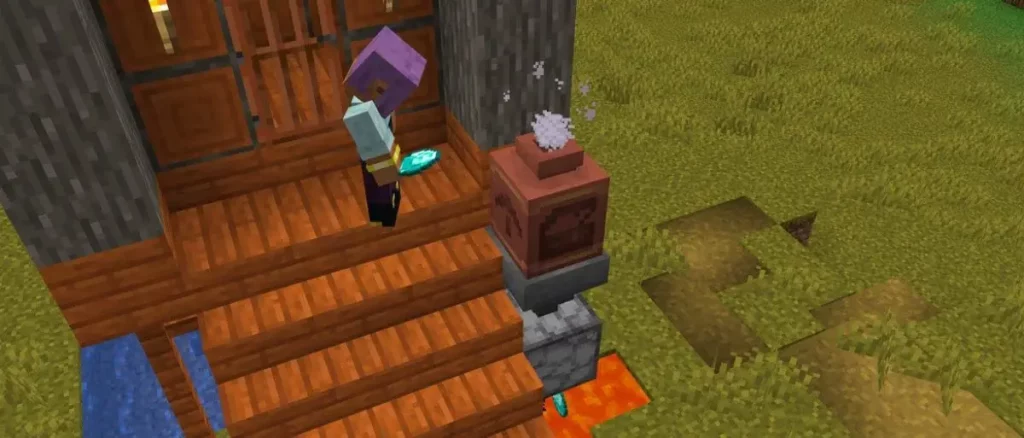 Despite usually adding a new feature or two, Minecraft 1.20.4 contains only one change. It turns out decorated pots were deleting items players placed inside, which explains why this update was released with such haste!
Patch Notes
FIXED BUGS IN 1.20.4
- MC-267185: Decorated pots can delete items when reloading the world
How to Install Minecraft 1.20.4
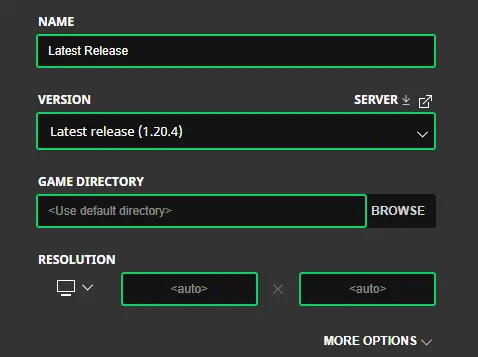 Players using the standard Java Edition client will find the update applied automatically upon clicking play. However, in the unfortunate case that something goes awry, the steps below will help create a new installation of 1.20.4.
- Open the “Installations” tab.
- Click "New Installation."
- Select "Latest Release" in the drop-down menu.
- Click create.
How to make Minecraft 1.20.4 Servers
 One bug fix is as good as any reason to start a new server with friends! Minecraft 1.20.4 servers can be created for free through home hosting, but we recommend paid hosting options for ease of use and performance. Especially with new releases, as they can be buggy!
Paid hosting is offered here at BisectHosting and many other places around the web. In either case, no less than 4GB of server RAM is recommended.
One bug fix is as good as any reason to start a new server with friends! Minecraft 1.20.4 servers can be created for free through home hosting, but we recommend paid hosting options for ease of use and performance. Especially with new releases, as they can be buggy!
Paid hosting is offered here at BisectHosting and many other places around the web. In either case, no less than 4GB of server RAM is recommended.
A Sudden Update's End
The speed at which Mojang fixed this bug was amazing to see, but we can’t help but feel bad for the unlucky players who lost something in between. This is why we recommend backups with every update, no matter how simple they may seem. Until Next Time, BisectHosting =)Créez votre propre
serveur Minecraft
serveur Minecraft
Choisissez un plan, sélectionnez un jeu et jouez avec vos amis !
Abonnez-vous à notre newsletter
Abonnez-vous pour recevoir les dernières mises à jour sur l'univers du jeu vidéo !

Rejoignez notre Discord
Rejoignez notre communauté de plus de 20 000 membres passionnés !
Comment évalueriez-vous ce blog ?
Partagez votre avis et aidez-nous à améliorer nos blogs !
Pas aimé
Neutre
Aimé

Besoin d'un serveur de jeu ?
Louez un serveur de jeu où vous et vos amis pouvez jouer en privé avec une faible latence et des paramètres personnalisés. Choisissez parmi 110+ jeux, invitez des joueurs du monde entier et profitez de parties privées, ou créez votre propre communauté en ligne avec vos propres règles.

Blogs pertinents







OBTENEZ LES DERNIÈRES INFOS !
Inscrivez-vous à nos e-mails pour obtenir des mises à jour sur nos jeux hébergés, des nouvelles de l'entreprise et des offres exclusives. Restez au courant !













