Miniatura
Minecraft 26.2 Chaos Cubed Update: Release Date, Patch Notes, & More
Publicado el por
Compartir:
Copiar

Compartir en X

Copiar

Compartir en Facebook

Copiar

Compartir en Threads

Copiar

Compartir en Bluesky

Copiar

Copiar al portapapeles

Correo electrónico

Compartir por correo electrónico

Minecraft 26.2 Chaos Cubed has bounced its way into public testing, kicking off the countdown to its release. So, today, we explore all the confirmed details of Minecraft Chaos Cubed, including the Minecraft 26.2 Chaos Cubed release date, patch notes, and how you too can try it early with a simple install.

Minecraft 26.2 Chaos Cubed Release Date
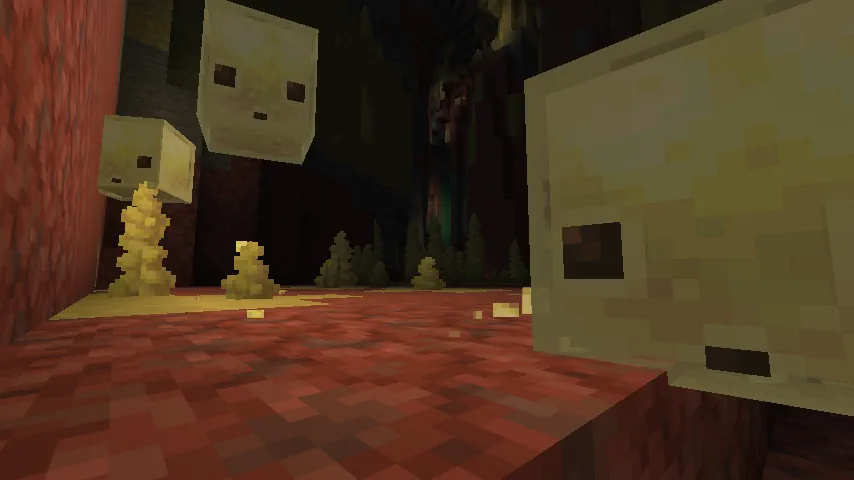
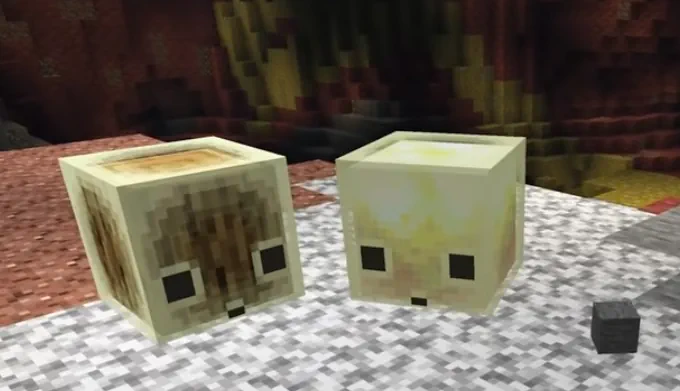
Minecraft Sulfur Cube Screenshot Minecraft 26.2 Chaos Cubed does not yet have an official release date. However, our estimation based on previous summer updates is anywhere from early to mid-June. Mojang has been very consistent with this release window, so anything earlier would break from a long-standing norm. As of Snapshot 6, released on May 5th, Chaos Cubed is considered feature complete by the developers. Pre-releases have not yet begun.

What's New in the Minecraft 26.2 Chaos Cubed Update?

Sulfur Caves
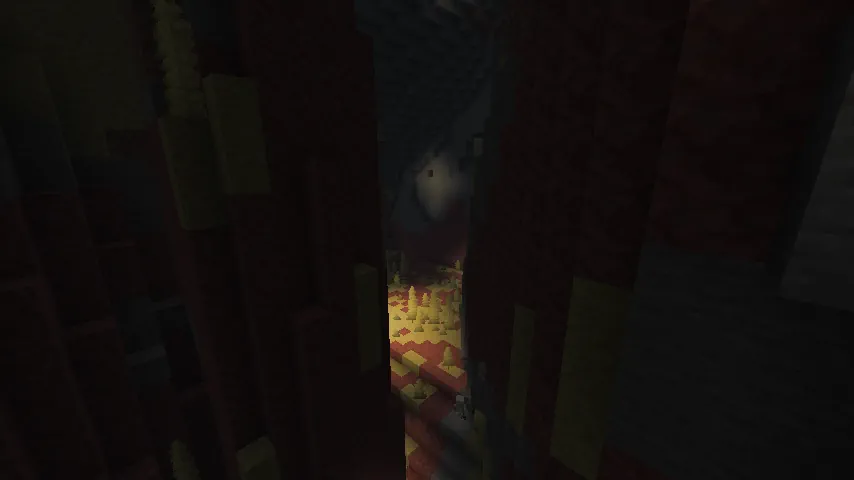
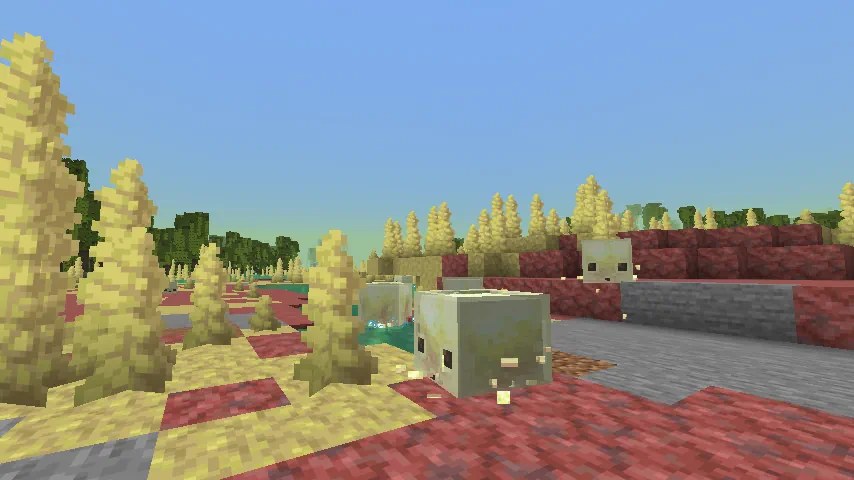
Minecraft Sulfur Caves Biome Screenshot
  • Location: Overworld (Underground)
Located underground in the overworld, this brand-new biome is home to red cinnabar and yellow sulfur blocks, hot springs that emit toxic gas, and erupting geysers. The toxic gas induces the nausea status effect on players, and geysers can erupt with steam, launching anything inside. Sulfur blocks and cinnabar blocks also come with complete stone block sets for building.

Sulfur Cubes

Minecraft Sulfur Cube Screenshot
  • Location: Sulfur Caves Biome
Sulfur cubes are a new passive mob exclusive to the sulfur caves biome that hop about, paying no mind to those in its surroundings. However, hidden within its cute display is one of the most in-depth mobs ever added to Minecraft. Sulfur cubes can absorb any block players give to them, and doing so puts the sulfur cube in an unmoving, damage-immune state, where players can hit them around like a ball. The block absorbed determines the type of “ball” that the sulfur cube gains the properties of, with blocks like wool making it a beach ball and ice making it slippery like a hockey puck. Where the slime is hit, and the damage dealt determines the direction and distance the sulfur cube will travel in this state.

Geysers

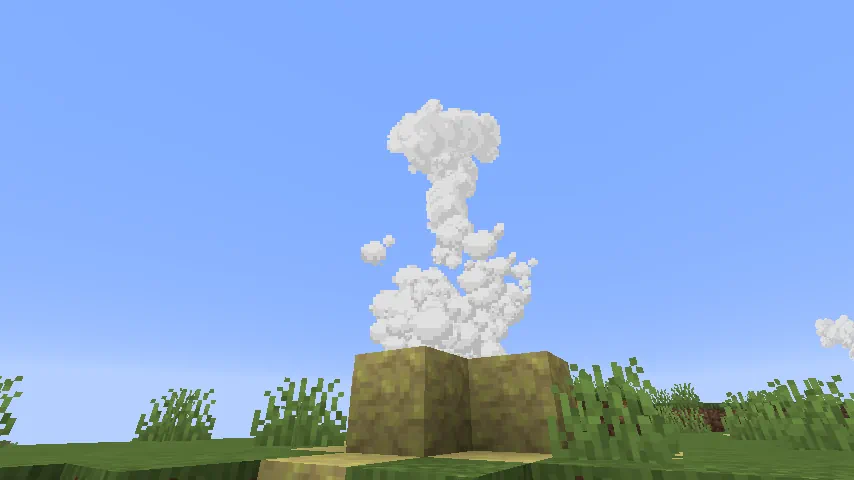
Minecraft Erupting Geyser Screenshot
  • Location: Overworld (Any Surface Biome) & Sulfur Caves Biome
Geysers are a new type of world generation found in sulfur caves and across the overworld. Those found in the overworld indicate a sulfur caves biome is somewhere below, much like azalea trees with lush cave biomes. All geysers erupt with steam on a random but short cooldown and launch any players, mobs, or items inside up into the sky. They also have four levels of power determined by how they are built. We offer a guide for geyser construction found here.

How to Install Minecraft Chaos Cubed

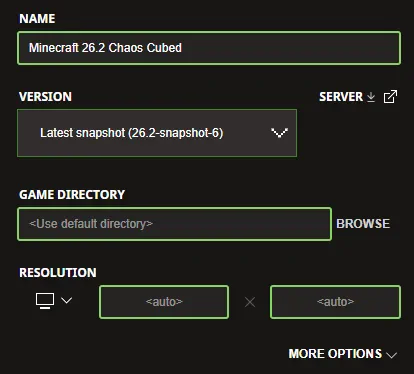
Minecraft 26.2 Chaos Cubed Snapshot Install Screenshot Upon the release of Minecraft 26.2 Chaos Cubed, both Java Edition and Bedrock Edition clients will automatically update as soon as they are opened. But why wait when you can try it today? The latest Minecraft 26.2 Chaos Cubed snapshot can be installed inside the Minecraft Launcher just before clicking play. Below, we have detailed every step to help get you right into the game.
  1. Open the Minecraft Launcher and select Java Edition.
  2. Enable snapshots under the ‘Installations’ tab.
  3. If a new installation called “Latest Snapshot,” represented by a dirt block, is now present, that can be used immediately to start playing. Otherwise, proceed with step four.
  4. Click ‘New Installation’
  5. Select ‘Latest Snapshot’ in the drop-down menu.
  6. Click ‘Install.’
With these steps complete, a new snapshot installation should be a selectable option before clicking play! New releases can corrupt old worlds! Ensure backups have been taken.

Minecraft 26.2 Patch Notes (So Far)

Minecraft Sulfur Cube Magma Block Screenshot

Minecraft 26.2 Snapshot 6

New Features
  • New Sulfur Cube archetypes: Slow Bouncy and Hot
  • Added Gallo language support to the game
  • Added Uzbek language support to the game
  • Added Võro language support to the game
Sulfur Cube mob
  • Added new Slow Bouncy and Hot archetypes to the Sulfur Cube
Sulfur Cube archetypes
  • There is a new archetype:
    • Slow Bouncy: slow speed, high bounciness, medium friction and medium air drag
      • It is buoyant
      • Used when absorbing stone blocks
  • There is also a new special archetype:
    • Hot: same properties as Regular, but damages entities on contact like Magma Blocks do
      • Used when absorbing Magma Blocks
Advancements
  • Added new "Uh Oh" Husbandry advancement for having a Sulfur Cube absorb a TNT block
Changes Sulfur Caves biome
  • Redesigned all surface Sulfur Springs features
  • The Sulfur Caves biome is less likely to generate underneath Oceans, Hills or Mountains
  • Sulfur Caves no longer generate with bands of Tuff and Granite
Developer's Note: Thanks to player feedback we've decided to revert tuff and granite blocks generating in sulfur caves, in favor of generating more sulfur to increase the chances of pools spawning. Sulfur spikes remain unaffected. Potent Sulfur
  • Geyser eruptions emit game events at the beginning and at the end of the eruption that can be detected by Sculk Sensors
Sounds
  • Updated eruption sounds for Sulfur Spring
Data Pack Version 105.0
  • Added minecraft:sulfur_cube_archetype registry entries:
    • hot
    • slow_bouncy
  • Entry format for minecraft:sulfur_cube_archetype registry has been updated:
    • explosion_fuse has been replaced by explosion: an optional field, if present, the Sulfur Cube of this archetype will explode:
      • fuse: positive integer, the fuse time when ignited
      • power: non-negative integer, the explosion power
      • causes_fire: boolean, whether the explosion causes fire
    • Added contact_damage: an optional field, if present, the Sulfur Cube of this archetype will deal damage to entities when they come in contact with it
      • amount: non-negative float, amount of damage dealt
      • damage_type: damage type
      • attribute_to_source: boolean indicating if the damage is attributed to the Sulfur Cube
    • Added knockback_modifiers: a field that contains various modifier fileds for the Sulfur Cubes knockback magnitude and direction
      • horizontal_power: float that represenst the horizontal power of the knockback
      • vertical_power: float that represenst the vertical power of the knockback
  • Removed the HurtByTimestamp tag from Living Entities, ticks_since_last_hurt_by_mob should be used instead
World Generation Surface Rules Changed noise_threshold Surface Rule Condition
  • Added new is_3d field - boolean, true if the noise should be evaluated in 3D
    • If not specified, defaults to false
Removed noise_gradient Surface Rule
  • Can be replaced with noise_threshold
Configured Features Added minecraft:weighted_random_selector Feature Type Randomly selects one of the given features to generate based on their weights. Format: object with fields:
  • features - list of Placed Features and their weights
Changes to minecraft:large_dripstone
  • The maximum allowed value for column_radius has been reduced from 19 to 16 to prevent features from reaching beyond neighboring chunks
  • Wind offset is now clamped to ensure the full dripstone (radius + wind) stays within neighboring chunk bounds
Changes to minecraft:root_system
  • New field level_test_distance indicating how far away from the origin the root system will check the existing terrain
  • New field max_level_deviation indicating how far the ground level can deviate from the original ground level at these test positions
Structure Processors Changed minecraft:block_rot Structure Processor
  • Now evaluates the block state produced by previous block processors in the chain, instead of always using the original block defined in the structure
    • The first processor in the chain still always evaluates against the original structure-defined block
Tags Item Tags
  • Added the following tags for items that can be placed inside a Sulfur Cube to determine its archetype:
    • #sulfur_cube_archetype/hot
    • #sulfur_cube_archetype/slow_bouncy
Fixed bugs in 26.2 Snapshot 6
  • MC-248758 - Logged Error: Detected setBlock in a far chunk
  • MC-302554 - Glowing falling blocks no longer show the glowing outline
  • MC-305239 - Growing world borders reset to their starting size upon reopening the world
  • MC-306778 - The fog color no longer transitions smoothly when the weather changes at night while under the Night Vision effect
  • MC-307043 - Applying a freeze effect while damaging a mob causes an incorrect value for ticks_since_last_hurt_by_mob
  • MC-307281 - /item replace cannot place items in sulfur cubes' body slot
  • MC-307297 - Sulfur cubes shake from freezing when inside powder snow despite not being able to freeze
  • MC-307310 - Potent sulfur can generate outside of water
  • MC-307323 - Sulfur caves can generate on the surface
  • MC-307351 - Dispenser arrows cannot push sulfur cubes
  • MC-307397 - Mace effects do not apply when hitting sulfur cubes
  • MC-307407 - Vertical velocity after bouncing does not take drag into consideration
  • MC-307424 - Chiseled cinnabar and sulfur are listed incorrectly in the Creative mode inventory
  • MC-307482 - Sulfur cubes with an absorbed block don't inherit any status effects from tipped arrows
  • MC-307517 - Beacon beams render in front of nether fog
  • MC-307544 - Sulfur spikes have an inaccurate map color
  • MC-307560 - Wandering traders are unable to sell sulfur spikes
  • MC-307584 - The border around the selected pack in the resource/data pack menu disappears when pressing Enter
  • MC-307667 - Dispensers can equip small sulfur cubes
  • MC-307673 - Sulfur caves appear much smaller due to their tuff border
  • MC-307674 - Knockback does nothing to sulfur cubes if they have a block inside
  • MC-307684 - Named sulfur cubes can despawn after being picked up with a bucket and replaced
  • MC-307774 - The bool(arg) SNBT operation returns false for some non-zero number values
  • MC-307777 - The patterns on banners are now invisible under some circumstances
  • MC-307778 - Priming sulfur cubes with absorbed TNT does not play the hand use animation
  • MC-307779 - Potent sulfur no longer causes noxious gas to appear upon world generation
  • MC-307780 - The server crashes when the management server is enabled
  • MC-307782 - Sulfur spring geysers can push players in Creative mode who are flying
  • MC-307783 - Lines are drawn between leashed entities in view
  • MC-307784 - Structure block rotation buttons aren't disabled correctly
  • MC-307785 - Geysers do not emit a game event when erupting
  • MC-307797 - Dying to a sulfur cube doesn't increase the player's killed_by:sulfur_cube statistic
  • MC-307802 - The player's arm swings when attempting to interact with a sulfur cube with ignited TNT inside
  • MC-307803 - The game crashes when a sulfur cube with an archetype that has explosion_fuse set to a value lower than 4 is primed by an explosion
  • MC-307821 - The glowing effect is now always white on the frame part of bell block displays
  • MC-307824 - Attempting to light a sulfur cube with TNT inside while TNT explosions are disabled does not display a message
  • MC-307825 - Disabling TNT explosions does not prevent already primed TNT sulfur cubes from exploding
  • MC-307829 - Sulfur cubes with TNT absorbed still explode with the game rule mob_griefing set to false
  • MC-307837 - Igniters deplete when used on TNT sulfur cubes while TNT explosions are disabled
  • MC-307854 - Weapons enchanted with Fire Aspect don't ignite TNT sulfur cubes
  • MC-307864 - Small sulfur cubes become large client-side when fed a slimeball after restarting their aging

Minecraft Jungle Geyser Screenshot

Minecraft 26.2 Snapshot 5

New Features
  • New Sulfur Cube archetype: Explosive
  • Potent Sulfur can now form Geysers
Sulfur Cube mob
  • With a block inside, it is now immune to explosions
Sulfur Cube archetypes
  • There is now a third special archetype:
    • Explosive: similar properties to a Regular with a slightly higher air drag,
      • Used when absorbing a TNT block
      • Absorbed TNT can be primed by Redstone, fire sources (including a Dispenser with a Flint and Steel) or nearby explosions
      • When primed by fire or Redstone, absorbed TNT uses a fuse time of 6 seconds
      • When primed by an explosion, absorbed TNT uses a randomized fuse time between 0.75 and 3 seconds
      • Sulfur Cubes with an absorbed, primed TNT block cannot be picked up with a Bucket
      • Sulfur Cubes with an absorbed, primed TNT block cannot be damaged
      • Absorbed, primed TNT blocks cannot be sheared out
      • On explosion, no Small Sulfur Cubes are spawned
Potent Sulfur
  • When placed above a Magma block and under 1-4 Water source blocks, it creates a Geyser
  • The Geyser will erupt at random intervals, shooting a plume of water particles upwards and applying an upward impulse to entities above it
Changes
  • Tweaked various mobs hitbox, eye height, and rider positions
Mob Spawning
  • Hoglins are now considered hostile and do not spawn on Peaceful difficutly
Sounds
  • Added sounds for Geyser eruptions
  • Sulfur Spikes now have unique sound events
Settings
  • Removed Touchscreen Mode
Developer's NoteTouch screen mode has been poorly implemented and not properly supported for a long time. We plan to deprecate this feature in this release. To provide your feedback on this topic, head over to the feedback site. Technical Changes
  • The Data Pack version is now 104.0
  • The Resource Pack version is now 86.2
  • A player's score will no longer be displayed in the player tab overlay if the player doesn't have the objective
Minecraft Server Management Protocol 3.0.0
  • The management server now starts before the Minecraft server starts
    • Most notably, this means the heartbeat will be sent while the world is loading and potentially upgrading
  • The rpc.discover and notification/server/status methods are now accessible before the dedicated server spins up
    • The server will return an error when other methods are called during this time
Data Pack Version 104.0
  • Entries in the minecraft:sulfur_cube_archetype registry have a new field:
    • explosion_fuse: optional integer, if present, the Sulfur Cube of this archetype will explode with this fuse time when ignited
  • Added geyser, geyser_poof, geyser_base, and geyser_plume particles
Commands
  • Team color arguments (used in team modify [name] color and waypoint modify [name] color) now accept only lowercase names with underscores
    • I.e. only dark_purple is accepted and not darkpurple or DarkPurple
    • Values now match color names in text components
Changed minecraft:nameplate_distance
  • Renamed to minecraft:name_tag_distance
World Generation
  • Added matching_biomes world generation-type block predicate type which checks if the block position matches one of the specified biomes
    • Format: object with fields:
      • biomes - biome ID, list of biome IDs, or hash-prefixed biome tag: the biomes to match
  • tree feature configuration's below_trunk_provider block state provider no longer has a default value
Configured Features Changes to minecraft:multiface_growth
  • Field block is now mandatory (defaulted to minecraft:grow_lichen)
Density Functions Added minecraft:interval_select Selects between a number of Density Functions based on an input Density Function and a set of threshold values. Format: object with fields:
  • input - Density Function, the value to be compared with any given thresholds
  • thresholds - non-empty list of floats, the threshold values to compare input with
    • If input < thresholds[i], the result of functions[i] will be selected
    • If the input is greater than the last threshold value, the last function will be selected
    • Must be one fewer thresholds than functions
  • functions - list of at least 2 Density Functions, the resulting functions to be selected from
    • Must be one more element in functions than in thresholds
Removed minecraft:weird_scaled_sampler
  • This Density Function has been removed, with its functionality replaced by interval_select
  • When rarity_value_mapper was type_1, equivalent to:
    • interval_select with thresholds -0.75, -0.5, 0.5, 0.75
    • Selected functions follow: abs(rarity * noise(x/rarity, y/rarity, z/rarity))
      • Corresponding rarity values: 0.5, 0.75, 1.0, 2.0, 3.0
  • When rarity_value_mapper was type_2, equivalent to:
    • interval_select with thresholds -0.5, 0.0, 0.5
    • Selected functions follow: abs(rarity * noise(x/rarity, y/rarity, z/rarity))
      • Corresponding rarity values: 0.75, 1.0, 1.5, 2.0
Tags Block Tags
  • Added the following tags for blocks which some mobs are immune to. These have effect on dismounting, and valid surroundings of spawn placements for some mobs. They do not have an effect on pathfinding.
    • #fox_immune_to
    • #polar_bear_immune_to
    • #snow_golem_immune_to
    • #stray_immune_to
    • #wither_immune_to
    • #wither_skeleton_immune_to
    • #default_immune_to - this tag is intentionally left empty
Particles Added minecraft:geyser_base
  • Spawns as a cloud on the base of an erupting Potent Sulfur block
  • Format: object with fields:
    • water_blocks - positive integer, scales the particle size and its burst impulse
    • burst_impulse_base - float, scales the initial burst impulse
Added minecraft:geyser_poof
  • Spawns as a cloud on the base of an erupting Potent Sulfur block
  • Format: object with fields:
    • water_blocks - positive integer, scales the particle size and its burst impulse
    • burst_impulse_base - float, scales the initial burst impulse
Added minecraft:geyser_plume
  • Spawns as an upwards stream above an erupting Potent Sulfur block
  • Format: object with fields:
    • water_blocks - positive integer, scales the particle size and its burst impulse
Added minecraft:geyser
  • An emitter particle that spawns the geyser_base, geyser_poof, and geyser_plume particles above an erupting Potent Sulfur block
  • Format: object with fields:
    • water_blocks - positive integer, scales the particle size and its burst impulse
Game Test Environments Added minecraft:difficulty Sets the difficulty of the game test environment. Fields:
  • difficulty: The difficulty ID to set
    • One of: peaceful, easy, normal, hard
Resource Pack Version 86.2 Sounds
  • Added sounds for Geyser eruptions:
    • block.potent_sulfur.geyser_eruption
    • block.potent_sulfur.geyser_eruption_active
Particles
  • Added new Particle textures:
    • particle/noxious_gas_01.png
    • particle/noxious_gas_02.png
    • particle/noxious_gas_03.png
    • particle/noxious_gas_04.png
    • particle/noxious_gas_05.png
    • particle/noxious_gas_06.png
    • particle/noxious_gas_07.png
    • particle/noxious_gas_08.png
    • particle/geyser_base_01.png
    • particle/geyser_base_02.png
    • particle/geyser_base_03.png
    • particle/geyser_base_04.png
    • particle/geyser_base_05.png
    • particle/geyser_base_06.png
    • particle/geyser_base_07.png
    • particle/geyser_base_08.png
    • particle/geyser_plume_01.png
    • particle/geyser_plume_02.png
    • particle/geyser_plume_03.png
    • particle/geyser_plume_04.png
    • particle/geyser_plume_05.png
    • particle/geyser_plume_06.png
    • particle/geyser_plume_07.png
    • particle/geyser_plume_08.png
    • particle/geyser_poof_01.png
    • particle/geyser_poof_02.png
    • particle/geyser_poof_03.png
    • particle/geyser_poof_04.png
    • particle/geyser_poof_05.png
    • particle/geyser_poof_06.png
    • particle/geyser_poof_07.png
    • particle/geyser_poof_08.png
Fixed bugs in 26.2 Snapshot 5
  • MC-304862 - Activating a dispenser with a hostile mob spawn egg in Peaceful difficulty consumes the egg and plays a sound
  • MC-306622 - The height of chicken jockeys is slightly off
  • MC-306685 - The riding position on baby hoglins is too low
  • MC-307012 - When a scoreboard objective is set to the below_name display mode, all named entities with no score display it with a score of 0
  • MC-307125 - Target selectors with duplicate team arguments are parsed inconsistently depending on argument order
  • MC-307194 - The discount given by fletchers for tipped arrow trades decreases the arrow cost instead of the emerald cost
  • MC-307266 - Zombie villagers change biome type after being cured
  • MC-307283 - Placing sulfur springs using /place does not update the affected blocks
  • MC-307513 - Using /deop on multiple players shows the same player in all success messages
  • MC-307623 - Chunk sections are sometimes invisible until they are updated
  • MC-307689 - The player's arm swings when failing to use a spawn egg in Peaceful difficulty
  • MC-307690 - The error message produced by /difficulty doesn't use the difficulty's translated name
  • MC-307702 - Skeletons' AI breaks when picking up any item
  • MC-307706 - The game inconsistently refers to name tags and name plates
  • MC-307710 - Deoxidizing waxed copper blocks now takes priority over scraping off the wax
  • MC-307754 - Monsters now spawn regardless of the "Spawn Monsters" game rule

MC Sulfur Cube Glowstone Screenshot

Minecraft 26.2 Snapshot 4

New Features
  • Added Swiss French language support to the game
  • Added Chuvash language support to the game
Sulfur Cube mob
  • Naturally-spawned small Sulfur Cubes now have the correct size
  • The outer texture of the Sulfur Cube has been updated
Sulfur Caves biome
  • Granite and Tuff blocks are now dispersed between Sulfur and Cinnabar blocks
  • The Sulfur Spike Clusters have been made slightly shorter, on average
Changes Mob Spawning
  • Hoglins, Piglins and Sulfur Cubes now spawn on Peaceful difficulty
Sounds
  • Added sounds for when using a bucket on a Sulfur Cube
Technical Changes
  • The Data Pack version is now 103.0
  • The Resource Pack version is now 86.1
Data Pack Version 103.0 Attributes Added minecraft:nameplate_distance
  • Controls how far away in blocks the nameplate of an entity is visible
  • The nameplate cannot be visible if the entity is not visible
  • Accepts values between 0.0 and 512.0
  • Default value: 64.0
Added minecraft:below_name_distance
  • Controls how far away in blocks the below_name scoreboard display is visible
  • The nameplate cannot be visible if the entity is not visible
  • Accepts values between 0.0 and 512.0
  • Default value: 10.0
Predicates Entity Predicates
  • Slime sub-predicate has been renamed from minecraft:type_specific/slime to minecraft:type_specific/cube_mob
Resource Pack Version 86.1
  • The minecraft:beds atlas has been removed
Telemetry New required events
  • graphics_capabilities
    • This is a new event that posts on startup, and informs us of the capabilities of the graphics device used to play the game
    • Added new property: backend_name
      • This will be Vulkan or OpenGL, and will help us understand which graphics api players are using
    • Added new property: backend_failure_reason
      • This will be a list of short error codes, for example vulkan_device_version_too_low, which will help us identify any issues with our targeted Vulkan requirements
    • Added new property: backend_failure_message
      • This will be a short and vague messages, such as Failed to find the GLFW platform surface extensions, which will help us narrow down issues if players are experiencing issues running with Vulkan
    • Added new property: backend_failure_missing_capabilities
      • This will be a list of missing capabilities from Vulkan, for example VULKAN_CORE_1_2, VK_KHR_dynamic_rendering, which will help us know which capabilities players would need in order to use Vulkan
Fixed bugs in 26.2 Snapshot 4
  • MC-186131 - Piglins and hoglins cannot spawn naturally on Peaceful difficulty
  • MC-296343 - Using the mouse wheel to switch between cast fishing rods briefly displays the uncast texture in first-person
  • MC-307002 - Using the kill command on one of the end crystals used to respawn the ender dragon no longer aborts the respawn sequence
  • MC-307327 - VSync limits the framerate inconsistently in fullscreen with the Vulkan rendering backend on some Mac systems
  • MC-307378 - The glowing effect is not visible with the Vulkan rendering backend on some graphics
  • MC-307434 - Sulfur cubes cannot spawn naturally on Peaceful difficulty
  • MC-307532 - Lava buckets now remain filled server-side when emptied into flowing water
  • MC-307539 - The game crashes upon startup on some Mac systems
  • MC-307545 - The "High Contrast" resource pack is listed as incompatible
  • MC-307549 - beds.png-atlas still exists
  • MC-307587 - Wet sponges are no longer removed from the inventory server-side when placed in the Nether
  • MC-307624 - The cube mob entity sub-predicate is called type_specific/slime rather than cube_mob
  • MC-307626 - The selection lists in the pack selection screen can extend outside the bounds of the game window, violating the Vulkan specification
  • MC-307647 - Crash on startup with the Vulkan validation layer enabled — the NORMAL vertex attribute uses a format without guaranteed VERTEX_BUFFER_BIT support
MC Sulfur Spike Screenshot

Minecraft 26.2 Snapshot 3

New Features Sulfur Spike
  • Is a new block that generates naturally on Sulfur blocks inside the sulfur caves biome
  • Forms a stalactite if placed on the ceiling or a stalagmite if placed on the floor
  • Can be combined to form longer stalactites & stalagmites
  • Stalactites and stalagmites merge if the tips are next to each other, unless you press shift while placing
  • Stalagmites will break if they're not attached to something below
  • Stalactites fall down if not attached to something above
  • Being hit by a falling stalactite hurts, and they are sharp!
  • Thrown Tridents break Sulfur Spike
Changes
  • The Potent Sulfur block no longer crafts back into Sulfur blocks
  • Updated the textures for the following blocks:
    • Chiseled Cinnabar
    • Chiseled Sulfur
    • Cinnabar
    • Cinnabar Bricks
    • Polished Cinnabar
    • Polished Sulfur
    • Sulfur Bricks
Sulfur Cube mob
  • Can no longer be picked up by Boats
Sounds
  • Updated sounds for Nautilus jets and Nautilus recovers
Technical Changes
  • The Data Pack version is now 102.0
  • The Resource Pack version is now 86.0
Data Pack Version 102.0 Block Entity Data
  • The minecraft:bed block entity has been removed
Predicates Entity Predicates Entity predicate format has changed from a structure with multiple optional fields to one similar to data component maps. For example, previously effects was an optional field: { "effects": {...} } In this version it has become a component-like sub-predicate entry: { "minecraft:effects": {...} } The main functional changes are:
  • All keys in entity predicates are now identifiers
    • Since identifiers can be written without namespace (default to minecraft namespace), existing field names are still valid
    • Exception: field type has been renamed to minecraft:entity_type
  • Unrecognized sub-predicate components are now rejected (previously unknown fields were ignored)
Existing type-specific sub-predicates have been renamed and moved to top-level.
  • minecraft:lightning to minecraft:type_specific/lightning
  • minecraft:fishing_hook to minecraft:type_specific/fishing_hook
  • minecraft:player to minecraft:type_specific/player
  • minecraft:raider to minecraft:type_specific/raider
  • minecraft:sheep to minecraft:type_specific/sheep
  • minecraft:slime to minecraft:cube_mob as it now includes Sulfur Cubes in addition to Slimes and Magma Cubes
For example: { "type_specific": { "type": "minecraft:player", "looking_at": { "type": "minecraft:ender_dragon" } } } becomes { "minecraft:type_specific/player": { "looking_at": { "minecraft:type": "minecraft:ender_dragon" } } } Added minecraft:entity_tags entity sub-predicate This predicate matches entity tags (i.e. ones set with the /tag command). Fields:
  • any_of - optional list of strings, if present the matched entity must have at least one of the listed tags
  • all_of - optional list of strings, if present the matched entity must have all the listed tags
  • none_of - optional list of strings, if present the matched entity must have none of the listed tags
World Generation Overworld Features
  • Adjusted Feature Type lake
    • Added field can_place_feature - Block Predicate, describes which blocks this feature can be placed on
    • Added field can_replace_with_air_or_fluid - Block Predicate, describes which blocks this feature can replace with air or the provided fluid block
    • Added field can_replace_with_barrier - Block Predicate, describes which blocks this feature can replace with the provided barrier block
Tags Block Tags
  • Added #speleothems for blocks which are speleothems like Pointed Dripstone and Sulfur Spike
Resource Pack Version 86.0 Block Sprites
  • Added new Block textures:
    • block/sulfur_spike_down_base.png
    • block/sulfur_spike_down_frustum.png
    • block/sulfur_spike_down_middle.png
    • block/sulfur_spike_down_tip.png
    • block/sulfur_spike_down_tip_merge.png
    • block/sulfur_spike_up_base.png
    • block/sulfur_spike_up_frustum.png
    • block/sulfur_spike_up_middle.png
    • block/sulfur_spike_up_tip.png
    • block/sulfur_spike_up_tip_merge.png
  • Beds now use block models and textures, replacing <color> with the respective bed's color's name
    • block/bed_down.png
    • block/bed_head_north.png
    • block/<color>_bed_foot_east.png
    • block/<color>_bed_foot_south.png
    • block/<color>_bed_foot_up.png
    • block/<color>_bed_foot_west.png
    • block/<color>_bed_head_east.png
    • block/<color>_bed_head_up.png
    • block/<color>_bed_head_west.png
Item Sprites
  • Added new Item sprites:
    • item/sulfur_spike.png
Item Models
  • The minecraft:bed special model type has been removed
Fixed bugs in 26.2 Snapshot 3
  • MC-229057 - Picking up an axolotl with a lead attached destroys the lead
  • MC-277744 - Blocks with emissive textures don't emit much light when held by endermen
  • MC-302496 - Glowing dragon fireballs no longer show the glowing outline
  • MC-307177 - Enabling JFR profiling causes the client to crash on startup
  • MC-307227 - Using an empty Offers NBT tag to disable trades doesn't work after a relog/data merge
  • MC-307289 - Polished sulfur is named "Polished Sulfur Block", which is inconsistent with all other polished stone blocks
  • MC-307291 - The game crashes when an entity with the friction_modifier attribute set to 2.5 moves
  • MC-307298 - Sulfur cubes with blocks inside them produce footstep sounds when moving across the ground
  • MC-307300 - Magma blocks held by sulfur cubes are not emissive
  • MC-307315 - Frogs try to eat large magma cubes now
  • MC-307316 - Magma cubes no longer drop magma cream
  • MC-307340 - The bottom face of slimes' outer layer z-fights with the ground
  • MC-307347 - Releasing a sulfur cube from a bucket and killing it does not cause it to drop its held block
  • MC-307357 - Sulfur cubes don't emit light when holding a glowing block
  • MC-307371 - The #sulfur_cube_archetype/fast_flat item tag contains pumpkin twice
  • MC-307405 - When picking up a leashed sulfur cube with a bucket, the lead disappears
  • MC-307420 - The game now renders fluid faces that should not be rendered
  • MC-307473 - The block breaking texture on bamboo stalks is now always displayed centered
  • MC-307483 - Emptying a sulfur cube bucket underwater doesn't place the sulfur cube at the targeted block
MC Sulfur Slime Screenshot

Minecraft 26.2 Snapshot 2

Changes Performance Improvements
  • Upgrading certain worlds from before 26.1 can now be faster
Technical Changes
  • The fps F3 screen entry will now report which type of present mode is used (e.g. mailbox or fifo relaxed), as opposed to just vsync
Fixed bugs in 26.2 Snapshot 2
  • MC-306840 - Dolphins still drown themselves when no players are nearby
  • MC-307286 - The game process does not terminate after exiting the game
  • MC-307296 - Launching the game with an incompatible resource pack that modifies core shaders causes the game to softlock
  • MC-307311 - Core shaders only load after restart when using Vulkan
  • MC-307320 - Vulkan prevents the game from opening and crashes some GPUs
  • MC-307349 - The game crashes before opening
  • MC-307383 - The "Exclusive Fullscreen" setting does not work with the Vulkan rendering backend

MC Sulfur Caves Screenshot

Minecraft 26.2 Snapshot 1

New Features
  • Added support for rendering the game through Vulkan
  • Added new option "Graphics API" in Video Settings
Sulfur Cube mob
  • Added the Sulfur Cube mob
  • Spawns in the new Sulfur caves biome
  • When a Player interacts with it while holding a block, the Sulfur Cube will absorb the block and disable its AI
  • With a block inside, a Player can also interact with the Sulfur Cube while holding Shears to shear the block. This enables its AI
  • The Sulfur Cube will follow a Player holding a block it can absorb
  • The Sulfur Cube can also look for block items nearby and move towards them to absorb them
  • When killed, the Sulfur Cube splits into two smaller Sulfur Cubes
  • The small Sulfur Cubes can be tempted and fed with Slime Balls to grow them into large Sulfur Cubes
  • With a block inside, the Sulfur Cube will not take any fall or Player damage and will become a physical object that players can interact with by punching and pushing
  • With a block inside, it will assume one of the archetypes (listed below) and change its physical properties to match the block it absorbs
  • A large Sulfur Cube can be picked up using an empty bucket
  • Dispensers can now equip and swap blocks inside a Sulfur Cube, as well as shear it with Shears to remove the block it is holding
  • Dispensers can spawn a Sulfur Cube from a Bucket of Sulfur Cube.
Sulfur Cube archetypes
  • Each archetype is characterized by the speed of the ball when hit, how bouncy it is when colliding with blocks and collidable entities, as well as its ground friction, air drag and if it floats in liquids
  • There are the following archetypes:
    • Regular: medium speed, medium bounciness, medium ground friction and low air drag
      • It is buoyant
      • Used when absorbing stone and mineral blocks
    • Bouncy: fast speed, high bounciness, medium ground friction and low air drag
      • It is buoyant
      • Used when absorbing wooden blocks
    • Slow Flat: slow speed, low bounciness, medium ground friction and medium air drag
      • Used when absorbing metal blocks
    • Fast Flat: fast speed, low bounciness, medium ground friction and low air drag
      • Used when absorbing organic blocks
    • Light: slow speed, high bounciness, medium ground friction and high air drag
      • It is buoyant
      • Used when absorbing all wool blocks
    • Fast Sliding: fast speed, no bounciness, low ground friction and low air drag
      • Used when absorbing icy blocks
    • Slow Sliding: slow speed, no bounciness, low ground friction and low air drag
      • Used when absorbing shroom blocks
  • There are also two special archetypes:
    • High Resistance: very slow, low drag with low bounce with high friction
      • Used when absorbing Soul Sand and Soul Soil
    • Sticky: same properties as a golf ball, but sticks with extremely high ground friction and no bounce to simulate stickiness
      • Used when absorbing Honeycomb Block
Cinnabar and Sulfur block sets
  • Added Cinnabar and Sulfur stone block sets
  • Each of them has the Polished and the Bricks variants
  • Each variant has its Slabs, Stairs and Walls blocks
  • Added Chiseled Cinnabar and Chiseled Sulfur blocks
Sulfur caves biome
  • Added sulfur caves underground biome
  • Now generate naturally underground and inside hills or mountains
  • The sulfur caves biome has bands of sulfur and cinnabar
  • Spawns the new Sulfur Cube mob as well as Cave Spiders
  • Generates with Sulfur Pools which contain Potent Sulfur
Potent Sulfur
  • Is a new block that generates naturally in water pools inside the sulfur caves biome
  • Produces bubbles which rise up to 4 water source blocks above it
  • When placed underneath up to 4 water source blocks, it generates a cloud of nausea-causing gas on the water surface
    • This cloud spreads across adjacent water with a maximum radius of 3 blocks
  • Can be crafted from 9 Sulfur blocks
  • The Potent Sulfur Block can be crafted into 4 Sulfur Blocks
Sulfur Spring
  • Is a new feature which generates naturally above the sulfur cave biome
  • Consists of Sulfur, Potent Sulfur and Magma Blocks
  • Sulfur Springs come in 4 different size variants:
    • Small
    • Medium
    • Large
    • Extra Large
Vulkan Support
  • As previously announced, we intend to switch the game from OpenGL to Vulkan
  • Vulkan is not supported by older hardware or drivers - OpenGL will be used as a fallback on those cases
    • The current requirement is Vulkan 1.2 with dynamic rendering and push descriptors, but this requirement may increase or decrease over time
  • This is currently an experimental rendering backend, and may not be as performant or stable. Please report any bugs you find with it to our bug tracker!
  • Under Vulkan, we will prefer your dedicated graphics card over any integrated graphics, which is a change from OpenGL
  • You can see which backend is being used in your F3 debug overlay (in the system_specs section)
  • On MacOS, we use MoltenVK to translate Vulkan to Metal
"Graphics API" Video Setting
  • This is a new option available in the "Video Settings"
  • There are three values: DefaultPrefer Vulkan and Prefer OpenGL
  • "Default" may be changed at our discretion, and we recommend this for all users unless you experience issues and need to change
    • Currently, it is the same as "Prefer Vulkan"
  • "Prefer Vulkan" will attempt to render using Vulkan, but fall back to OpenGL if it doesn't work
  • "Prefer OpenGL" will attempt to render using OpenGL, but fall back to Vulkan if it doesn't work
Changes
  • Fixed baby Hoglin's and Zoglin's left ear texture so it's properly mirrored
Minor Tweaks to Blocks, Items and Entities
  • When an entity bounces off of a block or other collidable entity, it emits a vibration of frequency 2
Developer's NoteWe have tweaked how Beds and Slime Blocks restitute entity velocity after collisions. For instance, when air drag is removed via the entity attribute, Slime Blocks will now correctly bounce Mobs indefinitely. This may affect player perception of the bounciness of Beds and Slime Blocks. Sounds Added block sounds for Sulfur, Potent Sulfur and Cinnabar Added mob sounds for Sulfur Cube and Small Sulfur Cube Technical Changes
  • The Data Pack version is now 101.2
  • The Resource Pack version is now 85
  • Profiling the game with Tracy (launching with --tracy) now includes GPU timings
  • Rendering now uses a reversed depth buffer, which helps with Z-fighting on most hardware
Data Pack Version 101.2
  • Added minecraft:sulfur_cube_archetype registry with the following values:
    • regular
    • bouncy
    • slow_flat
    • fast_flat
    • light
    • fast_sliding
    • slow_sliding
    • high_resistance
    • sticky
  • Entry format: Object with fields:
    • items: item tag that contains all items that can be fed to Sulfur Cubes of this archetype
    • buoyant: boolean indicating if the Sulfur Cube of this archetype floats in liquids
    • attribute_modifiers: a list of objects with fields:
      • attribute: attribute to modify
      • id: unique identifier for the modifier
      • amount: amount to modify the attribute by
      • operation: how to modify the attribute, one of add_value, add_multiplied_base and add_multiplied_total
Commands
  • When granting or revoking several advancements, the command output will now report how many advancements changed state across all players
  • When granting or revoking advancements or a criterion on several players, the command output will now report the number of players that any change applied to
Attributes Added minecraft:bounciness - Determines what portion of the velocity is restituted after the entity collides with blocks and collidable entities- When landing on bouncy blocks, like Beds and Slime Blocks, the higher bounciness (of the block or the entity) is applied- Accepts values between `0.0` and `1.0`- Default value: `0.0` - no velocity is restituted- Maximum value: `1.0` - full velocity is restituted, collisions with blocks and collidable entities will have no effect on lowering the velocity Added minecraft:friction_modifier - Determines how much ground friction is applied to the entity with regards to the block it is on- Accepts values between `0.0` and `2048.0`- Default value: `1.0` - friction of blocks is not modified- Minimum value: `0.0` - friction of blocks is reduced to zero- Values higher than `1.0` increase the friction applied to the entity from the blocks it is on Added minecraft:air_drag_modifier - Determines how much drag is applied to an entity while in the air- Accepts values between `0.0` and `2048.0`- Default value: `1.0` - the entity uses existing drag when moving in the air- Minimum value: `0.0` - no drag is applied to the entity- Values higher than `1.0` increase the drag applied to the entity when moving through the air Updated the minimum value of minecraft:knockback_resistance - The minimum value was changed from `0.0` to `-2.0` Data Components Added minecraft:sulfur_cube_content
  • Represents the item that is absorbed by the Sulfur Cube
  • Format: item that is absorbed by the Sulfur Cube
    • e.g. minecraft:sulfur_cube_content=green_wool
World Generation Dripstone Features
  • Renamed Feature Type pointed_dripstone to speleothem
    • Added field base_block - Block State, describes the block forming the base of the Speleothem
    • Added field pointed_block - Block State, describes the block creating the columns of the Speleothem
    • Added field replaceable_blocks - Block ID, list of Block IDs, or hash-prefixed Block Tag describing which blocks this feature can generate on
    • Renamed field chance_of_taller_dripstone to chance_of_taller_generation
  • Renamed Feature Type dripstone_cluster to speleothem_cluster
    • Added field base_block - Block State, describes the block forming the base of the Speleothem
    • Added field pointed_block - Block State, describes the block creating the columns of the Speleothem
    • Added field replaceable_blocks - Block ID, list of Block IDs, or hash-prefixed Block Tag describing which blocks this feature can generate on
    • Renamed field dripstone_block_layer_thickness to speleothem_block_layer_thickness
    • Renamed field chance_of_dripstone_column_at_max_distance_from_center to chance_of_speleothem_at_max_distance_from_center
    • Renamed field max_distance_from_edge_affecting_chance_of_dripstone_column to max_distance_from_edge_affecting_chance_of_speleothem
  • Adjusted Feature Type large_dripstone
    • Added field replaceable_blocks - Block ID, list of Block IDs, or hash-prefixed Block Tag describing which blocks this feature can generate on
Added noise_gradient Surface Rule Replaces blocks based on the specified noise and gradient list. Format: object with fields:
  • noise - noise id, the noise to sample
  • gradient - non-empty list of objects with fields, the list to sample based on the noise value:
    • state (optional) - the block state to select at this index
      • If this field is not defined, the surface rule will not replace any block when sampling this entry
Added sequence Feature Type Generates a list of Placed Features in order. If any feature in the list is not placed, the following features will also be skipped. Format: object with fields:
  • features - list of Placed Features or hash-prefixed Placed Feature tag, the features to generate
Added template Feature Type Places one template randomly chosen from the given Weighted List of Identifiers. By default, the template will be spawned randomly rotated, centered around the origin. Format: object with fields:
  • templates - Weighted List of structure template entries. Each structure template entry is composed of an Identifier and a list of rotations to randomly choose from
    • id - The template Identifier
    • rotations - Optional list of rotations to choose from and apply to this template if it is picked
      • Allowed values: none, clockwise_90, 180, counterclockwise_90
      • If not specified, defaults to all allowed values
Dimension Types
  • The field infiniburn now also accepts an ID and a list of IDs in addition to a tag
Configured Features minecraft:geode
  • The fields cannot_replace and invalid_blocks in blocks section of feature configuration now also accept an ID and a list of IDs in addition to a tag
minecraft:root_system The field root_replaceable in the feature configuration now also accepts an ID or a list of IDs in addition to a tag minecraft:vegetation_patch
  • The field replaceable in the feature configuration now also accepts an ID and or a list of IDs in addition to a tag
minecraft:waterlogged_vegetation_patch
  • The field replaceable in the feature configuration now also accepts an ID and or a list of IDs in addition to a tag
Structure Processors minecraft:protected_blocks
  • The field value now also accepts an ID or a list of IDs in addition to a tag
Tags Block Tags
  • Added #suppresses_bounce - all blocks that suppress the bounciness of entities when colliding with them
  • Added #glazed_terracotta, #concrete blocks collection tags
  • #concrete_powder collection tag has been renamed to #concrete_powders
  • Added #shears_extreme_breaking_speed for blocks that can be broken with shears with speed 15
  • Added #shears_major_breaking_speed for blocks that can be broken with shears with speed 5
  • Added #shears_minor_breaking_speed for blocks that can be broken with shears with speed 2
Item Tags
  • Added #glazed_terracotta, #concrete, and #concrete_powders items collection tags
  • Added #sulfur_cube_food - all items that can be fed to small Sulfur Cube
  • Added #sulfur_cube_swallowable - all items that can be placed inside a large Sulfur Cube
  • Added the following tags for items that can be placed inside a Sulfur Cube to determine its archetype:
    • #sulfur_cube_archetype/regular
    • #sulfur_cube_archetype/bouncy
    • #sulfur_cube_archetype/slow_flat
    • #sulfur_cube_archetype/fast_flat
    • #sulfur_cube_archetype/light
    • #sulfur_cube_archetype/fast_sliding
    • #sulfur_cube_archetype/slow_sliding
    • #sulfur_cube_archetype/high_resistance
    • #sulfur_cube_archetype/sticky
Entity Tags
  • minecraft:sulfur_cube is added to non_controlling_rider
  • Added minecraft:sulfur_cube_with_block_immune_to for all damage types that Sulfur Cubes are immune to when having a block absorbed
  • Updated not_scary_for_pufferfish to include the Sulfur Cube
Game Events Added minecraft:bounce
  • Emitted when an entity collides with a block or a collidable entity with non-zero bounciness
  • Has a vibration frequency of 2
Particles
  • Added sulfur_cube_goo - particles showing on a Sulfur Cube mob when hopping around
Resource Pack Version 85 Block Sprites
  • Added new Block textures:
    • block/chiseled_cinnabar.png
    • block/chiseled_sulfur.png
    • block/cinnabar.png
    • block/cinnabar_bricks.png
    • block/polished_cinnabar.png
    • block/polished_sulfur.png
    • block/potent_sulfur.png
    • block/sulfur.png
    • block/sulfur_bricks.png
Item Sprites
  • Added new Item sprites:
    • item/sulfur_cube_bucket.png
Entity Textures
  • Added new Entity textures:
    • entity/sulfur_cube/sulfur_cube_outer.png
    • entity/sulfur_cube/sulfur_cube_inner.png
Sounds
  • Added sounds for Sulfur Block:
    • block.sulfur.break
    • block.sulfur.hit
    • block.sulfur.place
    • block.sulfur.step
    • block.sulfur.fall
  • Added sounds for Potent Sulfur Block:
    • block.potent_sulfur.break
    • block.potent_sulfur.hit
    • block.potent_sulfur.place
    • block.potent_sulfur.step
    • block.potent_sulfur.fall
    • block.potent_sulfur.noxious_gas
  • Added sounds for Cinnabar Block:
    • block.cinnabar.break
    • block.cinnabar.hit
    • block.cinnabar.place
    • block.cinnabar.step
    • block.cinnabar.fall
  • Added sounds for Sulfur Cube:
    • entity.sulfur_cube.jump
    • entity.sulfur_cube.squish
    • entity.sulfur_cube.hurt
    • entity.sulfur_cube.death
    • entity.sulfur_cube.absorb
    • entity.sulfur_cube.eject
    • entity.sulfur_cube.bounce
    • entity.sulfur_cube.hit
    • entity.sulfur_cube.push
  • Added sounds for Small Sulfur Cube:
    • entity.small_sulfur_cube.jump
    • entity.small_sulfur_cube.squish
    • entity.small_sulfur_cube.hurt
    • entity.small_sulfur_cube.death
Shaders & Post-process Effects
  • The core/rendertype_text, core/rendertype_text_see_through, core/rendertype_text_intensity, core/rendertype_text_intensity_see_through, core/rendertype_text_background, and core/rendertype_text_background_see_through shaders have been replaced by core/text and core/text_background
    • Variants are now controlled by shader defines: IS_GUI, IS_SEE_THROUGH, and IS_GRAYSCALE
Fixed bugs in 26.2 Snapshot 1
  • MC-236770 - The "Ambient" and "Axolotl" mob caps both display as "A" in the debug overlay
  • MC-252814 - The clamp density function takes a direct input and doesn't allow a reference
  • MC-269520 - The game freezes when using /locate in a world without structures enabled
  • MC-269786 - "ID" is not capitalized in some strings
  • MC-277395 - The "options.screenEffectScale.tooltip" string displayed when holding your mouse cursor over the "Distortion Effects" slider is improperly capitalized
  • MC-277396 - Strings referencing nether portals are inconsistently capitalized
  • MC-279122 - Some strings that contain the abbreviation "id" are improperly capitalized
  • MC-279125 - Some "/locate" strings are missing articles before the word "reasonable"
  • MC-279126 - The "mco.configure.world.restore.download.question.line1" string incorrectly spells the word "singleplayer" as "single player"
  • MC-279137 - The "options.directionalAudio.on.tooltip" string is missing a hyphen between the words "HRTF" and "compatible"
  • MC-279138 - The "command.failed" string is missing a conjunction
  • MC-279154 - The "advancements.story.enter_the_nether.description" string is missing a serial comma
  • MC-279156 - The titles within some player reporting and punishment menus are improperly capitalized
  • MC-279158 - The "I know what I'm doing!" button is improperly capitalized
  • MC-279182 - Strings used to describe water and lava conversion game rules are missing commas
  • MC-279183 - The "options.allowServerListing.tooltip" string is missing a comma
  • MC-279184 - The "datapackFailure.title" string is missing an article and always pluralizes the word "pack"
  • MC-279186 - The "build.tooHigh" string is missing an article before the word "Height"
  • MC-279189 - The "mco.configure.world.leave.question.line1" string is missing a comma
  • MC-302488 - Strings that contain the term "Safe Mode" are inconsistently capitalized
  • MC-302628 - Dolphins don't dismount minecarts when passing over activator rails
  • MC-304113 - Underwater fog is not applied correctly at low render distances
  • MC-304873 - The "options.textureFiltering.rgss.tooltip" string is missing a hyphen between the words "shader" and "based"
  • MC-304874 - The "options.textureFiltering.anisotropic.tooltip" string is missing a hyphen between the words "hardware" and "based"
  • MC-305467 - The ender dragon's death animation effects render in front of worn armor
  • MC-306064 - Mobs can be forced to look like they're dying while they aren't by using commands
  • MC-306399 - The Spectator mode 'Teleport to Player' action only updates the list of valid targets after the Spectator menu is hidden
  • MC-306890 - Campfires cause bees to work much more slowly
  • MC-306903 - Cubic Bézier easing functions sometimes produce wrong values
  • MC-306946 - The block light transition from level 1 to 0 under the night sky is not smooth when Smooth Lighting is enabled

How to make Minecraft 26.2 Chaos Cubed Servers

BisectHosting Logo Sulfur cube minigames are better with friends! Minecraft 26.2 Chaos Cubed servers can be created for free through home hosting, but we recommend paid hosting options for ease of use and performance. Especially with new releases, as they can be buggy! Paid hosting is offered here at BisectHosting and many other places around the web. In either case, no less than 4GB of server RAM is recommended.
Crea tu propio servidor
de Minecraft

¡Elige un plan, escoge un juego y juega con tus amigos!

Suscríbete a nuestro boletín

¡Suscríbete para recibir las últimas actualizaciones sobre todo lo relacionado con los videojuegos!

Discord
Únete a nuestro Discord

¡Sé parte de nuestra comunidad de más de 20.000 miembros con ideas afines!

Unirse al servidor

¿Cómo calificarías este blog?

¡Comparte tu opinión y ayúdanos a mejorar nuestros blogs!
No me gustó
Neutral
Me gustó
¿Necesitas un servidor de juegos?
Renta un servidor de juego donde tú y tus amigos puedan jugar en privado con baja latencia y configuraciones personalizadas. Elige entre 100+ juegos, invita a gente de todo el mundo y disfruta de partidas privadas, o construye tu propia comunidad en línea con tus propias reglas.

Blogs relevantes

Sample title for BLog

Sample title for BLog

Publicado el
Sample title for BLog

Sample title for BLog

Publicado el
Sample title for BLog

Sample title for BLog

Publicado el
Sample title for BLog

Sample title for BLog

Publicado el
Sample title for BLog

Sample title for BLog

Publicado el
Sample title for BLog

Sample title for BLog

Publicado el
Fondo del formulario de registro

¡ENTÉRATE DE TODO!

Únete a nuestro correo para recibir actualizaciones sobre nuestros juegos alojados, noticias de la empresa y ofertas exclusivas. ¡Mantente al día!


BisectHosting Logo