

Minecraft 1.21 Bundles Guide: Recipe & Controls
发布于 ,作者

分享:

分享至 X

分享至 Facebook

分享至 Threads

分享至 Bluesky

复制到剪贴板

通过电子邮件分享
(Estimated Read Time: 3 Minutes)
Long ago, an item called a bundle was announced for the Minecraft Caves and Cliffs update, yet bundles would instead find themselves in an experimental limbo lasting years. So, today, we explore the exciting confirmation that bundles are almost here in our Minecraft 1.21 bundles guide!What Are Bundles?

How to Craft Minecraft 1.21 Bundles
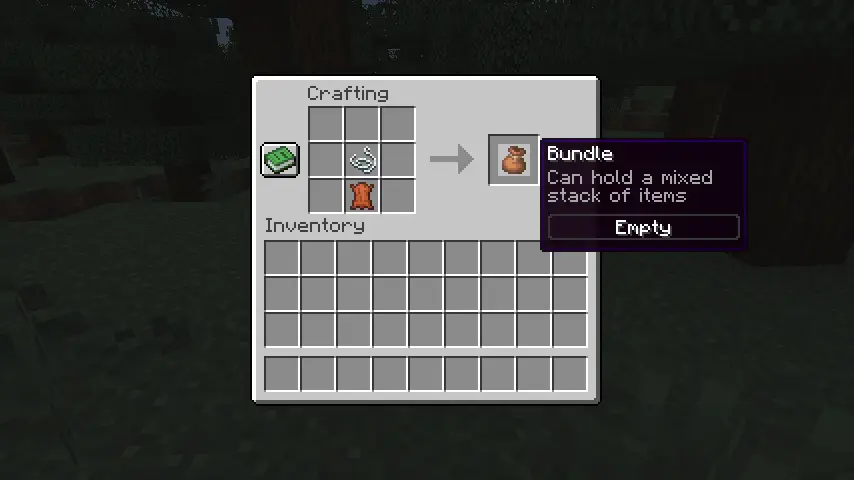 Bundles can be crafted on a crafting table or within one’s inventory using one leather and string. Simply place the leather on the crafting grid and then place the string directly above it. For a visual representation of this recipe, please see the image we included above.
How to Use Minecraft 1.21 Bundles
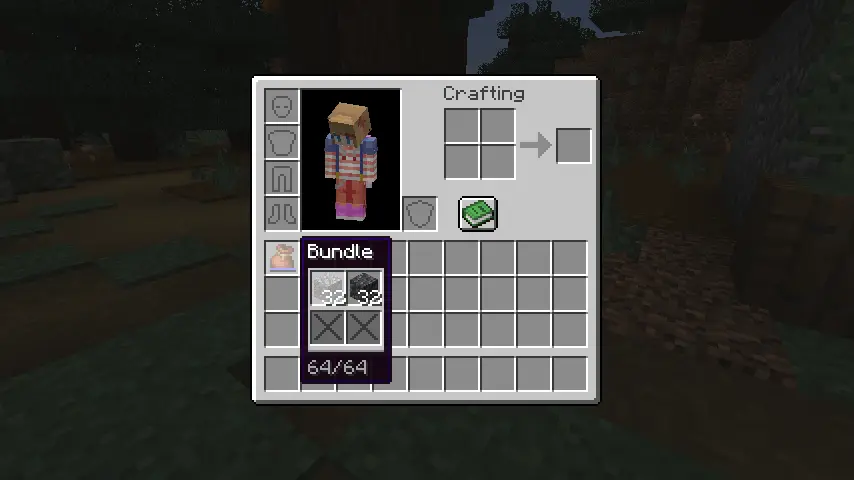 Bundles can be interacted with right from one’s inventory by picking it up and right-clicking the blocks and items to place within. Alternatively, one can pick up each individual item and right-click on the bundle instead. Bundles can also be actively used within one’s inventory to automatically remove the last item put in or outside one’s inventory to dump all the items within out into the world.
您对这篇博客有何评价?
分享您的看法,帮助我们将博客做得更好!
不喜欢
一般
喜欢

需要游戏服务器吗?
租用一台游戏服务器,您可以和朋友们在极低延迟和自定义设置下私密游玩。从 110+ 款游戏中挑选您的最爱,邀请全球玩家,享受私密对战,或者按照您自己的规则建立属于您的在线社区。








获取第一手独家资讯!
订阅我们的电子邮件,获取有关我们托管游戏、公司新闻和独家优惠的最新动态。随时掌握一手资讯!













