

Minecraft 1.20 Archeology Guide
发布于 ,作者

分享:

分享至 X

分享至 Facebook

分享至 Threads

分享至 Bluesky

复制到剪贴板

通过电子邮件分享
Archeology has been out for a little over a week’s time, and already players have found countless secrets not listed in the official release notes online. Today we explore Archeology in our Minecraft 1.20 archeology guide and provide exactly how you too can make use of this nifty new feature once it goes live.
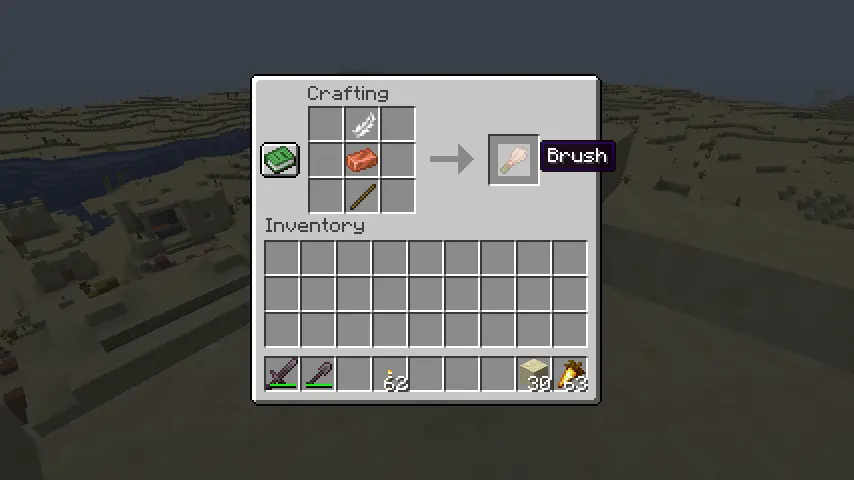 Before our journey to the past begins, there is a new tool every aspiring archeologist requires! The brush which will be used to sweep away suspicious sand. Players can craft a brush with relative ease by placing a stick on the bottom of the crafting table, a copper ingot right in the middle, and a feather at the very top.
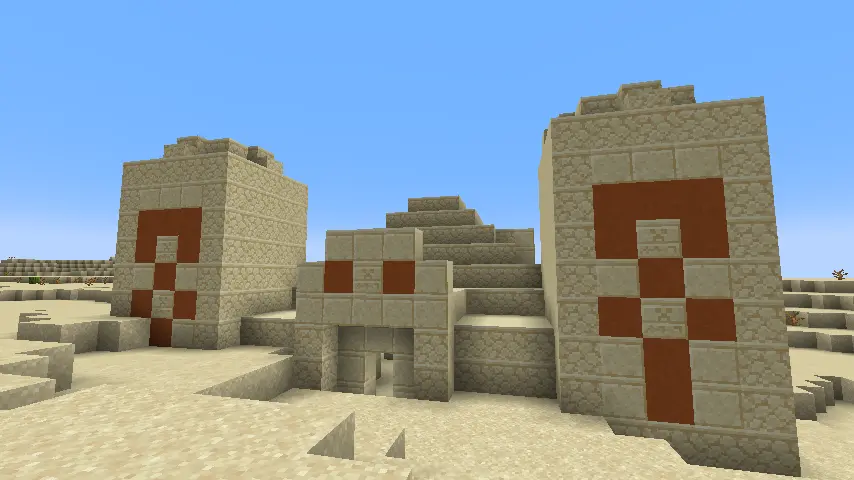 With a brush in hand, it’s time to find some sand! Currently, only desert temples and wells include suspicious sand, so one or the other will need to be located. A task easier said than done, unfortunately.
These two structures generate exclusively in desert biomes and are quite rare on top of that. It will likely take some time, and a lot of luck, but keep at it, and chances are you will find a desert temple soon enough.
However, for those with abysmal luck, the “/locate structure” command can be used to provide exact coordinates to a desert temple nearby. Some would consider this cheating, but in Minecraft, that is for you to decide.
With a brush in hand, it’s time to find some sand! Currently, only desert temples and wells include suspicious sand, so one or the other will need to be located. A task easier said than done, unfortunately.
These two structures generate exclusively in desert biomes and are quite rare on top of that. It will likely take some time, and a lot of luck, but keep at it, and chances are you will find a desert temple soon enough.
However, for those with abysmal luck, the “/locate structure” command can be used to provide exact coordinates to a desert temple nearby. Some would consider this cheating, but in Minecraft, that is for you to decide.
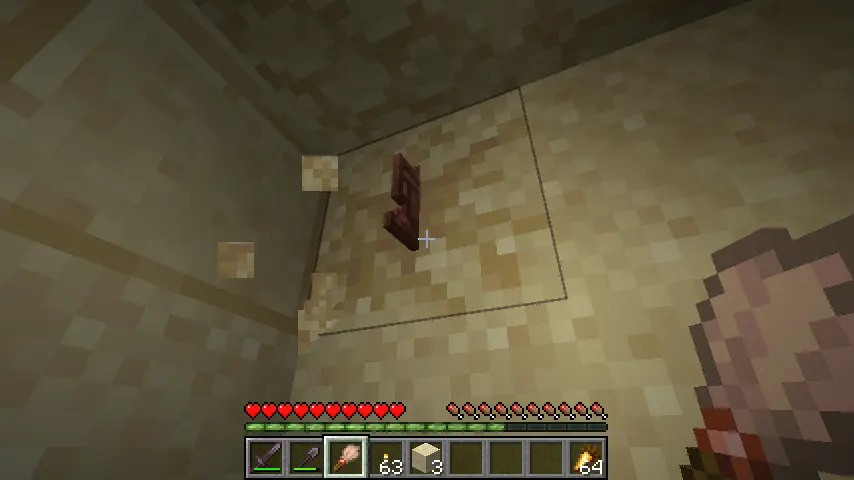 Once a desert temple or well has been found, excavation can commence! Suspicious sand generates in the rooms buried beneath desert temples and at the bottom of desert wells. The sand itself looks almost like regular sand but slightly off with what appears to be very faded cracks.
Finally, when suspicious sand has been spotted, take out your brush and begin brushing out the item. Congratulations on your very first discovery!
Desert Temple Archeology Loot:
Once a desert temple or well has been found, excavation can commence! Suspicious sand generates in the rooms buried beneath desert temples and at the bottom of desert wells. The sand itself looks almost like regular sand but slightly off with what appears to be very faded cracks.
Finally, when suspicious sand has been spotted, take out your brush and begin brushing out the item. Congratulations on your very first discovery!
Desert Temple Archeology Loot:
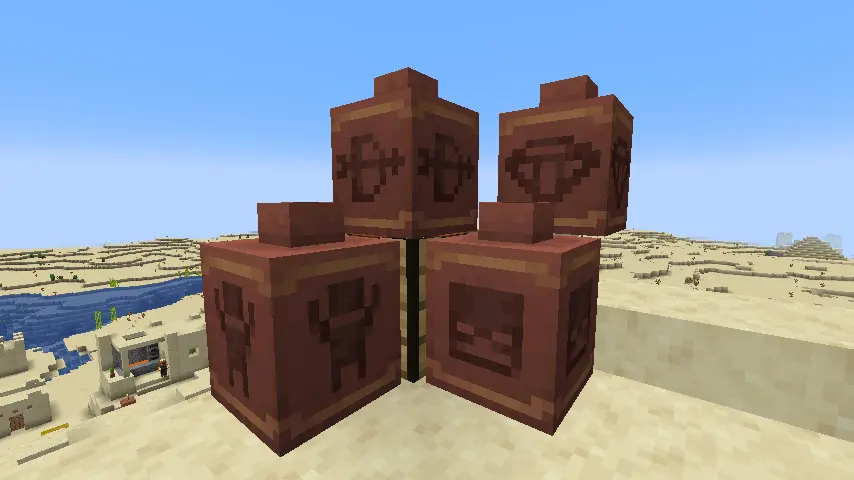
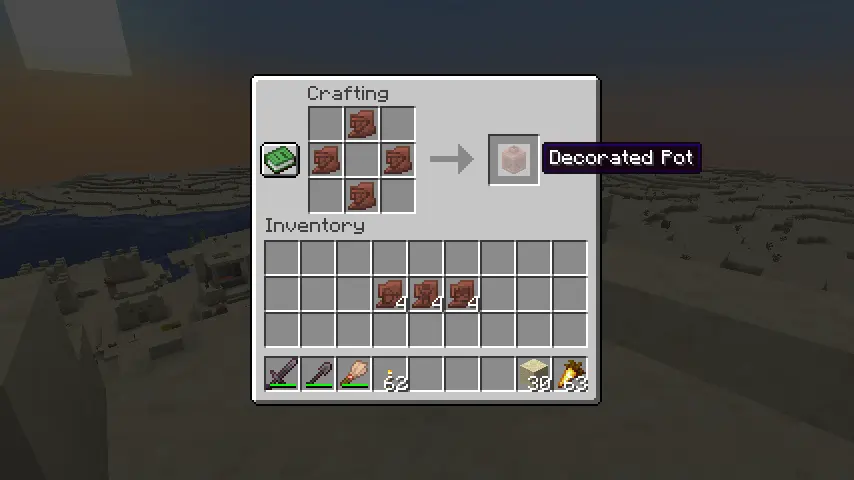 Four decorated pot variations have been added to Minecraft 1.20. Players looking to craft them will first need four identical pottery shards, which can’t be mixed and matched! First, place a shard on the very bottom of the crafting table, then one at the very top, followed by one on the far right, and then one on the far left. A diamond shape made of four pottery shards, in other words.
If done correctly, the decorated pot will appear to complete the craft!
Four decorated pot variations have been added to Minecraft 1.20. Players looking to craft them will first need four identical pottery shards, which can’t be mixed and matched! First, place a shard on the very bottom of the crafting table, then one at the very top, followed by one on the far right, and then one on the far left. A diamond shape made of four pottery shards, in other words.
If done correctly, the decorated pot will appear to complete the craft!
 Archeology is a fantastic way to give life to dated structures. And from what we have already heard, jungle temples and ocean monuments will receive the archeology treatment next! What goodies have they been hiding that were otherwise lost to time? Perhaps some sniffer eggs?
Until Next Time,
BisectHosting =)
Archeology is a fantastic way to give life to dated structures. And from what we have already heard, jungle temples and ocean monuments will receive the archeology treatment next! What goodies have they been hiding that were otherwise lost to time? Perhaps some sniffer eggs?
Until Next Time,
BisectHosting =)

Minecraft 1.20 Archeology Guide: Crafting a Brush
Before our journey to the past begins, there is a new tool every aspiring archeologist requires! The brush which will be used to sweep away suspicious sand. Players can craft a brush with relative ease by placing a stick on the bottom of the crafting table, a copper ingot right in the middle, and a feather at the very top.
Finding a Desert Temple or Desert Well
With a brush in hand, it’s time to find some sand! Currently, only desert temples and wells include suspicious sand, so one or the other will need to be located. A task easier said than done, unfortunately.
These two structures generate exclusively in desert biomes and are quite rare on top of that. It will likely take some time, and a lot of luck, but keep at it, and chances are you will find a desert temple soon enough.
However, for those with abysmal luck, the “/locate structure” command can be used to provide exact coordinates to a desert temple nearby. Some would consider this cheating, but in Minecraft, that is for you to decide.
Suspicious Sand
Once a desert temple or well has been found, excavation can commence! Suspicious sand generates in the rooms buried beneath desert temples and at the bottom of desert wells. The sand itself looks almost like regular sand but slightly off with what appears to be very faded cracks.
Finally, when suspicious sand has been spotted, take out your brush and begin brushing out the item. Congratulations on your very first discovery!
Desert Temple Archeology Loot:
- Skull Pottery Shard
- Prize Pottery Shard
- Archer Pottery Shard
- Diamond
- Emerald
- TNT
- Gunpowder
- Arms Up Pottery Shard
- Emerald
- Suspicious Stew
- Brick
- Stick
Minecraft 1.20 Archeology Guide: Crafting Pottery
Four decorated pot variations have been added to Minecraft 1.20. Players looking to craft them will first need four identical pottery shards, which can’t be mixed and matched! First, place a shard on the very bottom of the crafting table, then one at the very top, followed by one on the far right, and then one on the far left. A diamond shape made of four pottery shards, in other words.
If done correctly, the decorated pot will appear to complete the craft!
Minecraft 1.20 Archeology Guide
Archeology is a fantastic way to give life to dated structures. And from what we have already heard, jungle temples and ocean monuments will receive the archeology treatment next! What goodies have they been hiding that were otherwise lost to time? Perhaps some sniffer eggs?
Until Next Time,
BisectHosting =)

您对这篇博客有何评价?
分享您的看法,帮助我们将博客做得更好!
不喜欢
一般
喜欢

需要游戏服务器吗?
租用一台游戏服务器,您可以和朋友们在极低延迟和自定义设置下私密游玩。从 110+ 款游戏中挑选您的最爱,邀请全球玩家,享受私密对战,或者按照您自己的规则建立属于您的在线社区。








获取第一手独家资讯!
订阅我们的电子邮件,获取有关我们托管游戏、公司新闻和独家优惠的最新动态。随时掌握一手资讯!













