
HumanitZ Controls Guide: All PC Keybinds
发布于 ,作者

分享:

分享至 X

分享至 Facebook

分享至 Threads

分享至 Bluesky

复制到剪贴板

通过电子邮件分享
(Estimated Read Time: 3 minutes)
The world falls into chaos as the undead (called zeeks) significantly outnumber the surviving human population. It's now your job to rid the world of this zombie threat, but first, you must learn the basic controls in HumanitZ.HumanitZ Controls and Keybinds
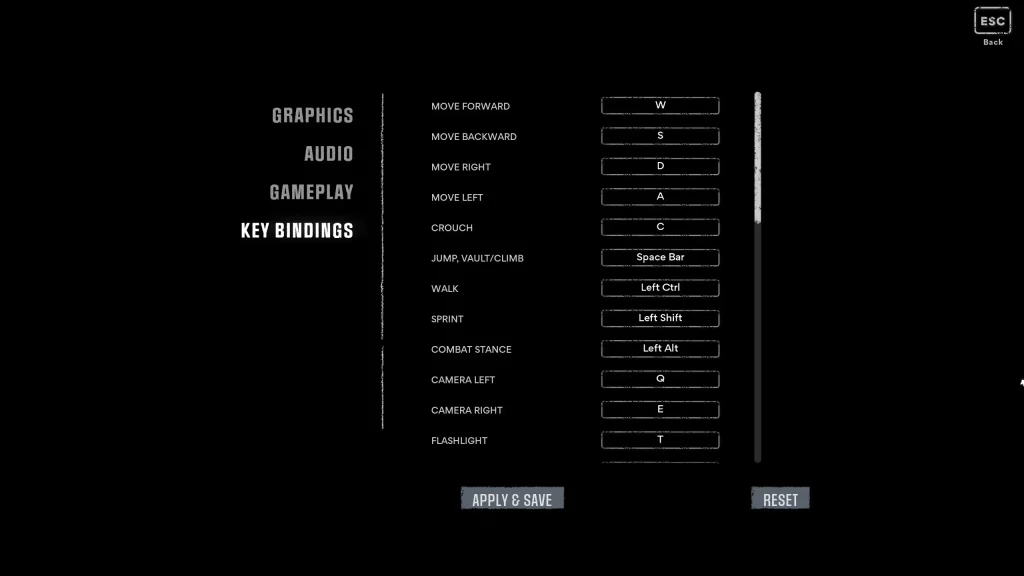 The controls for HumanitZ are dedicated to keyboard and mouse users. It's also important to mention that some limitations exist when using a controller to play this isometric zombie survival title. Nonetheless, players, especially HumanitZ beginners, should spend some time acquainting themselves with the game's basic controls to increase survivability and prevent early deaths.
Keyboard & Mouse Bindings
- Move Forward: W
- Move Backward: S
- Move Right: D
- Move Left: A
- Crouch: C
- Jump/Vault/Climb: SPACE BAR
- Walk: LEFT CTRL
- Sprint: LEFT SHIFT
- Combat Stance: LEFT ALT
- Camera Left: Q
- Camera Right: E
- Flashlight: T
- Interact: F
- Inventory: Tab
- Fire: Left mouse button
- Aim: Right mouse button
- Finisher: Middle mouse button
- Reload: R
- Ground Attack: V
- Primary: 1
- Secondary: 2
- Side Arm: 3
- Tool: 4
- Build Mode: B
- Car Horn: H
- Car Lights: T
- Open Map: M
- Show Building Health Bar: G
- Drop Backpack: U
- Drop Weapon: X
- Emote Menu: Z
- Quick Slot: 5
- Cycle Arrows: Y
- Vehicle Reverse Camera: Middle mouse button
- Text Chat: ENTER
- Switch Build Detection: R
- Push to Talk: J
- Lock/Unlock Door: L
Does HumanitZ Have Controller Support?
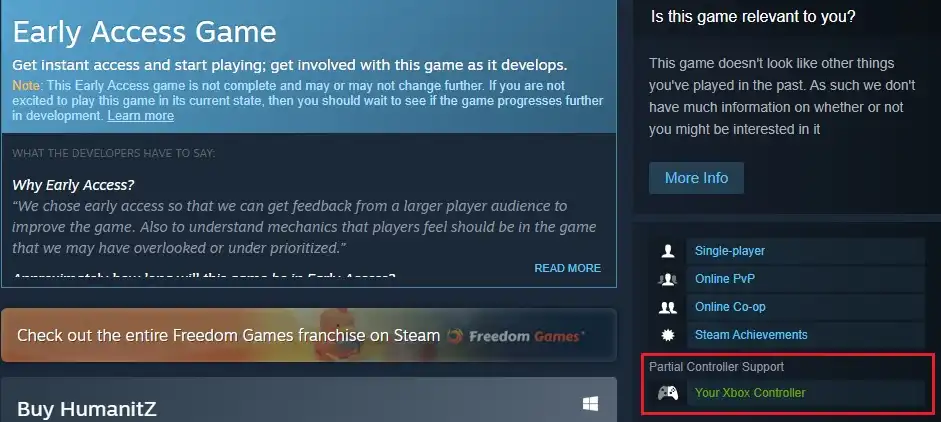 The official HumanitZ Steam page mentions that this game only has “Partial Controller Support.” It means that players can use a controller to play the game. However, there’s no method to change the controller's keybindings in the game’s Settings menu. It also means that players must fiddle with their controller to identify which button does what action.
Additionally, some buttons may have no keybinds. For example, if you’re playing HumanitZ using a PlayStation controller, the X, Triangle, Circle, and Square buttons may work, but the shoulder buttons might not function.
Thankfully, developer Yodubzz Studios has heard out players' requests, revealing that HumanitZ will have full controller support in 2024, as mentioned in a September 30, 2023 roadmap announcement. This declaration also has other exciting things for players to look forward to the game in 2024, including the following:
The official HumanitZ Steam page mentions that this game only has “Partial Controller Support.” It means that players can use a controller to play the game. However, there’s no method to change the controller's keybindings in the game’s Settings menu. It also means that players must fiddle with their controller to identify which button does what action.
Additionally, some buttons may have no keybinds. For example, if you’re playing HumanitZ using a PlayStation controller, the X, Triangle, Circle, and Square buttons may work, but the shoulder buttons might not function.
Thankfully, developer Yodubzz Studios has heard out players' requests, revealing that HumanitZ will have full controller support in 2024, as mentioned in a September 30, 2023 roadmap announcement. This declaration also has other exciting things for players to look forward to the game in 2024, including the following:
- Vehicle modification
- Multi-story buildings
- Hidden island
- Console support
- Mod support

您对这篇博客有何评价?
分享您的看法,帮助我们将博客做得更好!
不喜欢
一般
喜欢

需要游戏服务器吗?
租用一台游戏服务器,您可以和朋友们在极低延迟和自定义设置下私密游玩。从 110+ 款游戏中挑选您的最爱,邀请全球玩家,享受私密对战,或者按照您自己的规则建立属于您的在线社区。








获取第一手独家资讯!
订阅我们的电子邮件,获取有关我们托管游戏、公司新闻和独家优惠的最新动态。随时掌握一手资讯!













