
Farming Simulator 22 Controls Guide: All PC & Console Keybinds
发布于 ,作者

分享:

分享至 X

分享至 Facebook

分享至 Threads

分享至 Bluesky

复制到剪贴板

通过电子邮件分享
Continue reading as we cover the default controls of Farming Simulator 22 for all of its available platforms, including PC (keyboard & mouse, controller), PS4, PS5, Xbox One, Xbox Series S, and Xbox Series X.
 Beginners can learn the controls for Farming Simulator 22 through this guide. Still, some veteran farmers may also take note of the controls mentioned below if they need a refresher, particularly for their chosen version of the game.
Farming Simulator 22 Controls Guide
Beginners can learn the controls for Farming Simulator 22 through this guide. Still, some veteran farmers may also take note of the controls mentioned below if they need a refresher, particularly for their chosen version of the game.
Windows & Mac (Keyboard & Mouse)
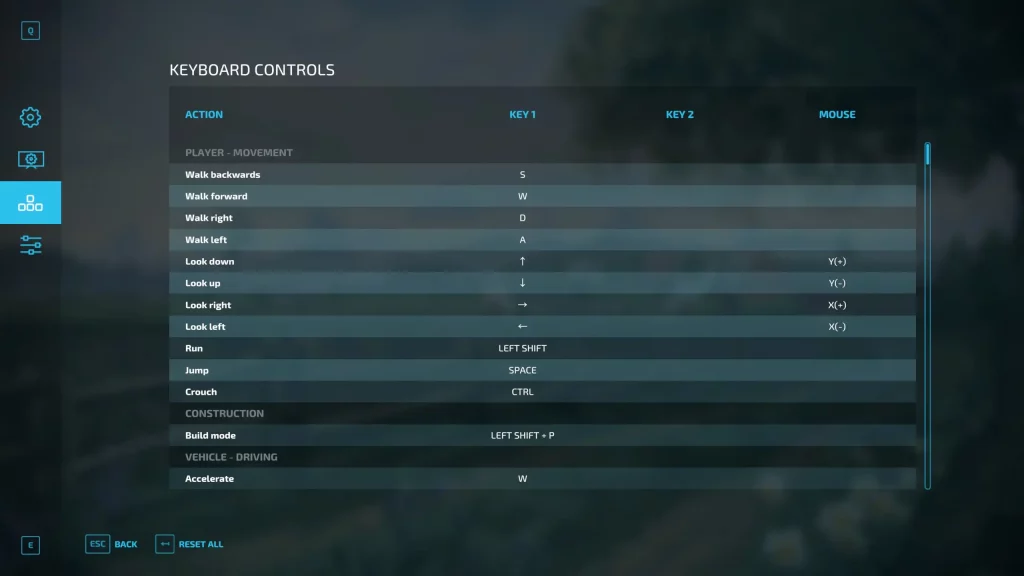
Note: Actions marked with “N/A” have no default keybinds. However, players can assign controls to these actions.Player – Movement
- Walk Backwards: S
- Walk Forward: W
- Walk Right: D
- Walk Left: A
- Look Down: Up directional button or move mouse upward
- Look Up: Down directional button or move mouse downward
- Look Right: Right directional button or move mouse to the right
- Look Left: Left directional button or move mouse to the left
- Run: Left ShiftJump: Spacebar
- Crouch: Control
Construction
- Build Mode: Left Shift + P
Vehicle – Driving
- Accelerate: W
- Brake: S
- Steer Right: D
- Steer Left: A
- Look Down (Vehicle): Up directional button or move mouse upward
- Look Up (Vehicle): Down directional button or move mouse downward
- Look Right (Vehicle): Right directional button or move mouse to the right
- Look Left (Vehicle): Left directional button or move mouse to the left
- Increase Axis Distance: K or hold left mouse button + move mouse to the right
- Decrease Axis Distance: M or hold left mouse button + move mouse to the left
- Increase Cruise Control: 2
- Decrease Cruise Control: 1
- Honk: 0
- Start/Stop Engine: Enter
- Toggle Steering Mode: Control + Y
- Toggle Steering Mode (Reverse): Left Shift + Control + Y
- Change Driving Direction: Left Shift + B
- Toggle Cruise Control: 3
- Crab Steering (All): Left Shift + I
- Crab Steering Left: Left Shift + U
- Crab Steering Right: Left Shift + O
Player – Interactive
- Rotate Hand Tool Right: N or hold right mouse button + move mouse to the right
- Rotate Hand Tool Left: J or hold right mouse button + move mouse to the left
- Activate Hand Tool: X or left click
- Rotate Object Left: Hold middle mouse button + move mouse to the right
- Rotate Object Right: Hold middle mouse button + move mouse to the left
- Rotate Object Up: Hold middle mouse button + move mouse downward
- Rotate Object Down: Hold middle mouse button + move mouse upward
- Interact: Left Click
- Throw Object: Right Click
- Toggle Flashlight: F
- Use Object: R
- Pet: R
Vehicle
- Raise Hydraulic Hitch: J or hold left mouse button + move mouse upward
- Lower Hydraulic Hitch: N or hold left mouse button + move mouse downward
- Raise Hydraulic Hitch 2: K or hold left mouse button + move mouse to the right
- Lower Hydraulic Hitch 2: M or hold left mouse button + move mouse to the left
- Rotate Pipe Up: K or hold left mouse button + move mouse downward
- Rotate Pipe Down: M or hold left mouse button + move mouse upward
- Rotate Pipe 2 Up: J or hold left mouse button + move mouse to the right
- Rotate Pipe 2 Down: N or hold left mouse button + move mouse to the left
- Raise Drawbar: Left Shift + J or hold left mouse button + move mouse to the right
- Lower Drawbar: Left Shift + N or hold left mouse button + move mouse to the left
- Fold Drawbar Right: Left Shift + K or hold left mouse button + move mouse upward
- Fold Drawbar Left: Left Shift + M or hold left mouse button + move mouse downward
- Enter: E
- Camera Zoom In: Page Up or mouse wheel up
- Camera Zoom Out: Page Down or mouse wheel down
- Switch to Next Vehicle: Tab
- Switch to Previous Vehicle: Left Shift + Tab or Control + Tab
- Attach Tool: Q
- Detach Tool: Control + Q
- Select Next Tool: G
- Select Previous Tool: Left Shift + G
- Dump: I
- Toggle Tip Side: U
- Fasten/Unfasten Tension Belts: L
- Change Bale Size: L
- Turn Tools On/Off: B
- Lower Tool: V
- Tool Function 1: B
- Tool Function 2: X
- Tool Function 3: Y
- Tool Function 4: Z
- Change Seeds: Y
- Change Seeds (Reverse): Left Shift + Y
- Toggle Pipe: O
- Open/Close Cover: N
- Toggle Straw Swath: ,
- Dump on Ground: Control + I
- Lower/Raise All Tools: Control + V
- Turn On/Off All Tools: Control + B
- Fold All Tools: Control + X
- Unload: I
Vehicle – Work
- Extend Header Reel: K or hold left mouse button + move mouse downward
- Retract Header Reel: M or hold left mouse button + move mouse upward
- Raise Header Reel: J or hold left mouse button + move mouse to the right
- Lower Header Reel: N or hold left mouse button + move mouse to the left
- Raise Sprayer Arm: J or hold left mouse button + move mouse to the right
- Lower Sprayer Arm: N or hold left mouse button + move mouse to the left
- AI Worker: H
- Toggle Work Mode: Control + Y
- Sprayer Application Rate Change: ,
- Deactivate Left Partial Widths: N/A
- Activate Left Partial Widths: N/A
- Activate Right Partial Widths: N/A
- Deactivate Right Partial Widths: N/A
- Change Work Width: Control + Z
- Change Wood Cut Length Back: Left Shift + Y
- Drop Tree From Wood Harvester: Left Shift + X
- Tilt Harvester Head: ,
- Work Mode Middle: Left Shift + I
- Work Mode Left: Left Shift + U
- Work Mode Right: Left Shift + O
Vehicle – Front Loader
- Raise Front Loader Arm: J or hold left mouse button + move mouse upward
- Lower Front Loader Arm: N or hold left mouse button + move mouse downward
- Extend Front Loader Arm: Left Shift + J or hold left mouse button + move mouse downward
- Contract Front Loader Arm: Left Shift + N or hold left mouse button + move mouse upward
- Raise Front Loader Tool: K or hold left mouse button + move mouse to the left
- Lower Front Loader Tool: M or hold left mouse button + move mouse to the right
- Open Front Loader Tool: Left Shift + K or hold left mouse button + move mouse to the right
- Close Front Loader Tool: Left Shift + M or hold left mouse button + move mouse to the left
- Raise Tool Axis 3: Left Shift + Ctrl + J or hold left and right mouse button + move mouse to the right
- Lower Tool Axis 3: Left Shift + Ctrl + N or hold left and right mouse button + move mouse to the left
- Raise Tool Axis 4: Left Shift + Ctrl + K or hold left and right mouse button + move mouse downward
- Lower Tool Axis 4: Left Shift + Ctrl + M or hold left and right mouse button + move mouse upward
- Raise Tool Axis 5: Control + K or hold middle mouse button + move mouse to the right
- Lower Tool Axis 5: Control + M or hold middle mouse button + move mouse to the left
Crane
- Rotate Crane Right: K or hold left mouse button + move mouse to the right
- Rotate Crane Left: M or hold left mouse button + move mouse to the left
- Raise Crane Arm: J or hold left mouse button + move mouse upward
- Lower Crane Arm: N or hold left mouse button + move mouse downward
- Raise Crane Arm 2: Left Shift + J or hold right mouse button + move mouse downward
- Lower Crane Arm 2: Left Shift + N or hold right mouse button + move mouse downward
- Extend Crane Arm: Left Shift + K or hold right mouse button + move mouse downward
- Retract Crane Arm: Left Shift + M or hold right mouse button + move mouse downward
- Open Crane Tool: Left Shift + Control + K or hold left and right mouse button + move mouse upward
- Close Crane Tool: Left Shift + Control + M or hold left and right mouse button + move mouse downward
- Rotate Crane Tool Right: Left Shift + Control + J or hold left and right mouse button + move mouse to the right
- Rotate Crane Tool Left: Left Shift + Control + N or hold left and right mouse button + move mouse to the left
- Raise Crane Tool Axis 3: Control + K or hold middle mouse button + move mouse to the right
- Lower Crane Tool Axis 3: Control + M or hold middle mouse button + move mouse to the left
- Crane Support Leg: Control + D or hold middle mouse button + move mouse upward
- Crane Support Leg 2: Control + A or hold middle mouse button + move mouse downward
Placeable
- Open Flap: J or hold left mouse button + move mouse upward
- Close Flap: N or hold left mouse button + move mouse downward
- Open Flap 2: K or hold left mouse button + move mouse to the right
- Close Flap 2: M or hold left mouse button + move mouse to the left
- Open Flap 3: Left Shift + K or hold right mouse button + move mouse to the right
- Close Flap 3: Left Shift + M or hold right mouse button + move mouse to the left
Camera
- Select Camera: C
Game
- Pause Game: Pause
- Skip Message Box: Left Click
- Open Menu: Escape
- Shop: P
- Map: N/A
- Character Creation: Alt + P
- Push to Talk: .
- Toggle Map View: 9
- Select: N/A
- Save Screenshot: Print Screen
- Chat (multiplayer): T
- Toggle Help Text: F1
- Increase Timescale: 8
- Decrease Timescale: 7
- Reset Head Tracking: F8
Vehicle – Gearbox
- Clutch: Left Shift
- Shift Gear Up: Numpad +
- Shift Gear Down: Numpad -
- Gear 1: N/A
- Gear 2: N/A
- Gear 3: N/A
- Gear 4: N/A
- Gear 5: N/A
- Gear 6: N/A
- Gear 7: N/A
- Gear 8: N/A
- Shift Group Up: Keypad 9
- Shift Group Down: Keypad 7
- Gear Group 1: N/A
- Gear Group 2: N/A
- Gear Group 3: N/A
- Gear Group 4: N/A
- Change Direction: Spacebar
- Select Forward Direction: N/A
- Select Backward Direction: N/A
Vehicle – Lights
- Toggle Light: F
- Toggle Light (Reverse): Left Shift + F
- Toggle Beacon Lights: Home
- Turn Signal Left: Keypad 1
- Turn Signal Right: Keypad 3
- Hazard Lights: Keypad 2
- Work Light Back: Keypad 6
- Work Light Front: Keypad 5
- High Beam Light: Control + F
- Light Front: N/A
Radio
- Toggle Radio: 5
- Next Radio Channel: 6
- Previous Radio Channel: 4
- Next Song: N/A
- Previous Song: N/A
Bale Stacking
- Show Help: F1
- Start Game: Control + S
- Reset Game: Control + R
- Finish Game: Control + F
- Camera POI 1: 1
- Camera POI 2: 2
- Camera POI 3: 3
- Camera POI 4: 4
- Camera POI 5: 5
- Camera POI 6: 6
- Camera POI 1 Vehicle: Control + 1
- Camera POI 2 Vehicle: Control + 2
- Camera POI 3 Vehicle: Control + 3
- Camera POI 4 Vehicle: Control + 4
- Camera POI 5 Vehicle: Control + 5
- Camera POI 6 Vehicle: Control + 6
- Camera POI 1 Vehicle Indoor: Control + Left Shift + 1
- Camera POI 2 Vehicle Indoor: Control + Left Shift + 2
- Camera POI 3 Vehicle Indoor: Control + Left Shift + 3
- Camera POI 4 Vehicle Indoor: Control + Left Shift + 4
- Camera POI 5 Vehicle Indoor: Control + Left Shift + 5
- Camera POI 6 Vehicle Indoor: Control + Left Shift + 6
Arena Mode
- Arena: Toggle Ghost Mode: Control + G
- Arena: Start Game (Team Blue): Control + B
- Arena: Start Game (Team Red): Control + R
- Arena: Start Game: Control + S
- Arena: Observer Camera Spline 0: Control + 1
- Arena: Observer Camera Spline 1: Control + 6
- Arena: Observer Camera POI 1: 3
- Arena: Observer Camera POI 2: 4
- Arena: Observer Camera POI 3: 1
- Arena: Observer Camera POI 4: 2
- Arena: Observer Camera POI 5: 0
- Arena: Observer Camera POI 6: 8
- Arena: Observer Camera POI 7: 9
- Arena: Observer Camera POI 8: 6
- Arena: Observer Camera POI 9: 7
- Arena: Observer Camera POI 10: 5
- Arena: Camera Player 1 (Blue): Control + Keypad 1
- Arena: Camera Player 2 (Blue): Control + Keypad 2
- Arena: Camera Player 3 (Blue): Control + Keypad 3
- Arena: Camera Player 1 (Red): Control + Keypad 4
- Arena: Camera Player 2 (Red): Control + Keypad 5
- Arena: Camera Player 3 (Red): Control + Keypad 6
- Arena: Observer Axis Camera Mode: Alt
- Arena: Observer Camera Slow: Control
- Arena: Observer Camera Fast: Left Shift
- Arena: Observer Mirror Camera: Spacebar
- Arena: Observer Camera Move Side: D
- Arena: Observer Camera Move Forward: S
- Arena: Observer Camera Move Up/Down: Q
- Arena: Observer Camera Look Left/Right: Right directional button or move mouse to the right
- Arena: Observer Camera Look Up/Down: Up directional button or move mouse upward
- Arena: Show Input Help: F1
Windows (Controller)
General Controls
- Advanced Functions: Hold Left Bumper + Right Bumper
- Brake/Reverse: Left Trigger
- Shop Menu: View button
- Move/Steer: Move left analog stick
- Refuel/Refill Tool: Press left analog stick
- Zoom Camera In: Up directional button
- Zoom Camera Out: Down direction button
- Switch to Previous Vehicle: Left directional button
- Switch to Next Vehicle: Right directional button
- Accelerate/Run: Right trigger
- Game Menu: Menu button
- Look Around: Right analog stick
- Switch Camera: Press right analog stick
- Jump/Attach/Detach: A
- AI Worker: B
- Enter/Exit Vehicle: X
- Switch Control Group: Y
PlayStation 4/5
Game Controls
- Advanced Functions: Hold L1 + R1
- Brake/Reverse: L2
- Shop Menu: Press touchpad
- Move/Steer: Move left analog stick
- Refuel/Refill Tool: Press left analog stick
- Zoom Camera In: Up directional button
- Zoom Camera Out: Down direction button
- Switch to Previous Vehicle: Left directional button
- Switch to Next Vehicle: Right directional button
- Accelerate/Run: R2
- Game Menu: Options button
- Look Around: Right analog stick
- Switch Camera: Press right analog stick
- Jump/Attach/Detach: X
- AI Worker: O
- Enter/Exit Vehicle: Square
- Switch Control Group: Triangle
Xbox One & Series X/S
Game Controls
- Advanced Functions: Hold Left Bumper + Right Bumper
- Brake/Reverse: Left Trigger
- Shop Menu: View button
- Move/Steer: Move left analog stick
- Refuel/Refill Tool: Press left analog stick
- Zoom Camera In: Up directional button
- Zoom Camera Out: Down direction button
- Switch to Previous Vehicle: Left directional button
- Switch to Next Vehicle: Right directional button
- Accelerate/Run: Right trigger
- Game Menu: Menu button
- Look Around: Right analog stick
- Switch Camera: Press right analog stick
- Jump/Attach/Detach: A
- AI Worker: B
- Enter/Exit Vehicle: X
- Switch Control Group: Y

您对这篇博客有何评价?
分享您的看法,帮助我们将博客做得更好!
不喜欢
一般
喜欢

需要游戏服务器吗?
租用一台游戏服务器,您可以和朋友们在极低延迟和自定义设置下私密游玩。从 110+ 款游戏中挑选您的最爱,邀请全球玩家,享受私密对战,或者按照您自己的规则建立属于您的在线社区。








获取第一手独家资讯!
订阅我们的电子邮件,获取有关我们托管游戏、公司新闻和独家优惠的最新动态。随时掌握一手资讯!













