

Farming Simulator 22 Cheats Guide (PC & Console)
发布于 ,作者

分享:

分享至 X

分享至 Facebook

分享至 Threads

分享至 Bluesky

复制到剪贴板

通过电子邮件分享
(Estimated Read Time: 6 minutes)
Like its real-life counterpart, starting and maintaining a farm in Farming Simulator 22 generally requires significant time and effort. However, players can use several cheats and exploits to help make their farming life easier - including the infamous money cheat. So, here’s a Farming Simulator 22 Cheats Guide covering all the cheats and exploits you can use to get ahead on your platform of choice.Farming Simulator 22 Cheats Guide
 Note that using cheats in Farming Simulator 22 is typically only possible for the game’s PC version. However, it doesn’t mean that the console versions can use exploits to help make players’ playthroughs easier than normal.
Farming Simulator 22 General Cheats (PC)
 Players must gain access to the command console before they can use cheats in the PC version of Farming Simulator 22. Learn how to activate the game’s command console by checking out our Farming Simulator 22 Console Commands Guide here.
Once the command console is accessible, enable it in the game by pressing the “~” or “`” key on the keyboard. Then, you’re free to enter the following cheats:
Players must gain access to the command console before they can use cheats in the PC version of Farming Simulator 22. Learn how to activate the game’s command console by checking out our Farming Simulator 22 Console Commands Guide here.
Once the command console is accessible, enable it in the game by pressing the “~” or “`” key on the keyboard. Then, you’re free to enter the following cheats:
- gsPlayerFlightMode: Activates flight mode. Press Q and E for altitude
- gsMoneyAdd: Adds 10k money. You can also use gsMoneyAdd <amount> for more money
- gsTeleport: Teleports to a given field or x/z-position
- gsFillUnitAdd <fillUnitIndex> <fillTypeName> [amount]: Fills indicated unit
- gsTimeSet <hour>: Set time
- gsBaleAdd fillTypeName isRoundBale [width] [height/diameter] [length] [wrapState] [modName]: Adds a bale in front of you
- gsPalletAdd <type>: Add pallet
- Types: Butter, Lettuce, Cake, Bread, Silage_Additive, Fertilizer, Wool, Liquidfertilizer, Mineral_Feed, Wheat, Oat, Olive, Sugar, Soybean, Herbicide, Lime, Oilseedradish, Barley, Furniture, Boards, Chocolate, Strawberry, Cereal, Canola_Oil, Grapejuice, Sunflower_Oil, Raisins, Olive_Oil, Honey, Maize, Seeds, Grape, Canola, Flour, Clothes, Cotton, Fabric, Sunflower, Sorghum, Potato, Sugarcane, Egg, Cheese, and Tomato
- gsFarmSet: Set farm for current player or vehicle
- gsFarmlandBuy: Buys farmland with the given id
- gsFarmlandBuyAll: Buys all farmlands
- gsFarmlandSell: Sells farmland with the given id
- gsFarmlandSellAll: Sells all farmlands
- gsFieldSetFruit: Sets a given fruit to the field
- gsFieldSetFruitAll: Sets a given fruit to all fields
- gsFieldSetGround: Sets a given fruit to the field
- gsFieldSetGroundAll: Sets a given fruit to the all field
Farming Simulator 22 Money Cheat (PC)
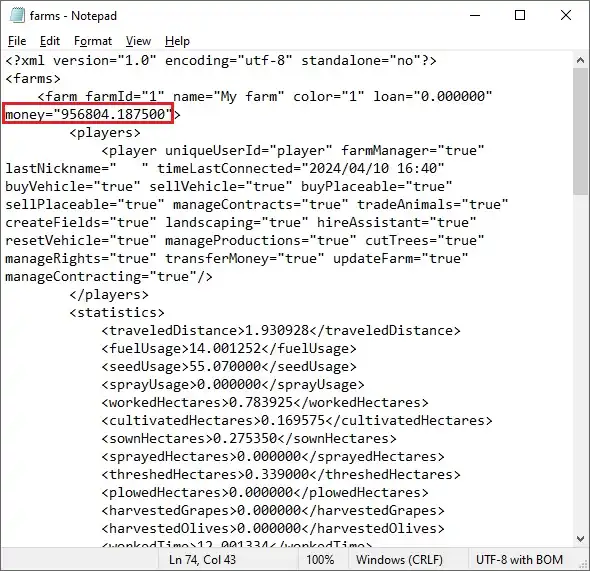 Entering the “gsMoneyAdd” cheat can increase funds instantly while you’re in the game. Alternatively, you can edit your saved file to add cash without grinding. However, ensure you don't mess with other fields in your save file unless you know what you're doing. Also, a backup of the saved file should be created in case a critical error occurs.
With that, here are the steps to follow in editing your saved file and increasing funds in Farming Simulator 22:
Entering the “gsMoneyAdd” cheat can increase funds instantly while you’re in the game. Alternatively, you can edit your saved file to add cash without grinding. However, ensure you don't mess with other fields in your save file unless you know what you're doing. Also, a backup of the saved file should be created in case a critical error occurs.
With that, here are the steps to follow in editing your saved file and increasing funds in Farming Simulator 22:
- 1. Search for your Farming Simulator 22 save file in your system. The default path is C:\Users\*User Name*\Documents\My Games\FarmingSimulator2022.
- 2. Open the folder containing the save file (usually denoted by the file name savegame1, savegame2, etc.).
- 3. Open the “farms.xml” file using a text editor like Notepad.
- 4. Search for the following field: <farm farmId="1" name="My farm" color="1" loan="0.000000" money="100.000" loanAnnualInterestRate="200.000000">.
- 5. Change the number after “money=” and save the file.
- 6. Run the game and load your save file to check if the inputted value in the farms.xml reflects in your game.
Farming Simulator 22 Money Exploit (Console)
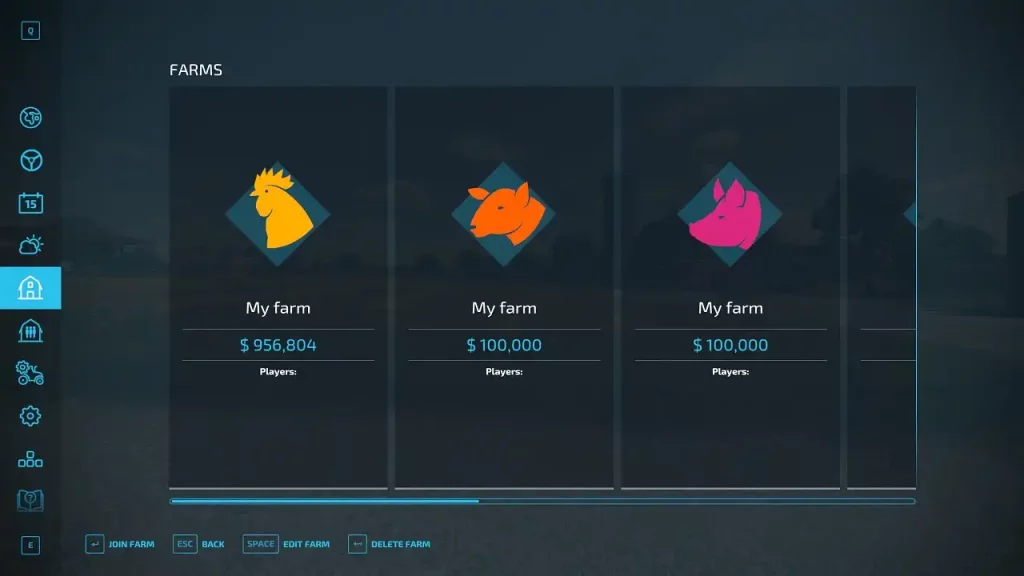 It’s not generally possible to access the command console in the console version of Farming Simulator 22. That means that the general cheats previously mentioned are rendered useless. However, console players can still increase their in-game funds using an exploit.
Follow these steps to manipulate your available cash when you’re playing the console version of Farming Simulator 22:
It’s not generally possible to access the command console in the console version of Farming Simulator 22. That means that the general cheats previously mentioned are rendered useless. However, console players can still increase their in-game funds using an exploit.
Follow these steps to manipulate your available cash when you’re playing the console version of Farming Simulator 22:
- 1. Launch the game and start or load a save file
- 2. Once in the game, save it and quit to the main menu
- 3. Start a multiplayer game using the newly saved game as the host
- 4. In the multiplayer game, create as many multiplayer farms as possible
- 5. Save and exit the multiplayer game, and then return to your single-player file
- 6. Once loaded, a prompt should appear that all multiplayer farms have been merged, letting you receive all the money gained from creating those farmlands
- 7. Save the game and repeat as many times as you want

您对这篇博客有何评价?
分享您的看法,帮助我们将博客做得更好!
不喜欢
一般
喜欢

需要游戏服务器吗?
租用一台游戏服务器,您可以和朋友们在极低延迟和自定义设置下私密游玩。从 110+ 款游戏中挑选您的最爱,邀请全球玩家,享受私密对战,或者按照您自己的规则建立属于您的在线社区。








获取第一手独家资讯!
订阅我们的电子邮件,获取有关我们托管游戏、公司新闻和独家优惠的最新动态。随时掌握一手资讯!













