
Astroneer Leveling Block Guide
发布于 ,作者

分享:

分享至 X

分享至 Facebook

分享至 Threads

分享至 Bluesky

复制到剪贴板

通过电子邮件分享
(Estimated Read Time: 3 minutes)
Gathering resources with the Terrain tool in Astroneer can leave uneven ground, making it unfit for placing items and structures. Thankfully, the Astroneer Leveling Block exists to remedy this concern. If you’re having trouble using this utility item, keep reading!Crafting the Leveling Block in Astroneer
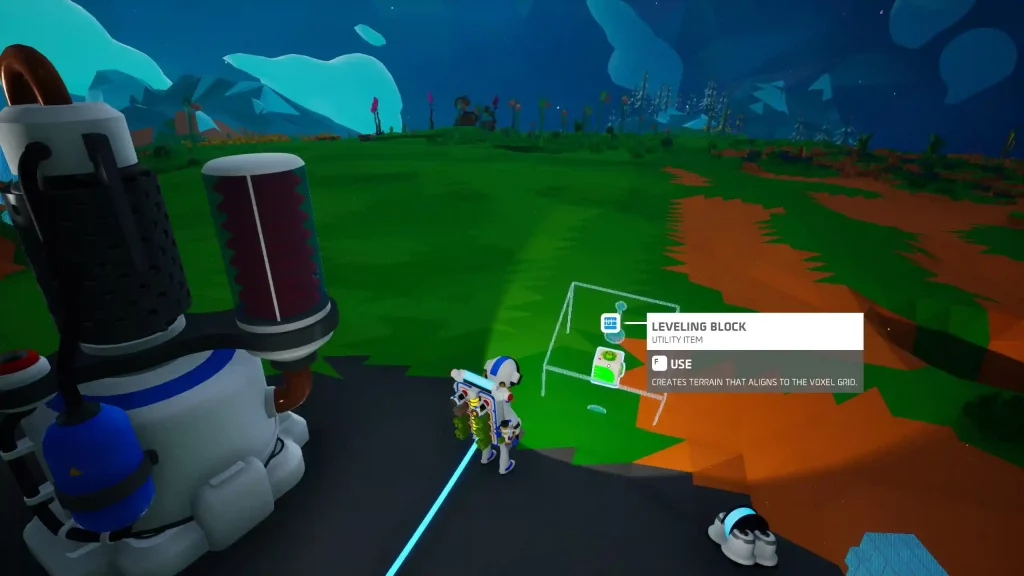 Introduced in Update 1.10.9 as an exclusive item in Creative Mode and introduced in Adventure Mode in Update 1.20.265, players must craft the Astroneer Leveling Block before they can use it. Thankfully, you only need 1x Soil using the Backpack Printer to craft this utility item.
How to Use the Leveling Block in Astroneer
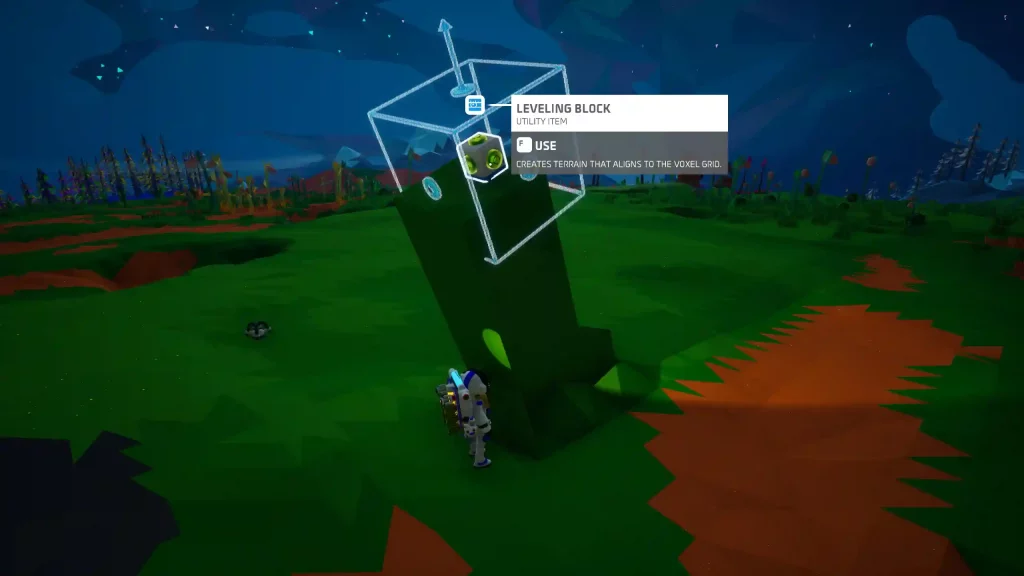 Like the Oxygen Filter and other items in Astroneer, proper usage of the Leveling Block is vital to take advantage of it fully. As mentioned earlier, use the Leveling Block to create uniformly even surfaces on the ground. The leveled surface aligns with the planet’s voxel grid, and the results have no bumps or ridges.
After crafting the Leveling Block, place it on a particular area you want to be leveled. Next, press the Use key (the “F” key by default for PC users). The block should animate, flattening the ground underneath it.
Note: Hover the cursor above the Leveling Block before pressing the Use key to preview the leveled area.
Players can only use the Leveling Block up to 10 times in Adventure Mode. However, this utility item has an unlimited number of uses in Creative Mode.
Also, the area to be leveled by the block will start at a 60-degree angle. Players can set the angle of the resulting even surface to 45 or 90 degrees for a practical finish. However, this can be quite challenging since the block aligns with the planet’s voxel grid, and there’s no way to rotate it manually at the time of writing.
Tip: Pair a Leveling Block with a Narrow Mod to expand the flattened surface. Craft a Narrow Mod from the Backpack Printer using 1x Zinc (made from refining 1x Sphalerite from the Smelting Furnace).
Like the Oxygen Filter and other items in Astroneer, proper usage of the Leveling Block is vital to take advantage of it fully. As mentioned earlier, use the Leveling Block to create uniformly even surfaces on the ground. The leveled surface aligns with the planet’s voxel grid, and the results have no bumps or ridges.
After crafting the Leveling Block, place it on a particular area you want to be leveled. Next, press the Use key (the “F” key by default for PC users). The block should animate, flattening the ground underneath it.
Note: Hover the cursor above the Leveling Block before pressing the Use key to preview the leveled area.
Players can only use the Leveling Block up to 10 times in Adventure Mode. However, this utility item has an unlimited number of uses in Creative Mode.
Also, the area to be leveled by the block will start at a 60-degree angle. Players can set the angle of the resulting even surface to 45 or 90 degrees for a practical finish. However, this can be quite challenging since the block aligns with the planet’s voxel grid, and there’s no way to rotate it manually at the time of writing.
Tip: Pair a Leveling Block with a Narrow Mod to expand the flattened surface. Craft a Narrow Mod from the Backpack Printer using 1x Zinc (made from refining 1x Sphalerite from the Smelting Furnace).
您对这篇博客有何评价?
分享您的看法,帮助我们将博客做得更好!
不喜欢
一般
喜欢

需要游戏服务器吗?
租用一台游戏服务器,您可以和朋友们在极低延迟和自定义设置下私密游玩。从 110+ 款游戏中挑选您的最爱,邀请全球玩家,享受私密对战,或者按照您自己的规则建立属于您的在线社区。








获取第一手独家资讯!
订阅我们的电子邮件,获取有关我们托管游戏、公司新闻和独家优惠的最新动态。随时掌握一手资讯!













