
V Rising Controls Guide (Keyboard, Controller)
tarihinde yazan:

Paylaş:

X'te Paylaş

Facebook'ta Paylaş

Threads'te Paylaş

Bluesky'da Paylaş

Panoya Kopyala

E-posta ile Paylaş
One of the essential elements to learning any game is understanding its controls - and V Rising is no different. Here, you’ll learn about the default controls and keybinds for V Rising across keyboards and the most common kinds of controllers.
 It’s important to mention that V Rising’s full release added partial controller support to the vampire survival action RPG. Although controllers aren’t fully supported, even with V Rising 1.0, the game still provides excellent flexibility in letting players customize their controller keybinds.
V Rising players can edit their keybinds by going to the in-game Settings menu. On the other hand, turn on “Big Picture Mode” on your Steam app. Then, navigate to V Rising on your Library and select the small controller icon to the right of the “Play” button. Here, you can edit the controller keybinds based on your preferences.
With that, here are the default controls for V Rising for the various usable gaming peripherals:
It’s important to mention that V Rising’s full release added partial controller support to the vampire survival action RPG. Although controllers aren’t fully supported, even with V Rising 1.0, the game still provides excellent flexibility in letting players customize their controller keybinds.
V Rising players can edit their keybinds by going to the in-game Settings menu. On the other hand, turn on “Big Picture Mode” on your Steam app. Then, navigate to V Rising on your Library and select the small controller icon to the right of the “Play” button. Here, you can edit the controller keybinds based on your preferences.
With that, here are the default controls for V Rising for the various usable gaming peripherals:
V Rising Controls & Keybinds (Default)
It’s important to mention that V Rising’s full release added partial controller support to the vampire survival action RPG. Although controllers aren’t fully supported, even with V Rising 1.0, the game still provides excellent flexibility in letting players customize their controller keybinds.
V Rising players can edit their keybinds by going to the in-game Settings menu. On the other hand, turn on “Big Picture Mode” on your Steam app. Then, navigate to V Rising on your Library and select the small controller icon to the right of the “Play” button. Here, you can edit the controller keybinds based on your preferences.
With that, here are the default controls for V Rising for the various usable gaming peripherals:
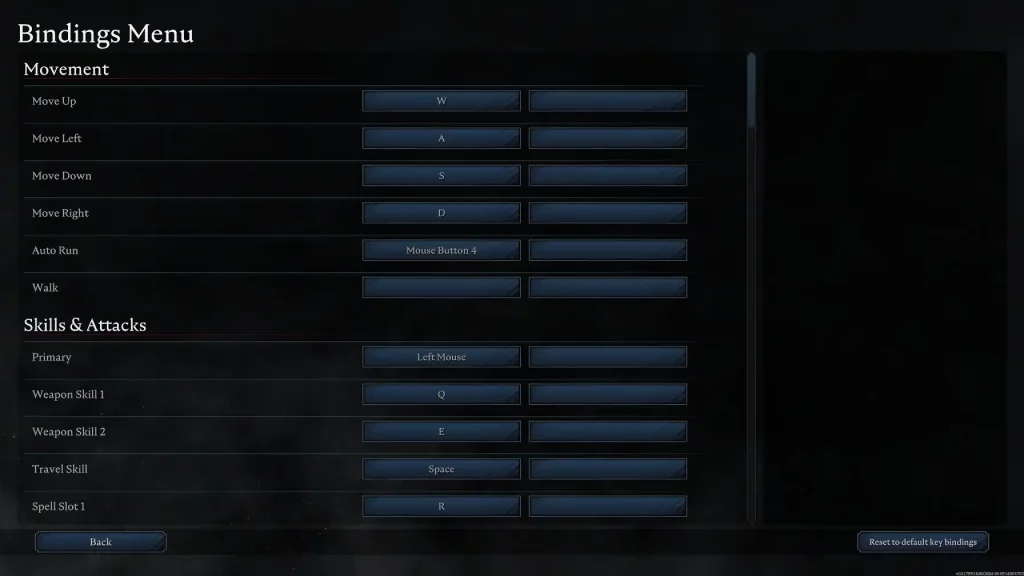
Keyboard & Mouse
Movement
- Move Up: W
- Move Left: A
- Move Down: S
- Move Right: D
- Auto Run: Mouse Button 4
- Walk: N/A
Skills & Attacks
- Primary: Left Mouse Button
- Weapon Skill 1: Q
- Weapon Skill 2: E
- Travel Skill: Space
- Spell Slot 1: R
- Spell Slot 2: C
- Ultimate: T
- Jump from Cliffs: Shift
- Action Wheel: Left Ctrl
- Vampire Power Modifier Key: Shift
- Vampire Power 1: 1
- Vampire Power 2: 2
- Vampire Power 3: 3
- Vampire Power 4: 4
- Vampire Power 5: 5
- Vampire Power 6: 6
- Vampire Power 7: 7
- Vampire Power 8: 8
- Vampire Power 9: N/A
- Vampire Power 10: N/A
- Vampire Power 11: N/A
- Vampire Power 12: N/A
- Emote Modifier Key: Left Alt
- Emote 1: 1
- Emote 2: 2
- Emote 3: 3
- Emote 4: 4
- Emote 5: 5
- Emote 6: 6
- Emote 7: 7
- Emote 8: 8
- Emote 9: N/A
- Emote 10: N/A
- Emote 11: N/A
- Emote 12: N/A
General
- Interact & Pick up: F
- Interrupt Ability Cast: X
- Drop Item from Inventory: Space
- Split item stack in Inventory: Scroll Wheel
- Repair Item in Inventory: Scroll Wheel
- Take All: Q
- Quick Send: E
- Sort: R
- Respawn: Space
- Give Up Revive: X
- Global Chat: Enter
- Emote Wheel: Left Alt
Camera
- Rotate Camera: Right Mouse
Panels
- Character Menu: Tab
- Build Menu: B
- Map Menu: M
- Social Menu: P
- Spellbook Menu: J
- Vampire Power Menu: N/A
- Emotes Menu: N/A
- V Blood Menu: K
Action Bar
- Action Bar 1: 1
- Action Bar 2: 2
- Action Bar 3: 3
- Action Bar 4: 4
- Action Bar 5: 5
- Action Bar 6: 6
- Action Bar 7: 7
- Action Bar 8: 8
Building
- Place Structure: Left Mouse
- Dismantle Structure: Space
- Repair Structure: R
- Rotate Structure Left: Q
- Rotate Structure Right: E
- Cancel Current Placement: Space
- Deselect Current Placement: Space
- Edit Variation: Left Ctrl
- Fill Wallpaper: Shift
Xbox Controller
Movement
- Move: Left Analog Stick
- Aim: Right Analog Stick
- Auto Run: Y + Left Directional Button
Skills & Attacks
- Primary: Right Trigger
- Weapon Skill 1: Left Trigger
- Weapon Skill 2: Left Trigger + Right Trigger
- Travel Skill: B
- Spell Slot 1: Left Bumper
- Spell Slot 2: Right Bumper
- Ultimate: Left Bumper + Right Bumper
- Jump from Cliffs: A
General
- Interact & Pick up: A
- Interrupt Ability Cast: A
- Drop Item from Inventory: X
- Split item stack in Inventory: X
- Repair Item in Inventory: X
- Take All: Press Left Analog Stick
- Quick Send: Press Right Analog Stick
- Respawn: A
- Give Up Revive: X
Camera
- Rotate Camera: Y
Panels
- Character Menu: Menu Button
- Build Menu: X + Left Directional Button
- Map Menu: Windows Button
- Ability Details: X + Right Directional Button
Building
- Place Structure: Right Trigger
- Dismantle Structure: Left Trigger
- Repair Structure: X
- Rotate Structure Left: Left Bumper
- Rotate Structure Right: Right Bumper
- Cancel Current Placement: B
- Deselect Current Placement: B
- Edit Variation: X
- Fill Wallpaper: Right Bumper
PlayStation Controller (DualSense Wireless Controller)
Movement
- Move: Left Analog Stick
- Aim: Right Analog Stick
- Auto Run: Triangle + Left Directional Button
Skills & Attacks
- Primary: R2
- Weapon Skill 1: L2
- Weapon Skill 2: L2 + R2
- Travel Skill: Circle
- Spell Slot 1: L1
- Spell Slot 2: R1
- Ultimate: L1 + R1
- Jump from Cliffs: X
General
- Interact & Pick up: X
- Interrupt Ability Cast: X
- Drop Item from Inventory: Square
- Split item stack in Inventory: Square
- Repair Item in Inventory: Square
- Take All: Press Left Analog Stick
- Quick Send: Press Right Analog Stick
- Respawn: X
- Give Up Revive: Square
Camera
- Rotate Camera: Triangle
Panels
- Character Menu: Options Button
- Build Menu: Square + Left Directional Button
- Map Menu: Share Button
- Ability Details: Square + Right Directional Button
Building
- Place Structure: R2
- Dismantle Structure: L2
- Repair Structure: A
- Rotate Structure Left: L1
- Rotate Structure Right: R2
- Cancel Current Placement: Circle
- Deselect Current Placement: Circle
- Edit Variation: Square
- Fill Wallpaper: R1
Nintendo Switch Pro Controller
Movement
- Move: Left Analog Stick
- Aim: Right Analog Stick
- Auto Run: X + Left Directional Button
Skills & Attacks
- Primary: ZR
- Weapon Skill 1: ZL
- Weapon Skill 2: ZL + ZR
- Travel Skill: A
- Spell Slot 1: L
- Spell Slot 2: R
- Ultimate: L + R
- Jump from Cliffs: B
General
- Interact & Pick up: B
- Interrupt Ability Cast: B
- Drop Item from Inventory: Y
- Split item stack in Inventory: Y
- Repair Item in Inventory: Y
- Take All: Press Left Analog Stick
- Quick Send: Press Right Analog Stick
- Respawn: B
- Give Up Revive: Y
Camera
- Rotate Camera: X
Panels
- Character Menu: Start Button
- Build Menu: Y + Left Directional Button
- Map Menu: Select Button
- Ability Details: Y + Right Directional Button
Building
- Place Structure: ZR
- Dismantle Structure: ZL
- Repair Structure: Y
- Rotate Structure Left: L
- Rotate Structure Right: R
- Cancel Current Placement: A
- Deselect Current Placement: A
- Edit Variation: Y
- Fill Wallpaper: R
Kendi
V Rising sunucunuzu oluşturun
V Rising sunucunuzu oluşturun
Bir plan seçin, bir oyun belirleyin ve arkadaşlarınızla oynayın!
Bültenimize Katılın
Oyun dünyasındaki en son güncellemeler için abone olun!

Discord'umuza Katılın
20.000'den fazla kafa dengi üyeden oluşan topluluğumuzun bir parçası olun!
Bu blogu nasıl değerlendirirsiniz?
Fikrinizi paylaşın ve bloglarımızı daha da iyi hale getirmemize yardımcı olun!
Beğenmedim
Nötr
Beğendim

Bir oyun sunucusuna mı ihtiyacınız var?
Siz ve arkadaşlarınızın düşük gecikme süresi ve özel ayarlarla özel olarak oynayabileceğiniz bir oyun sunucusu kiralayın. 110+ oyun arasından seçim yapın, dünyanın dört bir yanından insanları davet edin ve özel maçların keyfini çıkarın veya kendi kurallarınızla kendi çevrimiçi topluluğunuzu oluşturun.

İlgili Bloglar







İLK SENİN HABERİN OLSUN!
Barındırdığımız oyunlar, şirket haberleri ve özel fırsatlar hakkında güncellemeler için e-posta listemize katılın. Haberdar olun!













