

Minecraft 1.21 Bundles Guide: Recipe & Controls
tarihinde yazan:

Paylaş:

X'te Paylaş

Facebook'ta Paylaş

Threads'te Paylaş

Bluesky'da Paylaş

Panoya Kopyala

E-posta ile Paylaş
(Estimated Read Time: 3 Minutes)
Long ago, an item called a bundle was announced for the Minecraft Caves and Cliffs update, yet bundles would instead find themselves in an experimental limbo lasting years. So, today, we explore the exciting confirmation that bundles are almost here in our Minecraft 1.21 bundles guide!What Are Bundles?

How to Craft Minecraft 1.21 Bundles
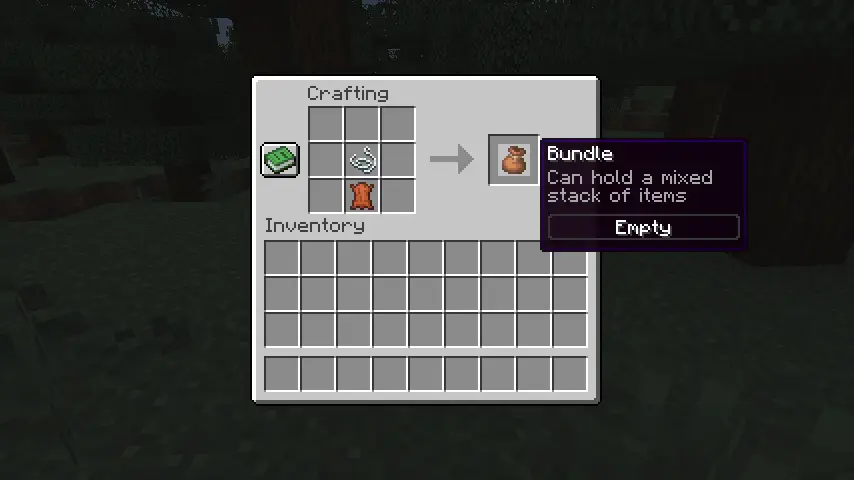 Bundles can be crafted on a crafting table or within one’s inventory using one leather and string. Simply place the leather on the crafting grid and then place the string directly above it. For a visual representation of this recipe, please see the image we included above.
How to Use Minecraft 1.21 Bundles
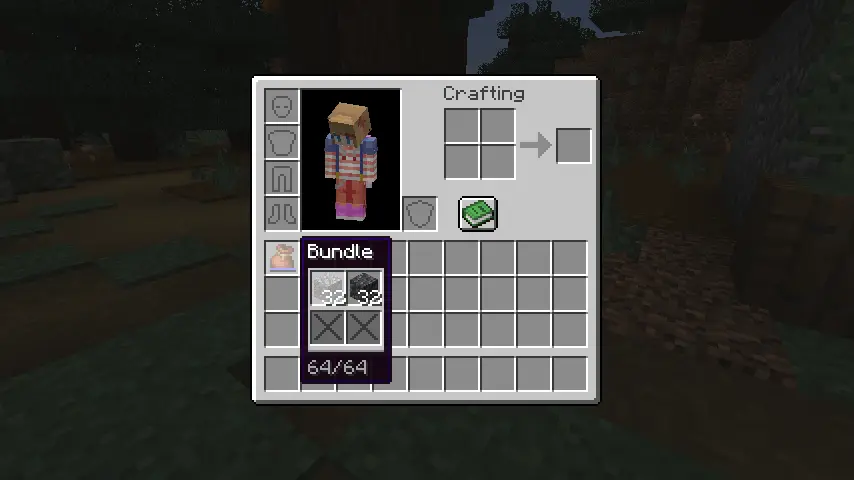 Bundles can be interacted with right from one’s inventory by picking it up and right-clicking the blocks and items to place within. Alternatively, one can pick up each individual item and right-click on the bundle instead. Bundles can also be actively used within one’s inventory to automatically remove the last item put in or outside one’s inventory to dump all the items within out into the world.
Kendi
Minecraft sunucunuzu oluşturun
Minecraft sunucunuzu oluşturun
Bir plan seçin, bir oyun belirleyin ve arkadaşlarınızla oynayın!
Bültenimize Katılın
Oyun dünyasındaki en son güncellemeler için abone olun!

Discord'umuza Katılın
20.000'den fazla kafa dengi üyeden oluşan topluluğumuzun bir parçası olun!
Bu blogu nasıl değerlendirirsiniz?
Fikrinizi paylaşın ve bloglarımızı daha da iyi hale getirmemize yardımcı olun!
Beğenmedim
Nötr
Beğendim

Bir oyun sunucusuna mı ihtiyacınız var?
Siz ve arkadaşlarınızın düşük gecikme süresi ve özel ayarlarla özel olarak oynayabileceğiniz bir oyun sunucusu kiralayın. 110+ oyun arasından seçim yapın, dünyanın dört bir yanından insanları davet edin ve özel maçların keyfini çıkarın veya kendi kurallarınızla kendi çevrimiçi topluluğunuzu oluşturun.

İlgili Bloglar







İLK SENİN HABERİN OLSUN!
Barındırdığımız oyunlar, şirket haberleri ve özel fırsatlar hakkında güncellemeler için e-posta listemize katılın. Haberdar olun!













