

Minecraft 1.20 Smithing Guide
tarihinde yazan:

Paylaş:

X'te Paylaş

Facebook'ta Paylaş

Threads'te Paylaş

Bluesky'da Paylaş

Panoya Kopyala

E-posta ile Paylaş
With the release of Minecraft 1.20, smithing is entirely new! Today we explore what that means for you, the process of upgrading diamond to netherite, and how to trim armor too. So, without further ado, let us jump into our Minecraft 1.20 Smithing Guide!
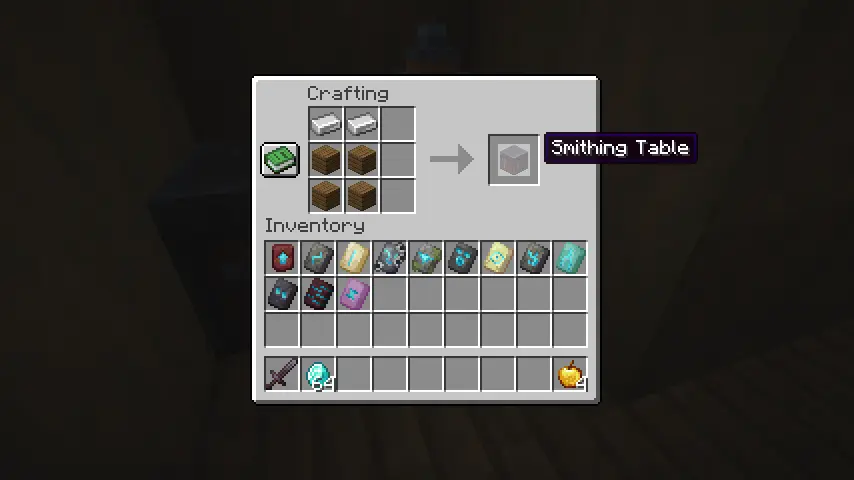 Step one of our Minecraft 1.20 Smithing Guide is making sure a smithing table has been acquired! They can be found in villages throughout the world but are more easily obtained by placing four planks on a crafting table with two iron ingots on top.
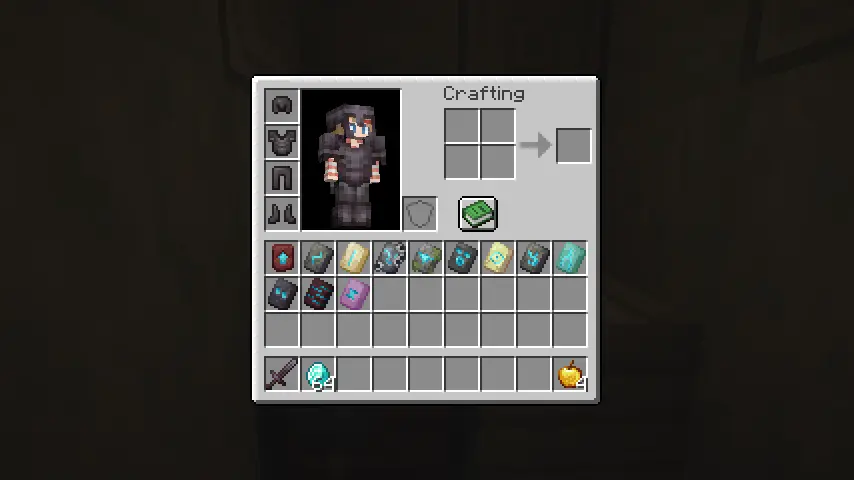 Step two is acquiring templates found across all three of the dimensions Minecraft has to offer. There are a total of 12 templates, with one being for upgrading diamond to netherite armor. Their locations are each listed below:
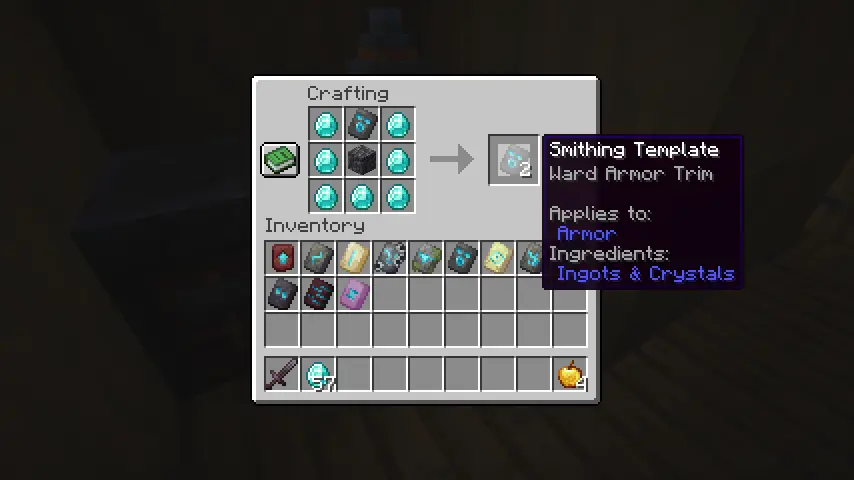 Once a template has been found, it can be duplicated on a crafting table using seven diamonds in a “U” shape, the template itself on the top middle slot, and finally, a block specific to each template in the middle.
Following the example shown in the image above, a second Ward Armor Trim Template can be crafted by placing one cobbled deepslate block in the center with the Ward Armor Trim Template directly on top. The middle block required for each template crafting recipe can be found below:
Once a template has been found, it can be duplicated on a crafting table using seven diamonds in a “U” shape, the template itself on the top middle slot, and finally, a block specific to each template in the middle.
Following the example shown in the image above, a second Ward Armor Trim Template can be crafted by placing one cobbled deepslate block in the center with the Ward Armor Trim Template directly on top. The middle block required for each template crafting recipe can be found below:
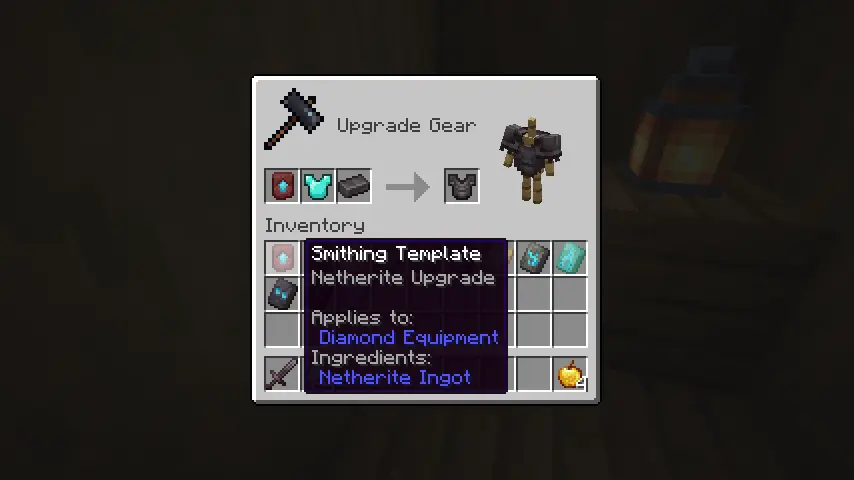 The process of obtaining netherite tools and armor has remained about the same, but with one key change. Netherite Upgrade Templates are now required alongside a netherite ingot to turn diamond armor and tools into their netherite versions.
Once both have been obtained, place the diamond armor in the smithing table, followed by the Netherite Upgrade Template and then the netherite ingot to smith your netherite tools and armor just like before.
But be warned! Templates are consumed, so make sure to craft a few backups before each use!
The process of obtaining netherite tools and armor has remained about the same, but with one key change. Netherite Upgrade Templates are now required alongside a netherite ingot to turn diamond armor and tools into their netherite versions.
Once both have been obtained, place the diamond armor in the smithing table, followed by the Netherite Upgrade Template and then the netherite ingot to smith your netherite tools and armor just like before.
But be warned! Templates are consumed, so make sure to craft a few backups before each use!
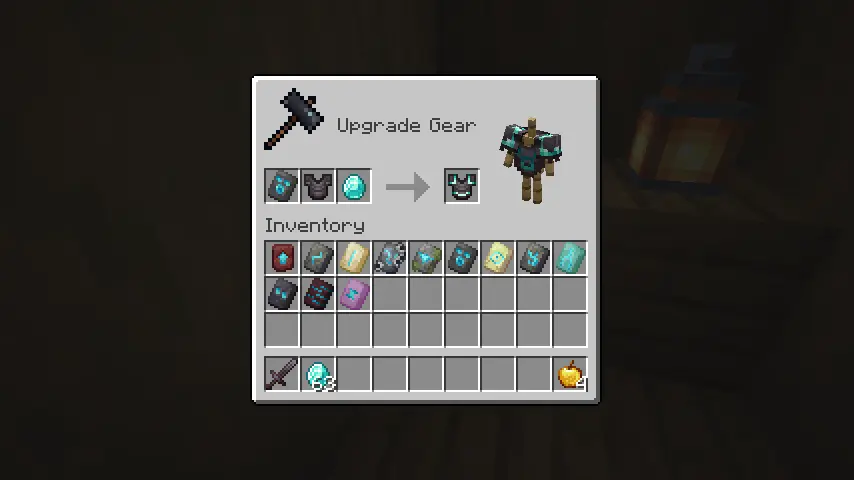 The main feature of the reworked smithing table is armor trims! Each of the templates listed prior have unique designs for all but leather armor. First place the armor on the smithing table, then place the desired template, and finally, choose the material for the trim. Diamond as the third material will result in a diamond trim, for example.
The third material can be iron, copper, gold, lapis, emerald, diamond, netherite, redstone, amethyst, or quartz. Everything, including the template, is consumed upon applying the trim, so be sure to create backups of each template beforehand!
The main feature of the reworked smithing table is armor trims! Each of the templates listed prior have unique designs for all but leather armor. First place the armor on the smithing table, then place the desired template, and finally, choose the material for the trim. Diamond as the third material will result in a diamond trim, for example.
The third material can be iron, copper, gold, lapis, emerald, diamond, netherite, redstone, amethyst, or quartz. Everything, including the template, is consumed upon applying the trim, so be sure to create backups of each template beforehand!
Crafting a Smithing Table
Step one of our Minecraft 1.20 Smithing Guide is making sure a smithing table has been acquired! They can be found in villages throughout the world but are more easily obtained by placing four planks on a crafting table with two iron ingots on top.
Acquiring Templates
Step two is acquiring templates found across all three of the dimensions Minecraft has to offer. There are a total of 12 templates, with one being for upgrading diamond to netherite armor. Their locations are each listed below:
- Pillager Outpost – Sentry Armor Trim Template
- Desert Pyramid – Dune Armor Trim Template
- Shipwreck – Coast Armor Trim Template
- Jungle Temple – Wild Armor Trim Template
- Ocean Monument – Tide Armor Trim Template
- Ancient City – Ward Armor Trim Template
- Woodland Mansion – Vex Armor Trim Template
- Nether Fortress – Rib Armor Trim Template
- Bastion Remnant – Snout Armor Trim Template
- Bastion Remnant – Netherite Upgrade Template
- Stronghold – Eye Armor Trim Template
- End City – Spire Armor Trim Template
Crafting Templates
Once a template has been found, it can be duplicated on a crafting table using seven diamonds in a “U” shape, the template itself on the top middle slot, and finally, a block specific to each template in the middle.
Following the example shown in the image above, a second Ward Armor Trim Template can be crafted by placing one cobbled deepslate block in the center with the Ward Armor Trim Template directly on top. The middle block required for each template crafting recipe can be found below:
- Netherite Upgrade Template = Netherrack
- Sentry Armor Trim Template = Cobblestone
- Dune Armor Trim Template = Sandstone
- Coast Armor Trim Template = Cobblestone
- Wild Armor Trim Template = Mossy Cobblestone
- Tide Armor Trim Template = Prismarine
- Ward Armor Trim Template = Cobbled Deepslate
- Vex Armor Trim Template = Cobblestone
- Rib Armor Trim Template = Netherrack
- Snout Armor Trim Template = Blackstone
- Eye Armor Trim Template = End Stone
- Spire Armor Trim Template = Purpur Block
Upgrading Diamond to Netherite
The process of obtaining netherite tools and armor has remained about the same, but with one key change. Netherite Upgrade Templates are now required alongside a netherite ingot to turn diamond armor and tools into their netherite versions.
Once both have been obtained, place the diamond armor in the smithing table, followed by the Netherite Upgrade Template and then the netherite ingot to smith your netherite tools and armor just like before.
But be warned! Templates are consumed, so make sure to craft a few backups before each use!
Armor Trims
The main feature of the reworked smithing table is armor trims! Each of the templates listed prior have unique designs for all but leather armor. First place the armor on the smithing table, then place the desired template, and finally, choose the material for the trim. Diamond as the third material will result in a diamond trim, for example.
The third material can be iron, copper, gold, lapis, emerald, diamond, netherite, redstone, amethyst, or quartz. Everything, including the template, is consumed upon applying the trim, so be sure to create backups of each template beforehand!
Minecraft 1.20 Smithing Guide
https://twitter.com/Minecraft/status/1617916297920282624And so ends our Minecraft 1.20 Smithing Guide. We hope it helps as both a step-by-step guide and quick reference on the fly! What are your thoughts on smithing? We can’t help but feel it finally makes armor truly shine! Until Next Time, BisectHosting =)
Kendi
Minecraft sunucunuzu oluşturun
Minecraft sunucunuzu oluşturun
Bir plan seçin, bir oyun belirleyin ve arkadaşlarınızla oynayın!
Bültenimize Katılın
Oyun dünyasındaki en son güncellemeler için abone olun!

Discord'umuza Katılın
20.000'den fazla kafa dengi üyeden oluşan topluluğumuzun bir parçası olun!
Bu blogu nasıl değerlendirirsiniz?
Fikrinizi paylaşın ve bloglarımızı daha da iyi hale getirmemize yardımcı olun!
Beğenmedim
Nötr
Beğendim

Bir oyun sunucusuna mı ihtiyacınız var?
Siz ve arkadaşlarınızın düşük gecikme süresi ve özel ayarlarla özel olarak oynayabileceğiniz bir oyun sunucusu kiralayın. 110+ oyun arasından seçim yapın, dünyanın dört bir yanından insanları davet edin ve özel maçların keyfini çıkarın veya kendi kurallarınızla kendi çevrimiçi topluluğunuzu oluşturun.

İlgili Bloglar







İLK SENİN HABERİN OLSUN!
Barındırdığımız oyunlar, şirket haberleri ve özel fırsatlar hakkında güncellemeler için e-posta listemize katılın. Haberdar olun!













