
7 Days to Die Combine Station Guide: Overview, How to Use, & More
tarihinde yazan:

Paylaş:

X'te Paylaş

Facebook'ta Paylaş

Threads'te Paylaş

Bluesky'da Paylaş

Panoya Kopyala

E-posta ile Paylaş
The zombie apocalypse in Navezgone got even more interesting with the 7 Days to Die 3.0 update (also known as the Dead Hot Summer Update). In particular, developer The Fun Pimps introduced a game-changing workstation called the Combine Station, allowing players to merge the stats of similar items to optimize their combat and survival capabilities. Here we'll cover how to use the Combine Station and how to get the most out of it in the 3.0 update!
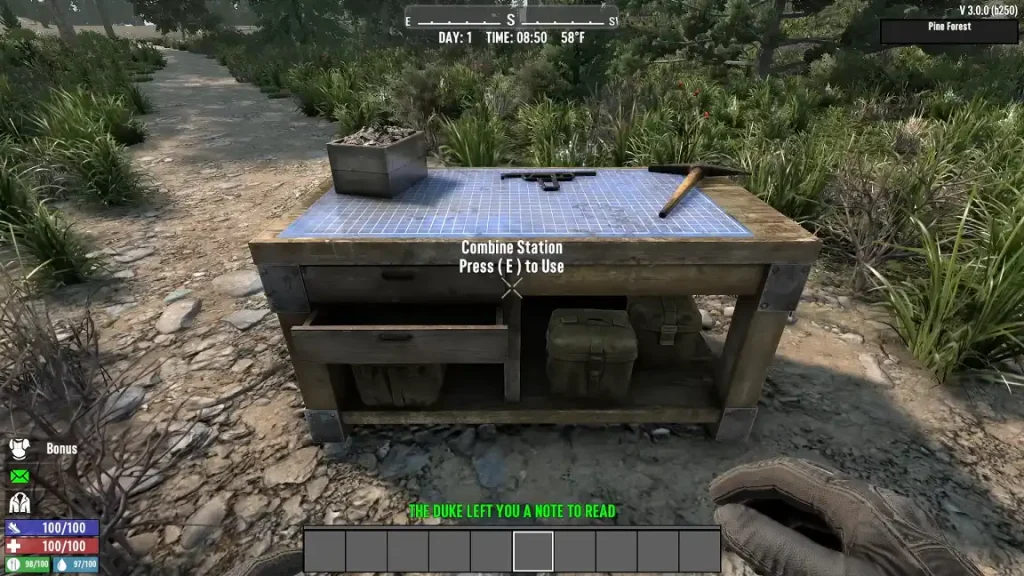 Note: Image courtesy of Capp00.
As mentioned earlier, the Combine Station is a new workstation introduced in the 7 Days to Die V3.0 Dead Hot Summer Update. Players in the Experimental Branch can take advantage of this functional structure since June 15. Its primary purpose is to allow survivors to combine the attributes of similar items, such as two shotguns, increasing their power. Doing so allows survivors to potentially min-max their equipment for optimum survivability.
Arguably, the Combine Station is the ultimate upgrade bench. Before this update, a player finding a Tier 6 weapon could see the item as the tool to use in the endgame. Now, this workstation can be the definitive starting point to endgame equipment. It also serves as an alternative repair method, promoting better control of gear maintenance.
Note: Image courtesy of Capp00.
As mentioned earlier, the Combine Station is a new workstation introduced in the 7 Days to Die V3.0 Dead Hot Summer Update. Players in the Experimental Branch can take advantage of this functional structure since June 15. Its primary purpose is to allow survivors to combine the attributes of similar items, such as two shotguns, increasing their power. Doing so allows survivors to potentially min-max their equipment for optimum survivability.
Arguably, the Combine Station is the ultimate upgrade bench. Before this update, a player finding a Tier 6 weapon could see the item as the tool to use in the endgame. Now, this workstation can be the definitive starting point to endgame equipment. It also serves as an alternative repair method, promoting better control of gear maintenance.
What is the Combine Station in 7 Days to Die?
Note: Image courtesy of Capp00.
As mentioned earlier, the Combine Station is a new workstation introduced in the 7 Days to Die V3.0 Dead Hot Summer Update. Players in the Experimental Branch can take advantage of this functional structure since June 15. Its primary purpose is to allow survivors to combine the attributes of similar items, such as two shotguns, increasing their power. Doing so allows survivors to potentially min-max their equipment for optimum survivability.
Arguably, the Combine Station is the ultimate upgrade bench. Before this update, a player finding a Tier 6 weapon could see the item as the tool to use in the endgame. Now, this workstation can be the definitive starting point to endgame equipment. It also serves as an alternative repair method, promoting better control of gear maintenance.
How to Use the Combine Station in 7 Days to Die
At first glance, using the Combine Station is a fairly straightforward endeavor. However, it requires some strategic thinking to maximize the output. For example, place two or more of the same item type into the Combine Station, such as two pickaxes. Confirming the operation merges the attributes of the tools, transferring the highest percentage stats to the final combined item regardless of quality. That way, combining a Quality 1 item with a boosted stat with a Quality 6 variant yields a Quality 6 tool with a higher base stat. With that, players can find boosted stats in loot as of the 3.0 Update. Known as the Magnitude System, these enhanced attributes are marked by an orange star. For example, a pickaxe may have increased block damage, or a shotgun might possess extended range. Some traders may also sell Magnitude-enhanced equipment for serious survivors. Aside from enhancing items, the Combine Station also serves as an alternate repair station. Interact with the workstation to use its repair and degradation settings. Here, players can choose from different options: no repair, repair kits only, combine-only repair, or a hybrid of both. It’s also possible to set permanent repair degradation to between 5% and 25% of the item’s maximum durability per operation (with the first instance being free).Kendi
7 Days to Die sunucunuzu oluşturun
7 Days to Die sunucunuzu oluşturun
Bir plan seçin, bir oyun belirleyin ve arkadaşlarınızla oynayın!
Bültenimize Katılın
Oyun dünyasındaki en son güncellemeler için abone olun!

Discord'umuza Katılın
20.000'den fazla kafa dengi üyeden oluşan topluluğumuzun bir parçası olun!
Bu blogu nasıl değerlendirirsiniz?
Fikrinizi paylaşın ve bloglarımızı daha da iyi hale getirmemize yardımcı olun!
Beğenmedim
Nötr
Beğendim

Bir oyun sunucusuna mı ihtiyacınız var?
Siz ve arkadaşlarınızın düşük gecikme süresi ve özel ayarlarla özel olarak oynayabileceğiniz bir oyun sunucusu kiralayın. 110+ oyun arasından seçim yapın, dünyanın dört bir yanından insanları davet edin ve özel maçların keyfini çıkarın veya kendi kurallarınızla kendi çevrimiçi topluluğunuzu oluşturun.

İlgili Bloglar







İLK SENİN HABERİN OLSUN!
Barındırdığımız oyunlar, şirket haberleri ve özel fırsatlar hakkında güncellemeler için e-posta listemize katılın. Haberdar olun!













