
V Rising Controls Guide (Keyboard, Controller)
Опубликовано автором

Поделиться:

Поделиться в X

Поделиться в Facebook

Поделиться в Threads

Поделиться в Bluesky

Скопировать в буфер обмена

Поделиться по email
One of the essential elements to learning any game is understanding its controls - and V Rising is no different. Here, you’ll learn about the default controls and keybinds for V Rising across keyboards and the most common kinds of controllers.
 It’s important to mention that V Rising’s full release added partial controller support to the vampire survival action RPG. Although controllers aren’t fully supported, even with V Rising 1.0, the game still provides excellent flexibility in letting players customize their controller keybinds.
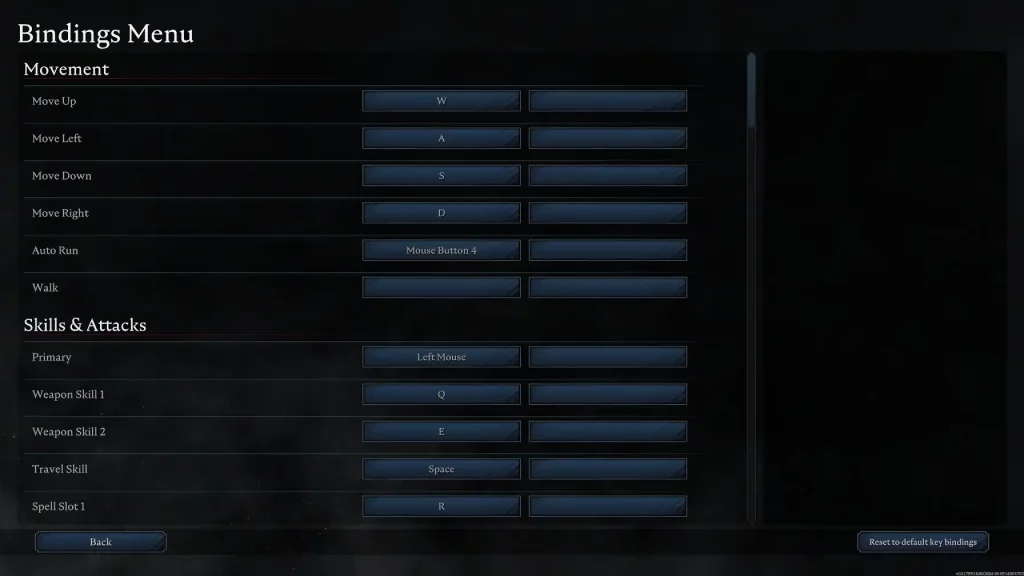
V Rising players can edit their keybinds by going to the in-game Settings menu. On the other hand, turn on “Big Picture Mode” on your Steam app. Then, navigate to V Rising on your Library and select the small controller icon to the right of the “Play” button. Here, you can edit the controller keybinds based on your preferences.
With that, here are the default controls for V Rising for the various usable gaming peripherals:
It’s important to mention that V Rising’s full release added partial controller support to the vampire survival action RPG. Although controllers aren’t fully supported, even with V Rising 1.0, the game still provides excellent flexibility in letting players customize their controller keybinds.
V Rising players can edit their keybinds by going to the in-game Settings menu. On the other hand, turn on “Big Picture Mode” on your Steam app. Then, navigate to V Rising on your Library and select the small controller icon to the right of the “Play” button. Here, you can edit the controller keybinds based on your preferences.
With that, here are the default controls for V Rising for the various usable gaming peripherals:
V Rising Controls & Keybinds (Default)
It’s important to mention that V Rising’s full release added partial controller support to the vampire survival action RPG. Although controllers aren’t fully supported, even with V Rising 1.0, the game still provides excellent flexibility in letting players customize their controller keybinds.
V Rising players can edit their keybinds by going to the in-game Settings menu. On the other hand, turn on “Big Picture Mode” on your Steam app. Then, navigate to V Rising on your Library and select the small controller icon to the right of the “Play” button. Here, you can edit the controller keybinds based on your preferences.
With that, here are the default controls for V Rising for the various usable gaming peripherals:
Keyboard & Mouse
Movement
- Move Up: W
- Move Left: A
- Move Down: S
- Move Right: D
- Auto Run: Mouse Button 4
- Walk: N/A
Skills & Attacks
- Primary: Left Mouse Button
- Weapon Skill 1: Q
- Weapon Skill 2: E
- Travel Skill: Space
- Spell Slot 1: R
- Spell Slot 2: C
- Ultimate: T
- Jump from Cliffs: Shift
- Action Wheel: Left Ctrl
- Vampire Power Modifier Key: Shift
- Vampire Power 1: 1
- Vampire Power 2: 2
- Vampire Power 3: 3
- Vampire Power 4: 4
- Vampire Power 5: 5
- Vampire Power 6: 6
- Vampire Power 7: 7
- Vampire Power 8: 8
- Vampire Power 9: N/A
- Vampire Power 10: N/A
- Vampire Power 11: N/A
- Vampire Power 12: N/A
- Emote Modifier Key: Left Alt
- Emote 1: 1
- Emote 2: 2
- Emote 3: 3
- Emote 4: 4
- Emote 5: 5
- Emote 6: 6
- Emote 7: 7
- Emote 8: 8
- Emote 9: N/A
- Emote 10: N/A
- Emote 11: N/A
- Emote 12: N/A
General
- Interact & Pick up: F
- Interrupt Ability Cast: X
- Drop Item from Inventory: Space
- Split item stack in Inventory: Scroll Wheel
- Repair Item in Inventory: Scroll Wheel
- Take All: Q
- Quick Send: E
- Sort: R
- Respawn: Space
- Give Up Revive: X
- Global Chat: Enter
- Emote Wheel: Left Alt
Camera
- Rotate Camera: Right Mouse
Panels
- Character Menu: Tab
- Build Menu: B
- Map Menu: M
- Social Menu: P
- Spellbook Menu: J
- Vampire Power Menu: N/A
- Emotes Menu: N/A
- V Blood Menu: K
Action Bar
- Action Bar 1: 1
- Action Bar 2: 2
- Action Bar 3: 3
- Action Bar 4: 4
- Action Bar 5: 5
- Action Bar 6: 6
- Action Bar 7: 7
- Action Bar 8: 8
Building
- Place Structure: Left Mouse
- Dismantle Structure: Space
- Repair Structure: R
- Rotate Structure Left: Q
- Rotate Structure Right: E
- Cancel Current Placement: Space
- Deselect Current Placement: Space
- Edit Variation: Left Ctrl
- Fill Wallpaper: Shift
Xbox Controller
Movement
- Move: Left Analog Stick
- Aim: Right Analog Stick
- Auto Run: Y + Left Directional Button
Skills & Attacks
- Primary: Right Trigger
- Weapon Skill 1: Left Trigger
- Weapon Skill 2: Left Trigger + Right Trigger
- Travel Skill: B
- Spell Slot 1: Left Bumper
- Spell Slot 2: Right Bumper
- Ultimate: Left Bumper + Right Bumper
- Jump from Cliffs: A
General
- Interact & Pick up: A
- Interrupt Ability Cast: A
- Drop Item from Inventory: X
- Split item stack in Inventory: X
- Repair Item in Inventory: X
- Take All: Press Left Analog Stick
- Quick Send: Press Right Analog Stick
- Respawn: A
- Give Up Revive: X
Camera
- Rotate Camera: Y
Panels
- Character Menu: Menu Button
- Build Menu: X + Left Directional Button
- Map Menu: Windows Button
- Ability Details: X + Right Directional Button
Building
- Place Structure: Right Trigger
- Dismantle Structure: Left Trigger
- Repair Structure: X
- Rotate Structure Left: Left Bumper
- Rotate Structure Right: Right Bumper
- Cancel Current Placement: B
- Deselect Current Placement: B
- Edit Variation: X
- Fill Wallpaper: Right Bumper
PlayStation Controller (DualSense Wireless Controller)
Movement
- Move: Left Analog Stick
- Aim: Right Analog Stick
- Auto Run: Triangle + Left Directional Button
Skills & Attacks
- Primary: R2
- Weapon Skill 1: L2
- Weapon Skill 2: L2 + R2
- Travel Skill: Circle
- Spell Slot 1: L1
- Spell Slot 2: R1
- Ultimate: L1 + R1
- Jump from Cliffs: X
General
- Interact & Pick up: X
- Interrupt Ability Cast: X
- Drop Item from Inventory: Square
- Split item stack in Inventory: Square
- Repair Item in Inventory: Square
- Take All: Press Left Analog Stick
- Quick Send: Press Right Analog Stick
- Respawn: X
- Give Up Revive: Square
Camera
- Rotate Camera: Triangle
Panels
- Character Menu: Options Button
- Build Menu: Square + Left Directional Button
- Map Menu: Share Button
- Ability Details: Square + Right Directional Button
Building
- Place Structure: R2
- Dismantle Structure: L2
- Repair Structure: A
- Rotate Structure Left: L1
- Rotate Structure Right: R2
- Cancel Current Placement: Circle
- Deselect Current Placement: Circle
- Edit Variation: Square
- Fill Wallpaper: R1
Nintendo Switch Pro Controller
Movement
- Move: Left Analog Stick
- Aim: Right Analog Stick
- Auto Run: X + Left Directional Button
Skills & Attacks
- Primary: ZR
- Weapon Skill 1: ZL
- Weapon Skill 2: ZL + ZR
- Travel Skill: A
- Spell Slot 1: L
- Spell Slot 2: R
- Ultimate: L + R
- Jump from Cliffs: B
General
- Interact & Pick up: B
- Interrupt Ability Cast: B
- Drop Item from Inventory: Y
- Split item stack in Inventory: Y
- Repair Item in Inventory: Y
- Take All: Press Left Analog Stick
- Quick Send: Press Right Analog Stick
- Respawn: B
- Give Up Revive: Y
Camera
- Rotate Camera: X
Panels
- Character Menu: Start Button
- Build Menu: Y + Left Directional Button
- Map Menu: Select Button
- Ability Details: Y + Right Directional Button
Building
- Place Structure: ZR
- Dismantle Structure: ZL
- Repair Structure: Y
- Rotate Structure Left: L
- Rotate Structure Right: R
- Cancel Current Placement: A
- Deselect Current Placement: A
- Edit Variation: Y
- Fill Wallpaper: R
Создайте свой собственный
сервер V Rising
сервер V Rising
Выберите тариф, укажите игру и играйте с друзьями!
Подпишитесь на нашу рассылку
Подпишитесь, чтобы получать последние новости из мира игр!

Присоединяйтесь к нашему Discord
Станьте частью нашего сообщества, в котором уже более 20000 единомышленников!
Как бы вы оценили этот блог?
Поделитесь своим мнением и помогите нам сделать наши блоги еще лучше!
Не понравилось
Нейтрально
Понравилось

Нужен игровой сервер?
Арендуйте игровой сервер, где вы и ваши друзья сможете играть в закрытом режиме с низкой задержкой и собственными настройками. Выбирайте из 110+ игр, приглашайте людей со всего мира и наслаждайтесь приватными матчами или создайте свое собственное онлайн-сообщество со своими правилами.

Похожие статьи







УЗНАЙТЕ ВСЕ ПЕРВЫМИ!
Подпишитесь на нашу рассылку, чтобы получать обновления о наших играх, новости компании и эксклюзивные предложения. Будьте в курсе!













