
Astroneer Leveling Block Guide
Опубликовано автором

Поделиться:

Поделиться в X

Поделиться в Facebook

Поделиться в Threads

Поделиться в Bluesky

Скопировать в буфер обмена

Поделиться по email
(Estimated Read Time: 3 minutes)
Gathering resources with the Terrain tool in Astroneer can leave uneven ground, making it unfit for placing items and structures. Thankfully, the Astroneer Leveling Block exists to remedy this concern. If you’re having trouble using this utility item, keep reading!Crafting the Leveling Block in Astroneer
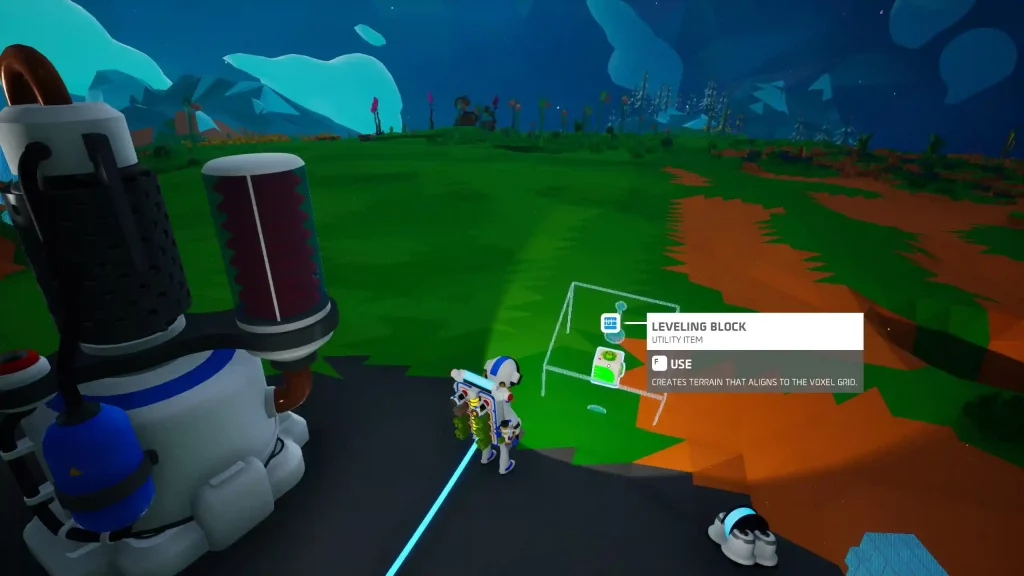 Introduced in Update 1.10.9 as an exclusive item in Creative Mode and introduced in Adventure Mode in Update 1.20.265, players must craft the Astroneer Leveling Block before they can use it. Thankfully, you only need 1x Soil using the Backpack Printer to craft this utility item.
How to Use the Leveling Block in Astroneer
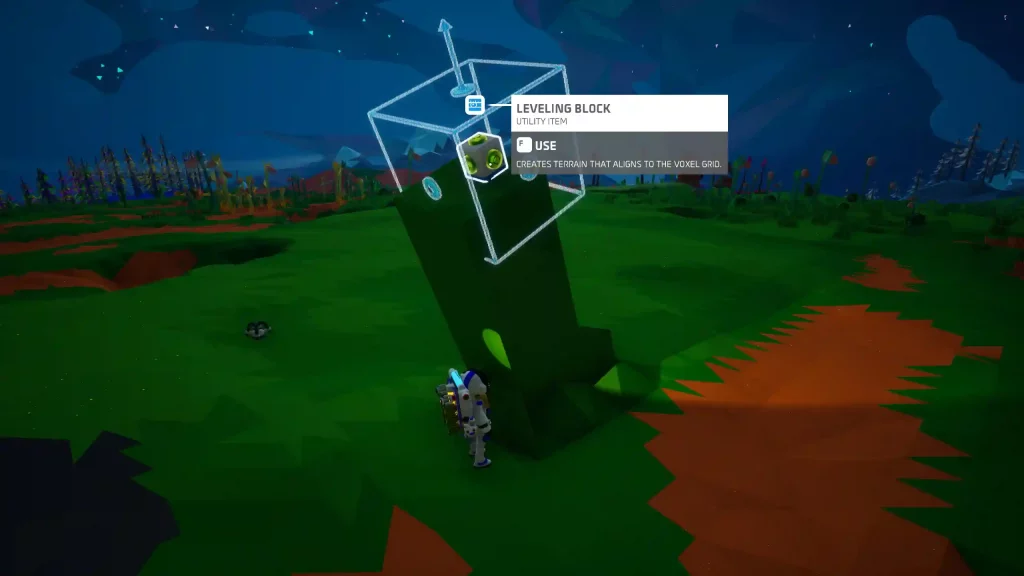 Like the Oxygen Filter and other items in Astroneer, proper usage of the Leveling Block is vital to take advantage of it fully. As mentioned earlier, use the Leveling Block to create uniformly even surfaces on the ground. The leveled surface aligns with the planet’s voxel grid, and the results have no bumps or ridges.
After crafting the Leveling Block, place it on a particular area you want to be leveled. Next, press the Use key (the “F” key by default for PC users). The block should animate, flattening the ground underneath it.
Note: Hover the cursor above the Leveling Block before pressing the Use key to preview the leveled area.
Players can only use the Leveling Block up to 10 times in Adventure Mode. However, this utility item has an unlimited number of uses in Creative Mode.
Also, the area to be leveled by the block will start at a 60-degree angle. Players can set the angle of the resulting even surface to 45 or 90 degrees for a practical finish. However, this can be quite challenging since the block aligns with the planet’s voxel grid, and there’s no way to rotate it manually at the time of writing.
Tip: Pair a Leveling Block with a Narrow Mod to expand the flattened surface. Craft a Narrow Mod from the Backpack Printer using 1x Zinc (made from refining 1x Sphalerite from the Smelting Furnace).
Like the Oxygen Filter and other items in Astroneer, proper usage of the Leveling Block is vital to take advantage of it fully. As mentioned earlier, use the Leveling Block to create uniformly even surfaces on the ground. The leveled surface aligns with the planet’s voxel grid, and the results have no bumps or ridges.
After crafting the Leveling Block, place it on a particular area you want to be leveled. Next, press the Use key (the “F” key by default for PC users). The block should animate, flattening the ground underneath it.
Note: Hover the cursor above the Leveling Block before pressing the Use key to preview the leveled area.
Players can only use the Leveling Block up to 10 times in Adventure Mode. However, this utility item has an unlimited number of uses in Creative Mode.
Also, the area to be leveled by the block will start at a 60-degree angle. Players can set the angle of the resulting even surface to 45 or 90 degrees for a practical finish. However, this can be quite challenging since the block aligns with the planet’s voxel grid, and there’s no way to rotate it manually at the time of writing.
Tip: Pair a Leveling Block with a Narrow Mod to expand the flattened surface. Craft a Narrow Mod from the Backpack Printer using 1x Zinc (made from refining 1x Sphalerite from the Smelting Furnace).Создайте свой собственный
сервер Astroneer
сервер Astroneer
Выберите тариф, укажите игру и играйте с друзьями!
Подпишитесь на нашу рассылку
Подпишитесь, чтобы получать последние новости из мира игр!

Присоединяйтесь к нашему Discord
Станьте частью нашего сообщества, в котором уже более 20000 единомышленников!
Как бы вы оценили этот блог?
Поделитесь своим мнением и помогите нам сделать наши блоги еще лучше!
Не понравилось
Нейтрально
Понравилось

Нужен игровой сервер?
Арендуйте игровой сервер, где вы и ваши друзья сможете играть в закрытом режиме с низкой задержкой и собственными настройками. Выбирайте из 110+ игр, приглашайте людей со всего мира и наслаждайтесь приватными матчами или создайте свое собственное онлайн-сообщество со своими правилами.

Похожие статьи







УЗНАЙТЕ ВСЕ ПЕРВЫМИ!
Подпишитесь на нашу рассылку, чтобы получать обновления о наших играх, новости компании и эксклюзивные предложения. Будьте в курсе!













